cancel
Showing results for 
Search instead for 
Did you mean: 

Get Fabric Certified for FREE during Fabric Data Days. Don't miss your chance! Request now

Reply
Anonymous
Not applicable

extended matrix - project management

Hi Community,

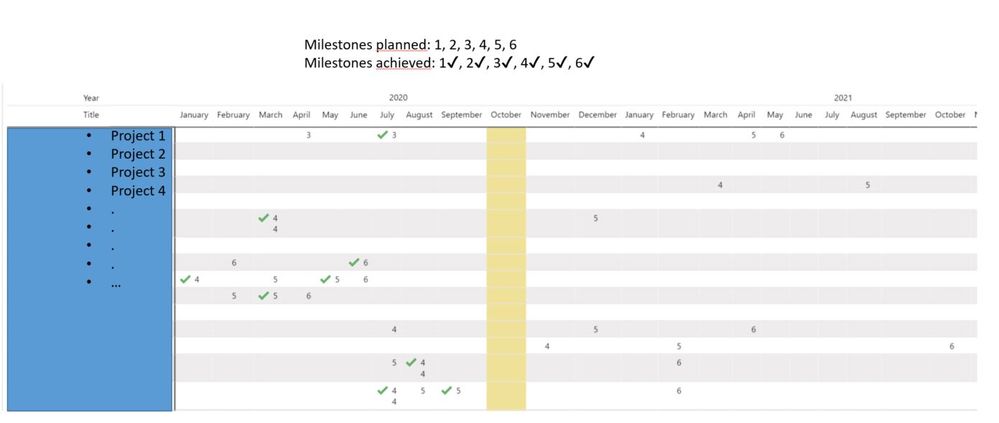
It is possible to expand my existing matrix as follows.


current matrix

000066.jpg


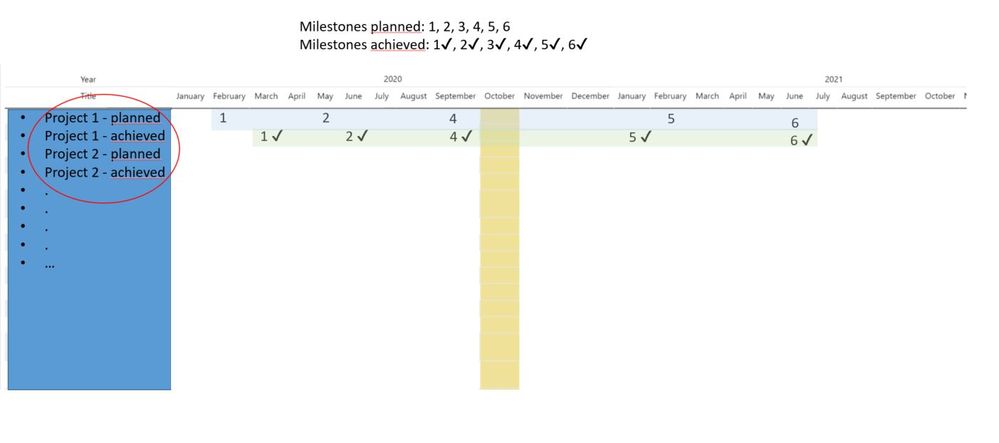
I would like to have two lines instead of one line for each project.

One line should contain the scheduled dates and the other the achieved dates.

000067.jpg

Datetable

000068.jpg


Table: Milestones and dates

000069.jpg


1 ACCEPTED SOLUTION
MFelix
Super User
Super User

Hello @Lachsforelle12 ,

To achieve this it is necessary to refer to my question in your other post which is how to identify the planned tasks versus achieved, if it is column with a specific term saynd planned /achieved or a date that says date achived you just have to use that column to make the split between the two dates.

If you can share how to make that distinction in your model the configuration of the above measure that I prepared for you should be quite straightforward.


Regards

Miguel Félix


Did I answer your question? Mark my post as a solution!

Proud to be a Super User!

Check out my blog: Power BI em Português


View solution in original post

1 REPLY 1
MFelix
Super User
Super User

Hello @Lachsforelle12 ,

To achieve this it is necessary to refer to my question in your other post which is how to identify the planned tasks versus achieved, if it is column with a specific term saynd planned /achieved or a date that says date achived you just have to use that column to make the split between the two dates.

If you can share how to make that distinction in your model the configuration of the above measure that I prepared for you should be quite straightforward.


Regards

Miguel Félix


Did I answer your question? Mark my post as a solution!

Proud to be a Super User!

Check out my blog: Power BI em Português


Helpful resources

Announcements
November Power BI Update Carousel

Power BI Monthly Update - November 2025

Check out the November 2025 Power BI update to learn about new features.

Fabric Data Days Carousel

Fabric Data Days

Advance your Data & AI career with 50 days of live learning, contests, hands-on challenges, study groups & certifications and more!

FabCon Atlanta 2026 carousel

FabCon Atlanta 2026

Join us at FabCon Atlanta, March 16-20, for the ultimate Fabric, Power BI, AI and SQL community-led event. Save $200 with code FABCOMM.

Top Solution Authors
Top Kudoed Authors