cancel
Showing results for 
Search instead for 
Did you mean: 

Learn from the best! Meet the four finalists headed to the FINALS of the Power BI Dataviz World Championships! Register now

Reply
abc_777
Solution Specialist
Solution Specialist

dynamic date

dear concern,

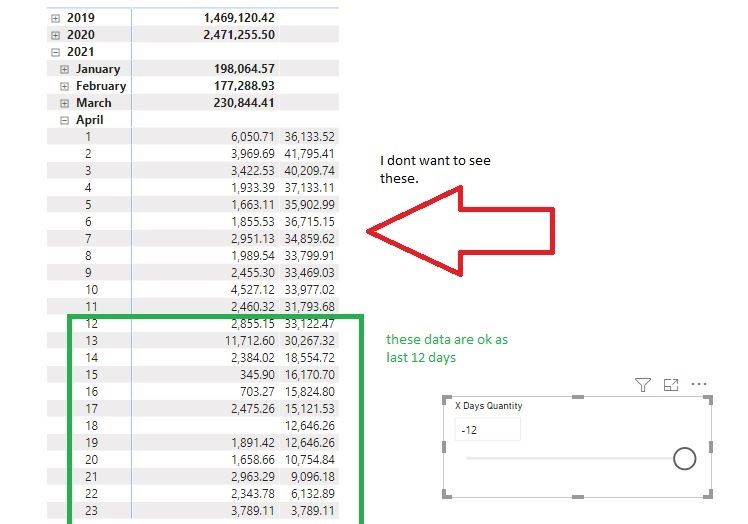
I have follwing table with measure and its working good. when user give date like -12 or -13 it calculate last 13 days quantity but still showing the whole lot data. I mean uncalculated data or more than -12 days or -13 days. I want to keep them clean and when user put date data will calculated and show accordingly not as in whole always.

1.JPG


X Days = 
IF(HASONEVALUE(BMCalendar[Date]),
CALCULATE(sum('bm_all_cul bm_sales_dhk_all_cul'[Actual Quantity]),
    DATESINPERIOD(BMCalendar[Date],MAX(BMCalendar[Date]),
    -1 * SELECTEDVALUE('X Days Quantity'[X Days Quantity]) , DAY)))


1 ACCEPTED SOLUTION

Hi, @abc_777 

Thank you for your feedback, and sorry that I did not recognize the backward cumulate.

Please check the below picture, the measure, and the link down below.


Picture5.png


https://www.dropbox.com/s/cd59ags3a8zk4x3/abc.pbix?dl=0 


QTY Total N days backward cumulate =
IF (
NOT ISBLANK ( [QTY Total N days] ),
CALCULATE (
[QTY Total N days],
FILTER (
ALLSELECTED ( 'Calendar' ),
'Calendar'[Date] >= MAX ( 'Calendar'[Date] )
)
)
)


Hi, My name is Jihwan Kim.


If this post helps, then please consider accept it as the solution to help other members find it faster, and give a big thumbs up.


Linkedin: www.linkedin.com/in/jihwankim1975/

Twitter: twitter.com/Jihwan_JHKIM


If this post helps, then please consider accepting it as the solution to help other members find it faster, and give a big thumbs up.


Click here to visit my LinkedIn page

View solution in original post

4 REPLIES 4
Jihwan_Kim
Super User
Super User

Hi, @abc_777 

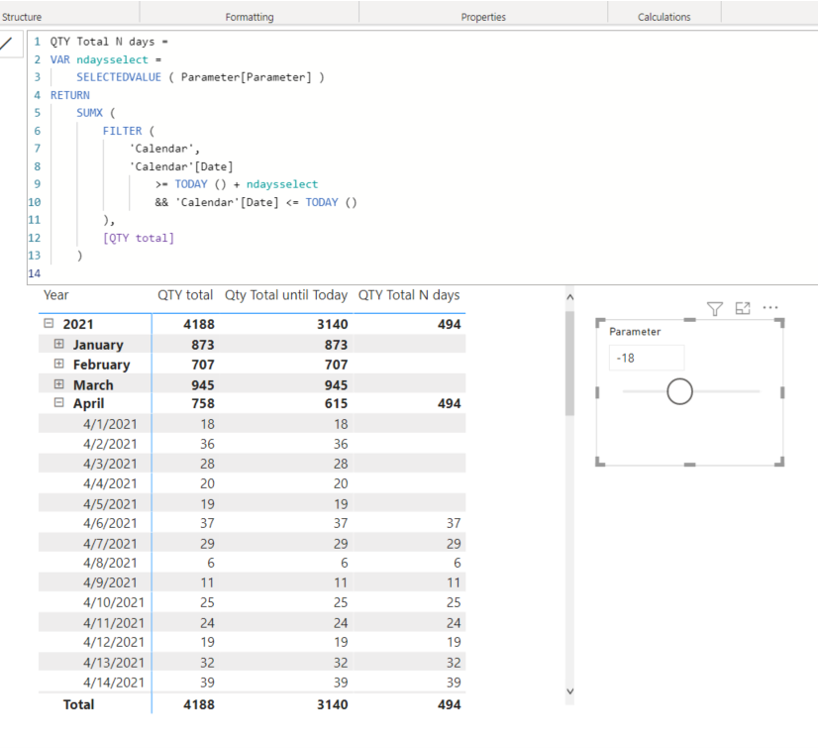
Please check the below picture and the sample pbix file's link down below.

All measures are in the sample pbix file.


Picture1.png


QTY Total N days =
VAR ndaysselect =
SELECTEDVALUE ( Parameter[Parameter] )
RETURN
SUMX (
FILTER (
'Calendar',
'Calendar'[Date]
>= TODAY () + ndaysselect
&& 'Calendar'[Date] <= TODAY ()
),
[QTY total]
)


Hi, My name is Jihwan Kim.


If this post helps, then please consider accept it as the solution to help other members find it faster, and give a big thumbs up.


Linkedin: https://www.linkedin.com/in/jihwankim1975/


If this post helps, then please consider accepting it as the solution to help other members find it faster, and give a big thumbs up.


Click here to visit my LinkedIn page

Hi @Jihwan_Kim ,


yours is perfectly works and it can clean previous data just showing the data that you want to see. ut its not cumulatively aggregate or summing and goes backward. if you see my first post it was cumulatively going backward.. so have any solution?

Hi, @abc_777 

Thank you for your feedback, and sorry that I did not recognize the backward cumulate.

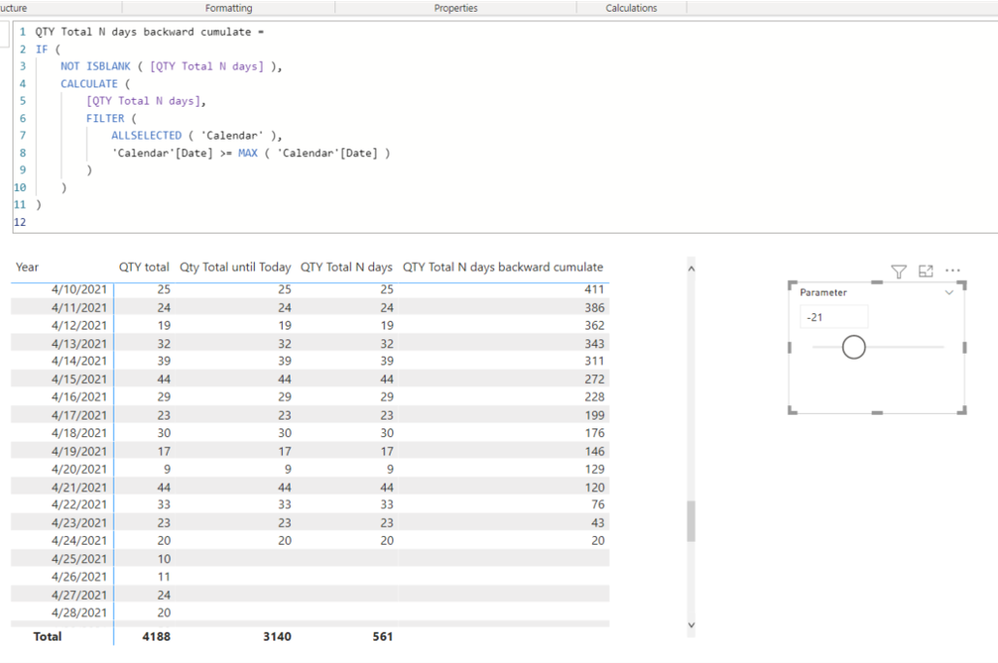
Please check the below picture, the measure, and the link down below.


Picture5.png


https://www.dropbox.com/s/cd59ags3a8zk4x3/abc.pbix?dl=0 


QTY Total N days backward cumulate =
IF (
NOT ISBLANK ( [QTY Total N days] ),
CALCULATE (
[QTY Total N days],
FILTER (
ALLSELECTED ( 'Calendar' ),
'Calendar'[Date] >= MAX ( 'Calendar'[Date] )
)
)
)


Hi, My name is Jihwan Kim.


If this post helps, then please consider accept it as the solution to help other members find it faster, and give a big thumbs up.


Linkedin: www.linkedin.com/in/jihwankim1975/

Twitter: twitter.com/Jihwan_JHKIM


If this post helps, then please consider accepting it as the solution to help other members find it faster, and give a big thumbs up.


Click here to visit my LinkedIn page

@jim

perfect. many many thanks for you effort.


really great. thanks you soo much

Helpful resources

Announcements
Power BI DataViz World Championships carousel

Power BI DataViz World Championships - June 2026

A new Power BI DataViz World Championship is coming this June! Don't miss out on submitting your entry.

Join our Fabric User Panel

Join our Fabric User Panel

Share feedback directly with Fabric product managers, participate in targeted research studies and influence the Fabric roadmap.

March Power BI Update Carousel

Power BI Community Update - March 2026

Check out the March 2026 Power BI update to learn about new features.