cancel
Showing results for 
Search instead for 
Did you mean: 

Get Fabric Certified for FREE during Fabric Data Days. Don't miss your chance! Request now

Reply
tangutoori
Helper III
Helper III

display count of specific stage against total of camp

i want the below format


 Current matrix report    
 stage 1stage 2stage 3stage 4Count
camp151 814
camp211114
camp3 2  2
camp4123 6
camp5  246


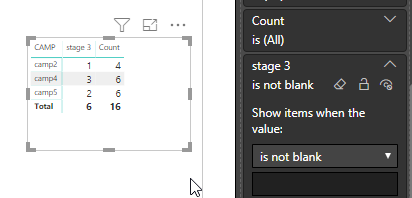
 I want vaues of stage 3 against camp in report     
 stage 3 Count   
camp214   
camp436   
camp526   
1 ACCEPTED SOLUTION

You can do one thing.


After Placing data on to the matric table. You go to the Visual Filter secton, there under Stage 3,  select Is not blank.


2019-03-06 18_12_39-Window.png


View solution in original post

5 REPLIES 5
rocky09
Solution Sage
Solution Sage

You could simply ignore other stages in Matrix columns?

excludin other stages impacting the total count.

any way thanks for you though.


I  see that you edited your Question. In the First version, there are blank included in the Stage3 (expecting result).

yes.. as there is no values for stage 3 i ahve removed those camps intentinally.


even if they display also no matters.

You can do one thing.


After Placing data on to the matric table. You go to the Visual Filter secton, there under Stage 3,  select Is not blank.


2019-03-06 18_12_39-Window.png


Helpful resources

Announcements
November Power BI Update Carousel

Power BI Monthly Update - November 2025

Check out the November 2025 Power BI update to learn about new features.

Fabric Data Days Carousel

Fabric Data Days

Advance your Data & AI career with 50 days of live learning, contests, hands-on challenges, study groups & certifications and more!

FabCon Atlanta 2026 carousel

FabCon Atlanta 2026

Join us at FabCon Atlanta, March 16-20, for the ultimate Fabric, Power BI, AI and SQL community-led event. Save $200 with code FABCOMM.

Top Solution Authors
Top Kudoed Authors