Join us at FabCon Atlanta from March 16 - 20, 2026, for the ultimate Fabric, Power BI, AI and SQL community-led event. Save $200 with code FABCOMM.
Register now!The Power BI Data Visualization World Championships is back! Get ahead of the game and start preparing now! Learn more
hi dears
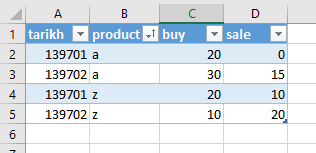
i have some data link below:
i want create comulitive total from diffrent form buy and sale columns.
when i create a measure with bellow dax formula it's ok:
Measure 1:=CALCULATE(SUMX(Table1,[buy]-[sale]),FILTER(all(Table1[tarikh]),[tarikh] <= MAX([tarikh])))
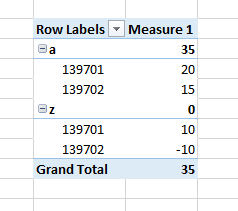
and the result like this:
for the "a" product:
diff["139701"] = 20-0 = 20
diff["139702"] = 30-15 = 15
sum(diff) = 20+15 = 35
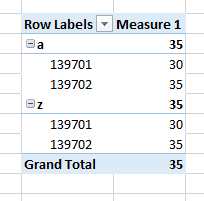
but when i use bellow formulas its wrang:
1- Table1 without [tarikh] the product not affect in result.
Measure 1:=CALCULATE(SUMX(Table1,[buy]-[sale]),FILTER(all(Table1),[tarikh] <= MAX([tarikh])))
1- fillter whitout All the SUMX not affect in result.
Measure 1:=CALCULATE(SUMX(Table1,[buy]-[sale]),FILTER((Table1),[tarikh] <= MAX([tarikh])))
what is diffrent between this formulas?
hi, @amir_daee
It involves the row context and filter context and depends on comulitive total of the grouping field in your visual.
it is meaningless that without all() in filter(table,...),
for it is always equal that [tarikh] and MAX([tarikh]) for current row
depend on the expression after it.
all(table) will not affect by any fields except field in the expression after it.
and all(table[field]) will not affect by fields in all() and field in the expression after it.
Best Regards,
Lin
Take a look at these links, I would personally move your FILTER clause within your SUMX as the table value (first parameter).
This looks like a measure totals problem. Very common. See my post about it here: https://community.powerbi.com/t5/DAX-Commands-and-Tips/Dealing-with-Measure-Totals/td-p/63376
Matrix Measure Total Triple Threat Rock & Roll
Measure Totals, The Final Word
https://community.powerbi.com/t5/Quick-Measures-Gallery/Measure-Totals-The-Final-Word/td-p/547907
Check out the November 2025 Power BI update to learn about new features.
Advance your Data & AI career with 50 days of live learning, contests, hands-on challenges, study groups & certifications and more!