Join us at FabCon Atlanta from March 16 - 20, 2026, for the ultimate Fabric, Power BI, AI and SQL community-led event. Save $200 with code FABCOMM.
Register now!The Power BI Data Visualization World Championships is back! Get ahead of the game and start preparing now! Learn more
Hi @RMV,
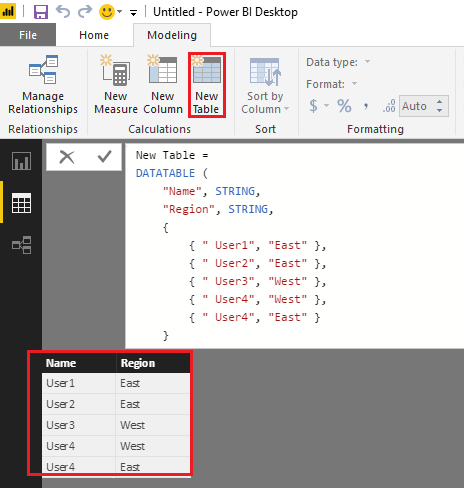
If I understand you correctly, you should be able to use DATATABLE function(DAX) to create the table with your defined value in this scenario.
For more details your refer to this article. And the formula below is for your reference. ![]()
New Table =
DATATABLE (
"Name", STRING,
"Region", STRING,
{
{ " User1", "East" },
{ " User2", "East" },
{ " User3", "West" },
{ " User4", "West" },
{ " User4", "East" }
}
)
Regards
Hi @RMV,
Do you mean create a new table using DAX/M, or add a Table visual on the report with some specific defined values?
Could post some sample data with your expected result?
Regards
Hi @v-ljerr-msft,
I mean create new table using DAX.
And I'd like to define the values of the new table.
For example
ColumnName
01-1
02-2
etc
This "01-1", "02-2" etc is defined directly using the DAX with the New Table feature.
Is this possible? Kindly advise.
Regards,
Hi @RMV,
If I understand you correctly, you should be able to use DATATABLE function(DAX) to create the table with your defined value in this scenario.
For more details your refer to this article. And the formula below is for your reference. ![]()
New Table =
DATATABLE (
"Name", STRING,
"Region", STRING,
{
{ " User1", "East" },
{ " User2", "East" },
{ " User3", "West" },
{ " User4", "West" },
{ " User4", "East" }
}
)
Regards
Check out the November 2025 Power BI update to learn about new features.
Advance your Data & AI career with 50 days of live learning, contests, hands-on challenges, study groups & certifications and more!