Join us at FabCon Atlanta from March 16 - 20, 2026, for the ultimate Fabric, Power BI, AI and SQL community-led event. Save $200 with code FABCOMM.
Register now!The Power BI Data Visualization World Championships is back! Get ahead of the game and start preparing now! Learn more
Dear,
We have clients with a reception date Per example 01/01/2018. I want to see a value (1) if the approved date is before 28 days after.
Is it possible using power bi?
example:
reception date 01/01/2018, approved: 10/01/2018: show value 1
reception date 01/01/2018, approved: 02/02/2018: no value.
The goal is to have the amount of accounts approved in less than 28 days as a conversion to the amount of accounts that are approved later.
Kind regards
Niek
Hi @niekdp,
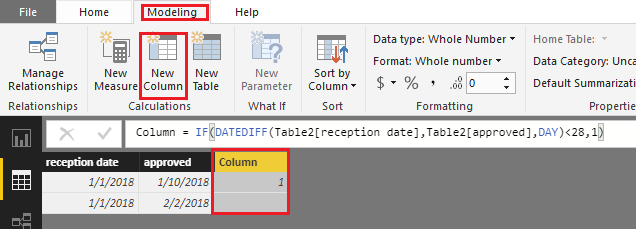
Based on my test, you should be able to use the formula below to create a calculate column in your table to get the expected result in your scenario. ![]()
Column = IF(DATEDIFF(Table2[reception date],Table2[approved],DAY)<28,1)
Regards
The Power BI Data Visualization World Championships is back! Get ahead of the game and start preparing now!
| User | Count |
|---|---|
| 40 | |
| 38 | |
| 36 | |
| 29 | |
| 28 |
| User | Count |
|---|---|
| 127 | |
| 88 | |
| 78 | |
| 66 | |
| 65 |