New Offer! Become a Certified Fabric Data Engineer
Check your eligibility for this 50% exam voucher offer and join us for free live learning sessions to get prepared for Exam DP-700.
Get Started- Power BI forums
- Get Help with Power BI
- Desktop
- Service
- Report Server
- Power Query
- Mobile Apps
- Developer
- DAX Commands and Tips
- Custom Visuals Development Discussion
- Health and Life Sciences
- Power BI Spanish forums
- Translated Spanish Desktop
- Training and Consulting
- Instructor Led Training
- Dashboard in a Day for Women, by Women
- Galleries
- Community Connections & How-To Videos
- COVID-19 Data Stories Gallery
- Themes Gallery
- Data Stories Gallery
- R Script Showcase
- Webinars and Video Gallery
- Quick Measures Gallery
- 2021 MSBizAppsSummit Gallery
- 2020 MSBizAppsSummit Gallery
- 2019 MSBizAppsSummit Gallery
- Events
- Ideas
- Custom Visuals Ideas
- Issues
- Issues
- Events
- Upcoming Events
Don't miss out! 2025 Microsoft Fabric Community Conference, March 31 - April 2, Las Vegas, Nevada. Use code MSCUST for a $150 discount. Prices go up February 11th. Register now.
- Power BI forums
- Forums
- Get Help with Power BI
- Desktop
- Re: date from yyyymmdd stored as whole number
- Subscribe to RSS Feed
- Mark Topic as New
- Mark Topic as Read
- Float this Topic for Current User
- Bookmark
- Subscribe
- Printer Friendly Page

- Mark as New
- Bookmark
- Subscribe
- Mute
- Subscribe to RSS Feed
- Permalink
- Report Inappropriate Content
date from yyyymmdd stored as whole number
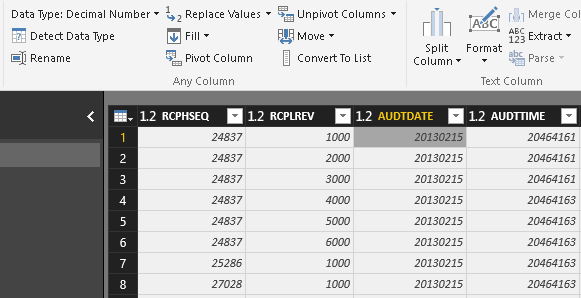
I have a large chunk of data that I have downloaded from our ERP system and am trying to work with. The only hitch in this process is the that my date columns (AUDTDATE as the example below) are stored as yyyymmdd and PBI sees them as Decimal Numbers.
The simple step of just changing the Data Type doesn't work (i tried).
Does anyone have any suggestions to convert these to usable dates?
Solved! Go to Solution.
- Mark as New
- Bookmark
- Subscribe
- Mute
- Subscribe to RSS Feed
- Permalink
- Report Inappropriate Content
I'm not really sure why it's not working for you but you could try to create a new column with the following M-code:
=Date.FromText(Text.From([insert-your-column-name-here]))
I hope this helps,
Magnus
- Mark as New
- Bookmark
- Subscribe
- Mute
- Subscribe to RSS Feed
- Permalink
- Report Inappropriate Content
Thank you Magnus, I will try this later for my education and let you know if it works for me later. However, I found a really simple workaround, once I quite looking at the problem so hard, and want to share here for others. It was a "I can't believe I didn't think of that sooner" moment.
The actual column containing the dates I needed is called DTCOMPLETE, below.
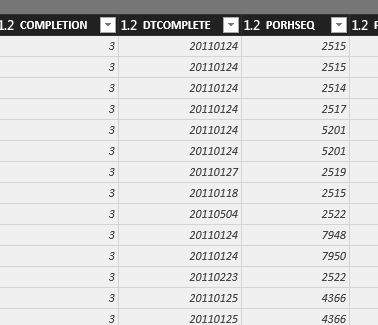
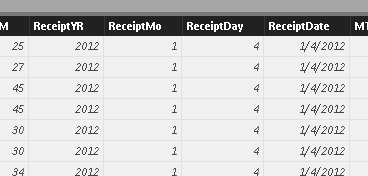
In the Query, I split this column into three columns call ReceiptYR, ReceiptMo, and RecieptDay.

In the table view, I created a calculated column using the Date function to bring all of this back together and format as needed.
ReceiptDate = DATE(PORCPL[ReceiptYR],PORCPL[ReceiptMo],PORCPL[ReceiptDay])


- Mark as New
- Bookmark
- Subscribe
- Mute
- Subscribe to RSS Feed
- Permalink
- Report Inappropriate Content
I just wanted to add that the only way I got my date as int (yyymmdd) converted to text is using the Value.FromText first:
Date.FromText(Text.From(Value.FromText([myDateAsInt]))))
Full line forrefrence:
#"mySecondTable" = Table.AddColumn(
#myFirstTable, "DateAsDate", each Date.FromText(Text.From(Value.FromText([myDateAsInt])))
)

- Mark as New
- Bookmark
- Subscribe
- Mute
- Subscribe to RSS Feed
- Permalink
- Report Inappropriate Content
I guess that could depend on the culture (Locale) settings you have for Power BI. On my machine for example I have Swedish and it works fine for me to change the data type to dates in the query editor when the values are stored in format yyyymmdd.
Otherwise you can create a new column in the query editor using the M-function #Date and extract year, month and day from the original date column to get a proper datevalue.
Br,
Magnus
- Mark as New
- Bookmark
- Subscribe
- Mute
- Subscribe to RSS Feed
- Permalink
- Report Inappropriate Content
Thanks for the feedback. I went into options/ reginal settings and switched my locale to Swedan. This did not change the result. It still Errors out when trying to convert. Did you mean that I would need to adjust locale elsewhere?
Can you expand on how to use #date to make this happen. I'm a newbie to M code and cannot seem to find any good information on how to apply this.

- Mark as New
- Bookmark
- Subscribe
- Mute
- Subscribe to RSS Feed
- Permalink
- Report Inappropriate Content
I'm not really sure why it's not working for you but you could try to create a new column with the following M-code:
=Date.FromText(Text.From([insert-your-column-name-here]))
I hope this helps,
Magnus

- Mark as New
- Bookmark
- Subscribe
- Mute
- Subscribe to RSS Feed
- Permalink
- Report Inappropriate Content
Hi can this be made to display only the date? It is currently showing as
| 10-Feb-19 00:00:00 |
Thanks allot
- Mark as New
- Bookmark
- Subscribe
- Mute
- Subscribe to RSS Feed
- Permalink
- Report Inappropriate Content
I don't have a great dataset to test this one right now but there should be a "Data Type" option where you can swicth "Date/Time" to just "Date".

- Mark as New
- Bookmark
- Subscribe
- Mute
- Subscribe to RSS Feed
- Permalink
- Report Inappropriate Content
Thanks!Solved my problem!

- Mark as New
- Bookmark
- Subscribe
- Mute
- Subscribe to RSS Feed
- Permalink
- Report Inappropriate Content
- Mark as New
- Bookmark
- Subscribe
- Mute
- Subscribe to RSS Feed
- Permalink
- Report Inappropriate Content
Column name should be in quotes ("ColumnNameHere ")
- Mark as New
- Bookmark
- Subscribe
- Mute
- Subscribe to RSS Feed
- Permalink
- Report Inappropriate Content
- Mark as New
- Bookmark
- Subscribe
- Mute
- Subscribe to RSS Feed
- Permalink
- Report Inappropriate Content
This M-Code works perfectly for me. Thank you
- Mark as New
- Bookmark
- Subscribe
- Mute
- Subscribe to RSS Feed
- Permalink
- Report Inappropriate Content
Thank you so much Magnus! It took me 2 hours to find the answer to this problem and your answer saved me!
- Mark as New
- Bookmark
- Subscribe
- Mute
- Subscribe to RSS Feed
- Permalink
- Report Inappropriate Content
I fianlly got to try this solution over the weekend and it worked great. Thank you for your insight.
- Mark as New
- Bookmark
- Subscribe
- Mute
- Subscribe to RSS Feed
- Permalink
- Report Inappropriate Content
Thank you Magnus, I will try this later for my education and let you know if it works for me later. However, I found a really simple workaround, once I quite looking at the problem so hard, and want to share here for others. It was a "I can't believe I didn't think of that sooner" moment.
The actual column containing the dates I needed is called DTCOMPLETE, below.
In the Query, I split this column into three columns call ReceiptYR, ReceiptMo, and RecieptDay.
In the table view, I created a calculated column using the Date function to bring all of this back together and format as needed.
ReceiptDate = DATE(PORCPL[ReceiptYR],PORCPL[ReceiptMo],PORCPL[ReceiptDay])
Helpful resources

Join us at the Microsoft Fabric Community Conference
March 31 - April 2, 2025, in Las Vegas, Nevada. Use code MSCUST for a $150 discount! Prices go up Feb. 11th.

Power BI Monthly Update - January 2025
Check out the January 2025 Power BI update to learn about new features in Reporting, Modeling, and Data Connectivity.

Fabric Community Update - January 2025
Find out what's new and trending in the Fabric community.

| User | Count |
|---|---|
| 146 | |
| 87 | |
| 66 | |
| 52 | |
| 46 |


| User | Count |
|---|---|
| 215 | |
| 90 | |
| 83 | |
| 66 | |
| 58 |


