Join us at FabCon Atlanta from March 16 - 20, 2026, for the ultimate Fabric, Power BI, AI and SQL community-led event. Save $200 with code FABCOMM.
Register now!The Power BI Data Visualization World Championships is back! Get ahead of the game and start preparing now! Learn more
Hello,
I created the following columns and was confused with the sorting of the Month/Year .
I still keep ketting February prior to January. Any thoughts
Solved! Go to Solution.
Thansk Again Phil.
I will remove Weeks and then only use Month/Year and DD fields.
I went to the modeling tab and sorted the data by M/Y Sort. It did the trick. Thanks again
Do you have a separate DATE table with 1 row per day?
If not, I recommend you do for more reasons than this. It will make sorting and hierarchies tidier.
So at the very least add the following table
Dates = CALENDARAUTO()
And then create a relationship between this table and your Query table
Thanks Phil. I will make sure I have a date table connected . But it is strange that it worked the other day using those formulaes.
There wasnt any problem with February going prior to January!!!!
Regards
Another thing I notice is that your hierarchy has Month then Week.
Weeks don't always play nicely with Months given they don't share clean boundaries. This can often cause issues depending on how the weeks are linked to the months.
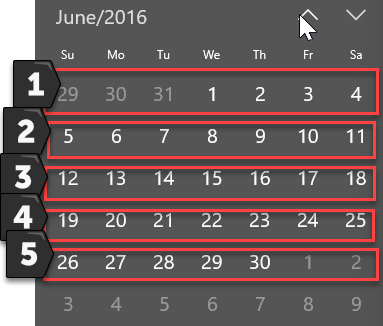
Note here how the 5th week in June 2016 also includes some dates from July. There is a small chance this can be upsetting your sorting.
Thansk Again Phil.
I will remove Weeks and then only use Month/Year and DD fields.
I went to the modeling tab and sorted the data by M/Y Sort. It did the trick. Thanks again
Cool, Nice work
The Power BI Data Visualization World Championships is back! Get ahead of the game and start preparing now!
| User | Count |
|---|---|
| 39 | |
| 37 | |
| 33 | |
| 32 | |
| 29 |
| User | Count |
|---|---|
| 133 | |
| 88 | |
| 85 | |
| 68 | |
| 64 |