Join us at FabCon Atlanta from March 16 - 20, 2026, for the ultimate Fabric, Power BI, AI and SQL community-led event. Save $200 with code FABCOMM.
Register now!The Power BI Data Visualization World Championships is back! Get ahead of the game and start preparing now! Learn more
Hello,
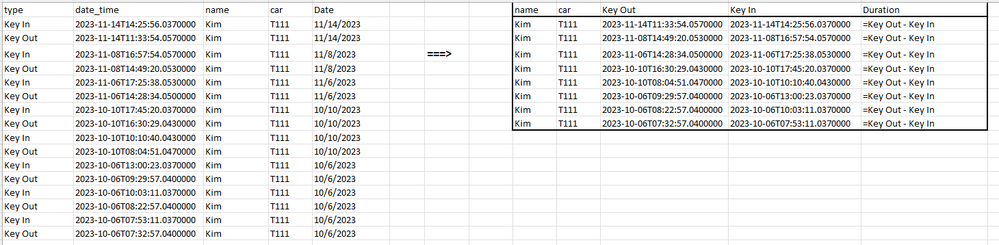
Can somebody help me out how to transform the data as below?
Thanks in advance.
data here
| type | date_time | name | car | Date |
| Key In | 2023-11-14T14:25:56.0370000 | Kim | T111 | 11/14/2023 |
| Key Out | 2023-11-14T11:33:54.0570000 | Kim | T111 | 11/14/2023 |
| Key In | 2023-11-08T16:57:54.0570000 | Kim | T111 | 11/8/2023 |
| Key Out | 2023-11-08T14:49:20.0530000 | Kim | T111 | 11/8/2023 |
| Key In | 2023-11-06T17:25:38.0530000 | Kim | T111 | 11/6/2023 |
| Key Out | 2023-11-06T14:28:34.0500000 | Kim | T111 | 11/6/2023 |
| Key In | 2023-10-10T17:45:20.0370000 | Kim | T111 | 10/10/2023 |
| Key Out | 2023-10-10T16:30:29.0430000 | Kim | T111 | 10/10/2023 |
| Key In | 2023-10-10T10:10:40.0430000 | Kim | T111 | 10/10/2023 |
| Key Out | 2023-10-10T08:04:51.0470000 | Kim | T111 | 10/10/2023 |
| Key In | 2023-10-06T13:00:23.0370000 | Kim | T111 | 10/6/2023 |
| Key Out | 2023-10-06T09:29:57.0400000 | Kim | T111 | 10/6/2023 |
| Key In | 2023-10-06T10:03:11.0370000 | Kim | T111 | 10/6/2023 |
| Key Out | 2023-10-06T08:22:57.0400000 | Kim | T111 | 10/6/2023 |
| Key In | 2023-10-06T07:53:11.0370000 | Kim | T111 | 10/6/2023 |
| Key Out | 2023-10-06T07:32:57.0400000 | Kim | T111 | 10/6/2023 |
Solved! Go to Solution.
to know how to do this watch my video
Hi,
In the Query Editor, click on any cell in the type column and click on Pivot Column. Select date_time column and the Aggregate function as Don's aggregate.
Shouldn't the duration be Key_in - Key_out ?
The Power BI Data Visualization World Championships is back! Get ahead of the game and start preparing now!
| User | Count |
|---|---|
| 40 | |
| 37 | |
| 35 | |
| 34 | |
| 28 |
| User | Count |
|---|---|
| 136 | |
| 99 | |
| 73 | |
| 66 | |
| 65 |