cancel
Showing results for 
Search instead for 
Did you mean: 

The Power BI Data Visualization World Championships is back! Get ahead of the game and start preparing now! Learn more

Reply
isaideepika
Regular Visitor

current period and prev. period productivity matrix

Hi,

I have the below data in power bi-

NameTypeDateHours
ABCDirect -17/27/2018 0:005.5
DEFDirect-27/30/2018 0:005.75
GHIDirect-37/31/2018 0:006.5
JKLIndirect-18/1/2018 0:002.5
ABCIndirect-28/2/2018 0:002
DEFDirect-38/3/2018 0:003
GHIDirect -18/6/2018 0:004.5
JKLDirect-38/7/2018 0:004

I need the output/report in the following form for ABC, DEF, GHI and JKL


 Direct -1Direct-2Direct-3TOTAL DIRECTTOTAL INDRECTPRODUCTIVITY Current moth (Direct/(Direct+Indirect)*100PRODUCtivity PREV. MONTH
        
ABC5.55.756.517.750100 


Can you please help.


TIA

1 ACCEPTED SOLUTION
v-eachen-msft
Community Support
Community Support

Hi @isaideepika ,


At first, you need to pivot column "Type" with value "Hours" in the query editor.
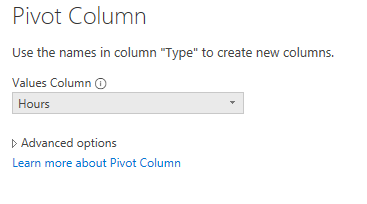
1-1.PNG

Then create a new column to get "YEAR&MONTH".

YM =
FORMAT ( test[Date], "yyyymm" )

Calculate the "totaldirect" ,"totalindirect" and the percentage.

totaldirect =
CALCULATE ( SUM ( test[Direct -1] ), ALLEXCEPT ( test, test[YM] ) )
    + CALCULATE ( SUM ( test[Direct-2] ), ALLEXCEPT ( test, test[YM] ) )
    + CALCULATE ( SUM ( test[Direct-3] ), ALLEXCEPT ( test, test[YM] ) )
totalindirect =
CALCULATE ( SUM ( test[Indirect-1] ), ALLEXCEPT ( test, test[YM] ) )
    + CALCULATE ( SUM ( test[Indirect-2] ), ALLEXCEPT ( test, test[YM] ) )
currentMonth =
 ( [totaldirect] / ( [totaldirect] + [totalindirect] ) ) * 100

You can get the previous values by PREVIOUSMOTH() or DATESMTD() function.


Community Support Team _ Eads
If this post helps, then please consider Accept it as the solution to help the other members find it.

View solution in original post

2 REPLIES 2
v-eachen-msft
Community Support
Community Support

Hi @isaideepika ,


At first, you need to pivot column "Type" with value "Hours" in the query editor.

1-1.PNG

Then create a new column to get "YEAR&MONTH".

YM =
FORMAT ( test[Date], "yyyymm" )

Calculate the "totaldirect" ,"totalindirect" and the percentage.

totaldirect =
CALCULATE ( SUM ( test[Direct -1] ), ALLEXCEPT ( test, test[YM] ) )
    + CALCULATE ( SUM ( test[Direct-2] ), ALLEXCEPT ( test, test[YM] ) )
    + CALCULATE ( SUM ( test[Direct-3] ), ALLEXCEPT ( test, test[YM] ) )
totalindirect =
CALCULATE ( SUM ( test[Indirect-1] ), ALLEXCEPT ( test, test[YM] ) )
    + CALCULATE ( SUM ( test[Indirect-2] ), ALLEXCEPT ( test, test[YM] ) )
currentMonth =
 ( [totaldirect] / ( [totaldirect] + [totalindirect] ) ) * 100

You can get the previous values by PREVIOUSMOTH() or DATESMTD() function.


Community Support Team _ Eads
If this post helps, then please consider Accept it as the solution to help the other members find it.
amitchandak
Super User
Super User

Check this example, here I have used one filter on past qtr and one on current Qtr. You can do the same for a month. One filter at a time.

Time dimension here has been marked as date tables 


Sales Before QTR = 
CALCULATE(SUMx(FILTER(sales,and(Sales[Order_Date]>= STARTOFQUARTER(DATEADD(STARTOFQUARTER(OrderTime[Order Date]),-1,DAY)) && Sales[Order_Date]<= DATEADD(STARTOFQUARTER(OrderTime[Order Date]),-1,DAY),
Sales[Requested_Date]>= STARTOFQUARTER(OrderTime[Order Date]) && Sales[Requested_Date]<= STARTOFQUARTER(OrderTime[Order Date])
)),Sales[Sales]),CROSSFILTER(Sales[Order_Date],OrderTime[Order Date],None))


Share with Power BI Enthusiasts: Full Power BI Video (20 Hours) YouTube
Microsoft Fabric Series 60+ Videos YouTube
Microsoft Fabric Hindi End to End YouTube

Helpful resources

Announcements
Power BI DataViz World Championships

Power BI Dataviz World Championships

The Power BI Data Visualization World Championships is back! Get ahead of the game and start preparing now!

December 2025 Power BI Update Carousel

Power BI Monthly Update - December 2025

Check out the December 2025 Power BI Holiday Recap!

FabCon Atlanta 2026 carousel

FabCon Atlanta 2026

Join us at FabCon Atlanta, March 16-20, for the ultimate Fabric, Power BI, AI and SQL community-led event. Save $200 with code FABCOMM.