cancel
Showing results for 
Search instead for 
Did you mean: 

Try your skills in the Power BI Dataviz World Championship! Round one ends June 26. Join now

Reply
Ben_Schenck
Regular Visitor

cumulative total + missing data

Hi,

I'm having some troubles with the following.
I'm calculating a cumulative total going back in time, which is my timeline 0 = today, 1 yesterday and so on.


Cumulative SQL1% =
CALCULATE(
    [SQL1%],
    FILTER(
        ALLSELECTED('Calendar3'),
        'Calendar3'[Timeline] <= MAX('Calendar3'[Timeline] )
    )

SQL1% =
DIVIDE([Activated],[SQL])
 
Activated = CALCULATE(
    SUM(ClientDays[Activated]),
        ClientDays[StopReason__c] <> ""
    )
)

SQL = CALCULATE(
    COUNT(ClientDays[Id]),
        ClientDays[StopReason__c] <> ""
    )

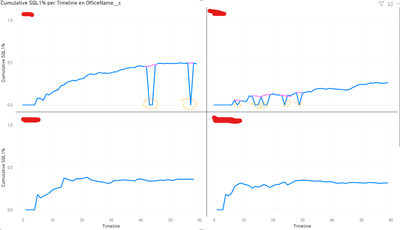
Now I have the issue when I don't have data for this multiple on that day the Y-axis drops to 0, I would like it to be like the purple line. It ignoring the fact there's no data for that day. 

Ben_Schenck_0-1711361997974.png


Thank you in advance for your input.


1 ACCEPTED SOLUTION
Anonymous
Not applicable

Hi @Ben_Schenck ,

Based on my testing, please try the following methods:

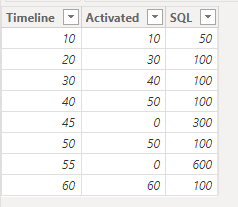
1.Create the simple table.

vjiewumsft_3-1711965805410.png


2.Create the new measure to calculate.

Cumulative SQL1% = 
VAR activ_ = SELECTEDVALUE('Table 1'[Activated])
VAR sq_ = SELECTEDVALUE('Table 1'[SQL])
VAR sql_1 = DIVIDE(activ_, sq_)
VAR calcu_ = CALCULATE(
    DIVIDE(activ_, sq_),
    FILTER(
        ALLSELECTED('Table 1'),
        'Table 1'[Timeline] <= MAX('Table 1'[Timeline])
    ))
RETURN
IF(
    calcu_ = 0,
    BLANK(),
    calcu_
)


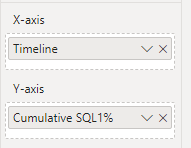
3.Drag the measure into the Line chart.

vjiewumsft_4-1711965847937.png

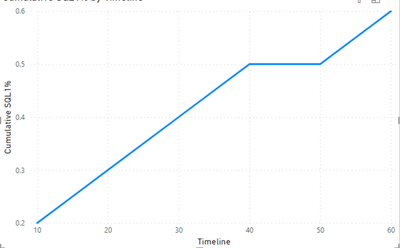
4.The result is shown below.

vjiewumsft_5-1711965860083.png


Best Regards,

Wisdom Wu

If this post helps, then please consider Accept it as the solution to help the other members find it more quickly.

View solution in original post

1 REPLY 1
Anonymous
Not applicable

Hi @Ben_Schenck ,

Based on my testing, please try the following methods:

1.Create the simple table.

vjiewumsft_3-1711965805410.png


2.Create the new measure to calculate.

Cumulative SQL1% = 
VAR activ_ = SELECTEDVALUE('Table 1'[Activated])
VAR sq_ = SELECTEDVALUE('Table 1'[SQL])
VAR sql_1 = DIVIDE(activ_, sq_)
VAR calcu_ = CALCULATE(
    DIVIDE(activ_, sq_),
    FILTER(
        ALLSELECTED('Table 1'),
        'Table 1'[Timeline] <= MAX('Table 1'[Timeline])
    ))
RETURN
IF(
    calcu_ = 0,
    BLANK(),
    calcu_
)


3.Drag the measure into the Line chart.

vjiewumsft_4-1711965847937.png

4.The result is shown below.

vjiewumsft_5-1711965860083.png


Best Regards,

Wisdom Wu

If this post helps, then please consider Accept it as the solution to help the other members find it more quickly.

Helpful resources

Announcements
Fabric Data Days is here Carousel

Data Days 2026

Don't miss out on Data Days, June 15 through August 7. Learn Fabric, Power BI, SQL, AI and more.

May Power BI Update Carousel

Power BI Monthly Update - May 2026

Check out the May 2026 Power BI update to learn about new features.

Power BI DataViz World Championships carousel

Power BI DataViz World Championships - June 2026

A new Power BI DataViz World Championship is coming this June! Don't miss out on submitting your entry.