cancel
Showing results for 
Search instead for 
Did you mean: 

Get Fabric Certified for FREE during Fabric Data Days. Don't miss your chance! Request now

Reply
Anonymous
Not applicable

compare sum of column against the target

Hi,


I have a table/list ("Performance") where one of the columns ("Occupancy") contains some values that'll be added to give me a total.

Table: Performance  (for Department C)


Column1 | Column2 | Column3

xxx          |  20           | xxx

xxx          | 50            | xxx

xxx          | 40            | xxx


There's another table ("Targets") that contains a list of targets for particular department:

NameofDepartment | Target

Dept_A                     | 120

Dept_B                     | 200

Dept_C                     | 140


I'm doing a report for Dept C and would like to display 110/140 as a Gauge or other visual (sum of Performance[Column2] / Target value for Dept C in the Targets table?


Thanks

1 ACCEPTED SOLUTION
Nathaniel_C
Community Champion
Community Champion

Hi @Anonymous ,


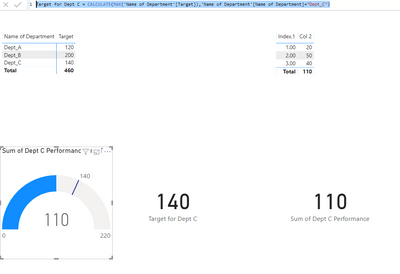
You will need these two measures to get the picture below.


Let me know if you have any questions,


If this solves your issues, please mark it as the solution, so that others can find it easily. Kudos are nice too.
Nathaniel


Sum of Dept C Performance = SUM('Performance Dept C'[Col 2])

Target for Dept C = CALCULATE(MAX('Name of Department'[Target]),'Name of Department'[Name of Department]="Dept_C")

Dept c target.PNG


Did I answer your question? Mark my post as a solution!

Proud to be a Super User!


View solution in original post

2 REPLIES 2
Nathaniel_C
Community Champion
Community Champion

Hi @Anonymous ,


You will need these two measures to get the picture below.


Let me know if you have any questions,


If this solves your issues, please mark it as the solution, so that others can find it easily. Kudos are nice too.
Nathaniel


Sum of Dept C Performance = SUM('Performance Dept C'[Col 2])

Target for Dept C = CALCULATE(MAX('Name of Department'[Target]),'Name of Department'[Name of Department]="Dept_C")

Dept c target.PNG


Did I answer your question? Mark my post as a solution!

Proud to be a Super User!


@Anonymous ,


Or you could make the target the max value for this picture.


If this solves your issues, please mark it as the solution, so that others can find it easily. Kudos are nice too.
Nathaniel

Dept c target 1.PNG


Did I answer your question? Mark my post as a solution!

Proud to be a Super User!


Helpful resources

Announcements
November Power BI Update Carousel

Power BI Monthly Update - November 2025

Check out the November 2025 Power BI update to learn about new features.

Fabric Data Days Carousel

Fabric Data Days

Advance your Data & AI career with 50 days of live learning, contests, hands-on challenges, study groups & certifications and more!

FabCon Atlanta 2026 carousel

FabCon Atlanta 2026

Join us at FabCon Atlanta, March 16-20, for the ultimate Fabric, Power BI, AI and SQL community-led event. Save $200 with code FABCOMM.

Top Solution Authors
Top Kudoed Authors