
cancel
Showing results for 
Search instead for 
Did you mean: 

The Power BI Data Visualization World Championships is back! Get ahead of the game and start preparing now! Learn more

Reply
Anonymous
Not applicable

columns graph colour conditional formatting

my power bi im formatting section doesn´t show the conditional formatting option. Only show this options

formatting

         columns

                   colours  ( possibility of choice the column colour )


How can I access the column colour conditional formatting option ?

1 REPLY 1
SidTrengove
Advocate III
Advocate III

Hey @Anonymous!


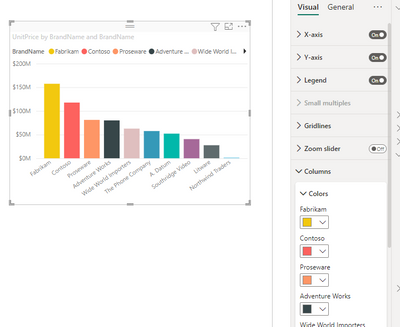
This will most likely be because you have added an item to your Legend .


For example here:

SidTrengove_0-1675275758377.png

SidTrengove_1-1675275779067.png


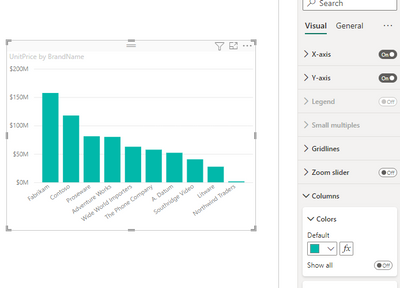
If you remove the item from your Legend you will be able to use conditional formatting to choose your colours 😊

SidTrengove_2-1675275836297.png


SidTrengove_3-1675275870058.png


Appreciate your Kudos!

Please accept the solution if it answers your question 🙂


Easy Power BI Tutorials

Unleash the full potential of Power BI with Help Xel

Visit HelpXel
2.png


Helpful resources

Announcements
Power BI DataViz World Championships

Power BI Dataviz World Championships

The Power BI Data Visualization World Championships is back! Get ahead of the game and start preparing now!

December 2025 Power BI Update Carousel

Power BI Monthly Update - December 2025

Check out the December 2025 Power BI Holiday Recap!

FabCon Atlanta 2026 carousel

FabCon Atlanta 2026

Join us at FabCon Atlanta, March 16-20, for the ultimate Fabric, Power BI, AI and SQL community-led event. Save $200 with code FABCOMM.