Join us at FabCon Atlanta from March 16 - 20, 2026, for the ultimate Fabric, Power BI, AI and SQL community-led event. Save $200 with code FABCOMM.
Register now!The Power BI Data Visualization World Championships is back! Get ahead of the game and start preparing now! Learn more
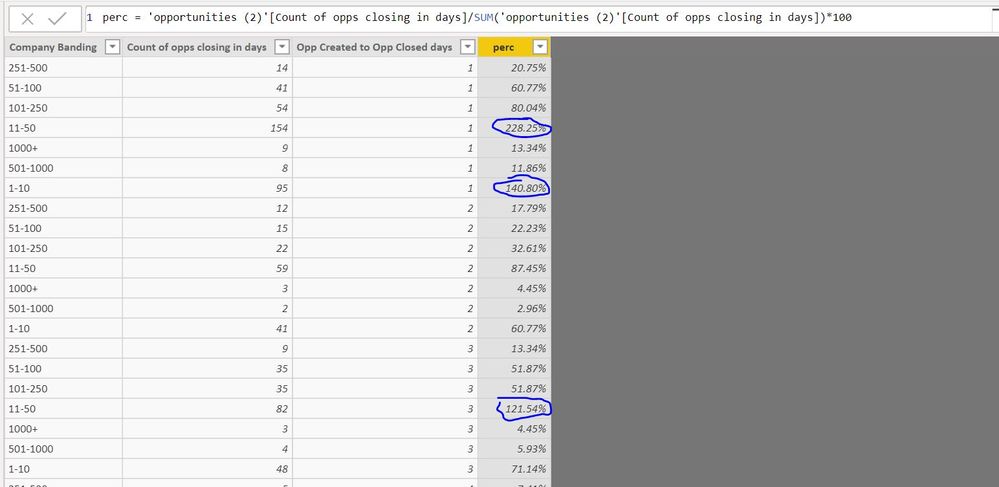
am looking to find the percentage of the column 'Count of Opps closing in days' in the below dataset. The issue i am having is when i use the below formula i am geeting percentages over 100%?
Solved! Go to Solution.
@Anonymous
You may add custom column as follows.
Value.Divide([Column2], List.Sum(#"Changed Type"[Column2]))
@Anonymous
I would recommend creating seperate calculations to determine where the fault is. Sometimes, I actually have percentages greater than 100.
In fact, I think that your calculation may be flawed.
First, create your count of opps closing in days calculation. Then create a count of all opps in the company band (removing the filter for closed in days [I don't understand that logic as it is not my data]). Finally, use the DIVIDE function to complete the calculation. Drop all three in your table and see if the math lines up.
Right now, your calculation seems to be dividing a calculation by the sum of itself multiplied by 100. To me, a percentage would be the number of opps fitting the specified criteria divided by the number of opps (with no filter on specified criteria) and formatted as a percentage (multiplied by 100).
Proud to be a Super User!
@Kalpavruksh @ZunzunUOC i was hoping to do this as a powequery custom column? the formula works but not as a power query
@Anonymous
You may add custom column as follows.
Value.Divide([Column2], List.Sum(#"Changed Type"[Column2]))
@Anonymous, you can get your answer in the other post.
You must use the brackets correctly. Try it ![]()
The Power BI Data Visualization World Championships is back! Get ahead of the game and start preparing now!
Check out the November 2025 Power BI update to learn about new features.
| User | Count |
|---|---|
| 59 | |
| 46 | |
| 42 | |
| 23 | |
| 18 |
| User | Count |
|---|---|
| 190 | |
| 122 | |
| 96 | |
| 66 | |
| 47 |