Join us at FabCon Atlanta from March 16 - 20, 2026, for the ultimate Fabric, Power BI, AI and SQL community-led event. Save $200 with code FABCOMM.
Register now!The Power BI Data Visualization World Championships is back! Get ahead of the game and start preparing now! Learn more
I want to calculate the average churn, based upon two tables in my model, containing:
Table1
Clientnr Month Subscription
A 201501 1
A 201502 1
B 201501 1
B 201502 1
Table2
Clientnr Month Churn
A 201501 1
A 201502 0
B 201501 1
B 201502 0
Resulting in a form of output where I can see that:
Month Churn%
201501 100%
201502 0%
How do I do this in the report view?
Solved! Go to Solution.
Hi @MichielvS,
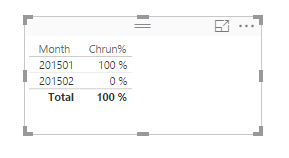
Based on my understanding, for 201501 month, there is 2=1+1(AandB) Churn in Table2, 2=1+1(AandB) Subcription in table1, so 100%=2/2. And for 201502 month, there is 0=0+0(A and B) Churn in Table2, 2=1+1(A and B) Subcription in Table1, so 0%=0/2, right? If it is, please review the following steps.
First, click New table under Modeling in home page, create two new tables using the following formulas.
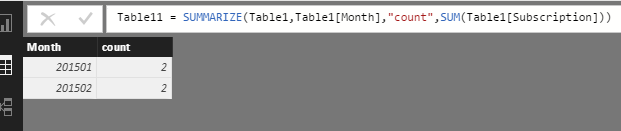
Table11 = SUMMARIZE(Table1,Table1[Month],"count",SUM(Table1[Subscription]))
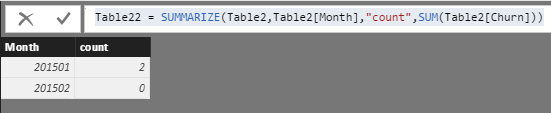
Table22 = SUMMARIZE(Table2,Table2[Month],"count",SUM(Table2[Churn]))
Please see the new tables.
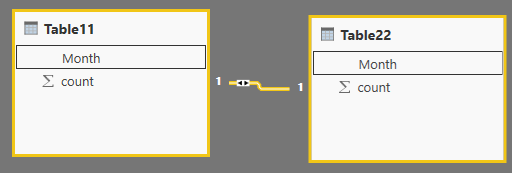
Then create relationship between Table11 and Table22.
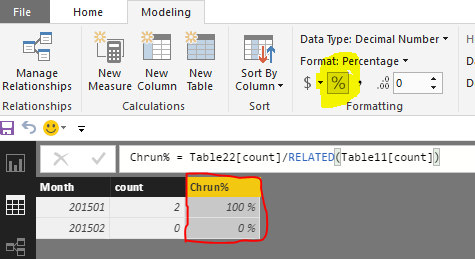
In table22, create a calculated column using the formula, create a table visual to show the expected result.
Chrun% = Table22[count]/RELATED(Table11[count])
If this is not what you want, please let me know.
Best Regards,
Angelia
Hi @MichielvS,
Based on my understanding, for 201501 month, there is 2=1+1(AandB) Churn in Table2, 2=1+1(AandB) Subcription in table1, so 100%=2/2. And for 201502 month, there is 0=0+0(A and B) Churn in Table2, 2=1+1(A and B) Subcription in Table1, so 0%=0/2, right? If it is, please review the following steps.
First, click New table under Modeling in home page, create two new tables using the following formulas.
Table11 = SUMMARIZE(Table1,Table1[Month],"count",SUM(Table1[Subscription]))
Table22 = SUMMARIZE(Table2,Table2[Month],"count",SUM(Table2[Churn]))
Please see the new tables.
Then create relationship between Table11 and Table22.
In table22, create a calculated column using the formula, create a table visual to show the expected result.
Chrun% = Table22[count]/RELATED(Table11[count])
If this is not what you want, please let me know.
Best Regards,
Angelia
Now I would like to take this one step further, if possible. Do you know if I can incorporate dimensions to use as slicers, in one way or another? With the current result I can only show the totals over the base. What if for instance I would have the field 'gender' that I would like to be able to filter on in the output? Is that possible at all?
Hi @MichielvS,
Based on your description, it's difficult to reproduce the scenario. Unusualy there is one question in one case. I personally suggest you open a new thread and post the sample data and expexted result. Thanks for your understanding.
Best Regards,
Angelia
I will do that, thanks.
This is exactly what I was looking for! Thank you very much Angelia, your explanation is very helpful.
The Power BI Data Visualization World Championships is back! Get ahead of the game and start preparing now!
| User | Count |
|---|---|
| 39 | |
| 37 | |
| 33 | |
| 32 | |
| 29 |
| User | Count |
|---|---|
| 133 | |
| 88 | |
| 85 | |
| 68 | |
| 64 |