cancel
Showing results for 
Search instead for 
Did you mean: 

The Power BI Data Visualization World Championships is back! Get ahead of the game and start preparing now! Learn more

Reply
LParker97
Helper I
Helper I

calculate average from previous 3 months to be used as a variable for every month in the future

Hi I'm trying to create a measure that will appear as a secondary bar on a bar chart

Currently I have the average completion per person for each month and I want to use the average of the last 3 calender months. This will then be multiplied and be used to show as a flat sequence of bars across the axis as a constant.


i.e. 

Month | Completed | Capacity | Average
----------------------------------------------
Feb      |      10         |         2      |       5

Mar    |      10         |         2      |       5

Apr      |      16        |         2      |      8

May      |      15         |         3      |       5

June      |      10         |         5      |       2


So As of today (17th June), I would like the average of averages from , MAR, APR & JUN = 6

I want to then use this value and times by the latest capacity (June=5) to form a a series of bars with the same height (for a comparison to the data) for months in the future - It may help to know that this is a different date to the month in the table above..


Sounds complicated, happy to explain further

4 REPLIES 4
v-lionel-msft
Community Support
Community Support

Hi @LParker97 ,


Is the [Average] column a calculated column? If yes, you can do like this.

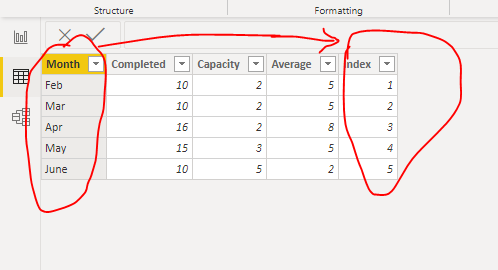
1. Add a [Index] column.

nnn2.PNG

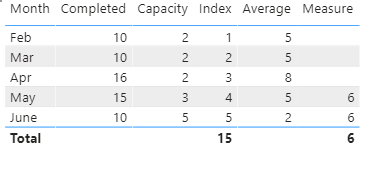
2. Create a measure.

Measure = 
VAR x = 
CALCULATE(
    AVERAGE(Sheet2[Average]),
    FILTER(
        ALL(Sheet2),
        Sheet2[Index] < MAX(Sheet2[Index])  && Sheet2[Index] >= MAX(Sheet2[Index]) -3 
    )
)
RETURN
IF(
    MAX(Sheet2[Index]) <= 3,
    BLANK(),
    x
)

nnn3.PNG


If the [Average] is a measure then the situation will be more complex, you may need to use AVERAGEX() function.

Of course, you can also change the [Average] to a calculated column.


Best regards,
Lionel Chen

If this post helps, then please consider Accept it as the solution to help the other members find it more quickly.

Hi @v-lionel-msft 

So the issue is that the table I've listed is actually a derrivative of my data - which is built in the record view. i.e. product 1 with a completed and closure date in seperate columns with a pointer for the capacity of when it was completed.

The Date I want this to feed into is also a different column - the due date.

So essentially I want the columsn to be forward looking based on the due date but calculated from the averages from the completed and closed dates

Hi @LParker97 ,


Has your problem been solved?

If not please give me the sample data model, because we can not understand your data model based on text description alone.


Best regards,
Lionel Chen

If this post helps, then please consider Accept it as the solution to help the other members find it more quickly.


amitchandak
Super User
Super User

@LParker97 , You can try with Date table .

Example

Rolling 3 = CALCULATE(sum(Sales[Sales Amount]),DATESINPERIOD('Date'[Date],ENDOFMONTH(Sales[Sales Date]),-3,MONTH))


To get the best of the time intelligence function. Make sure you have a date calendar and it has been marked as the date in model view. Also, join it with the date column of your fact/s. Refer :
https://radacad.com/creating-calendar-table-in-power-bi-using-dax-functions
https://www.archerpoint.com/blog/Posts/creating-date-table-power-bi
https://www.sqlbi.com/articles/creating-a-simple-date-table-in-dax/

See if my webinar on Time Intelligence can help: https://community.powerbi.com/t5/Webinars-and-Video-Gallery/PowerBI-Time-Intelligence-Calendar-WTD-Y...


Appreciate your Kudos.

Share with Power BI Enthusiasts: Full Power BI Video (20 Hours) YouTube
Microsoft Fabric Series 60+ Videos YouTube
Microsoft Fabric Hindi End to End YouTube

Helpful resources

Announcements
Power BI DataViz World Championships

Power BI Dataviz World Championships

The Power BI Data Visualization World Championships is back! Get ahead of the game and start preparing now!

November Power BI Update Carousel

Power BI Monthly Update - November 2025

Check out the November 2025 Power BI update to learn about new features.

FabCon Atlanta 2026 carousel

FabCon Atlanta 2026

Join us at FabCon Atlanta, March 16-20, for the ultimate Fabric, Power BI, AI and SQL community-led event. Save $200 with code FABCOMM.