Hi PBI friends,
Previously i posted this message. Interkoubess replied with nice insights.
But I have a new challenge on this. When use the proposed method, the performance is low, as the table grow to over 20Gb andtakes hours to process. probably because the large amount of data to process.
I added an additional sample below
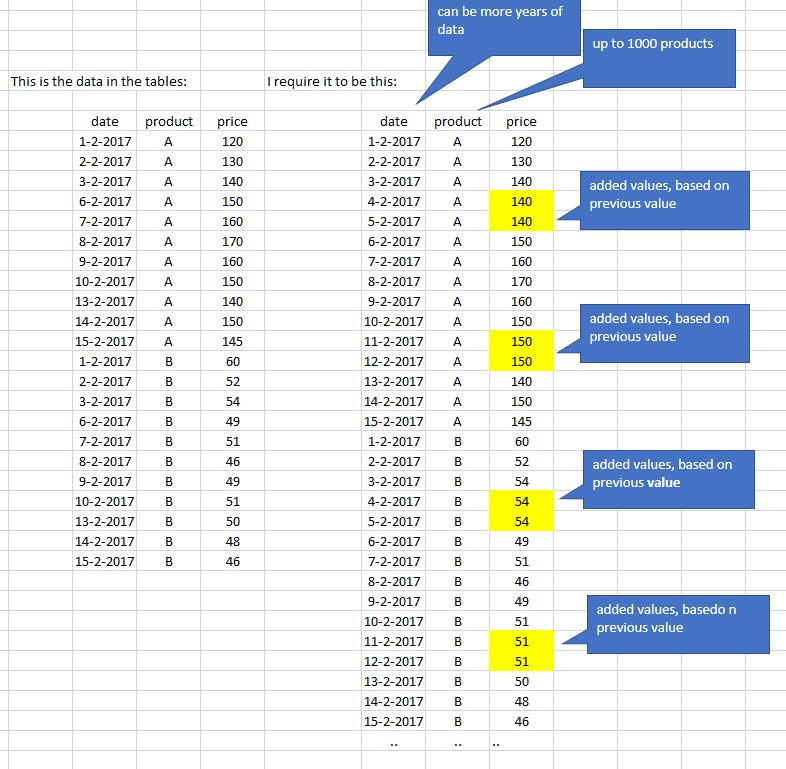
The challenge is now that i have 1000 products and multiyear data.
This really slows down the preparation of the data in PBI.
I found that there is quite some insights on single product solutions (like A only in the above sample), but a list with all products i cannot find.
Any suggestions to solve this in M or PBI?
thanks,
Sam12
below the sample data:
| date | product | price |
| 1-2-2017 | A | 120 |
| 2-2-2017 | A | 130 |
| 3-2-2017 | A | 140 |
| 6-2-2017 | A | 150 |
| 7-2-2017 | A | 160 |
| 8-2-2017 | A | 170 |
| 9-2-2017 | A | 160 |
| 10-2-2017 | A | 150 |
| 13-2-2017 | A | 140 |
| 14-2-2017 | A | 150 |
| 15-2-2017 | A | 145 |
| 1-2-2017 | B | 60 |
| 2-2-2017 | B | 52 |
| 3-2-2017 | B | 54 |
| 6-2-2017 | B | 49 |
| 7-2-2017 | B | 51 |
| 8-2-2017 | B | 46 |
| 9-2-2017 | B | 49 |
| 10-2-2017 | B | 51 |
| 13-2-2017 | B | 50 |
| 14-2-2017 | B | 48 |
| 15-2-2017 | B | 46 |
previous topic:
https://community.powerbi.com/t5/Desktop/adding-rows-in-power-query-and-performance-issue/m-p/339558...
Hi PBI and PQ community,
i learn a lot from all the postings.
But for the following situation i did not find anything yet. May be you can help.
I want to improve the data that is loaded into PBI in Power Query.
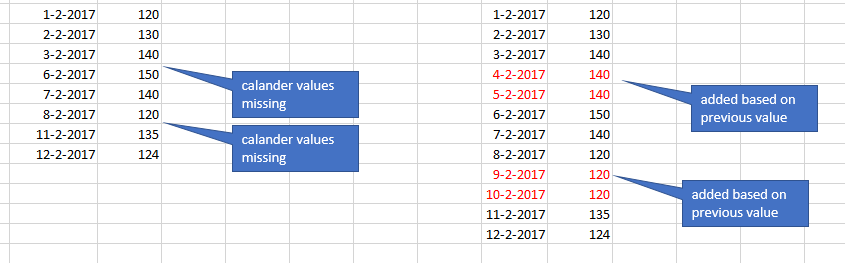
On the left side: the data that is loaded from a system, but it has missing values.
On the right side: the data how i need to have it. additional rows are added, with the previous value. (PQs Filldown might help here).
I have already calender tables that state all the available dates, but i do not know how to get those missing dates in this list
Any thoughts?
Sam.