cancel
Showing results for 
Search instead for 
Did you mean: 

The Power BI Data Visualization World Championships is back! Get ahead of the game and start preparing now! Learn more

Reply
MikeSolvesBI
Helper II
Helper II

add 3D borders to visualizations

Hello,


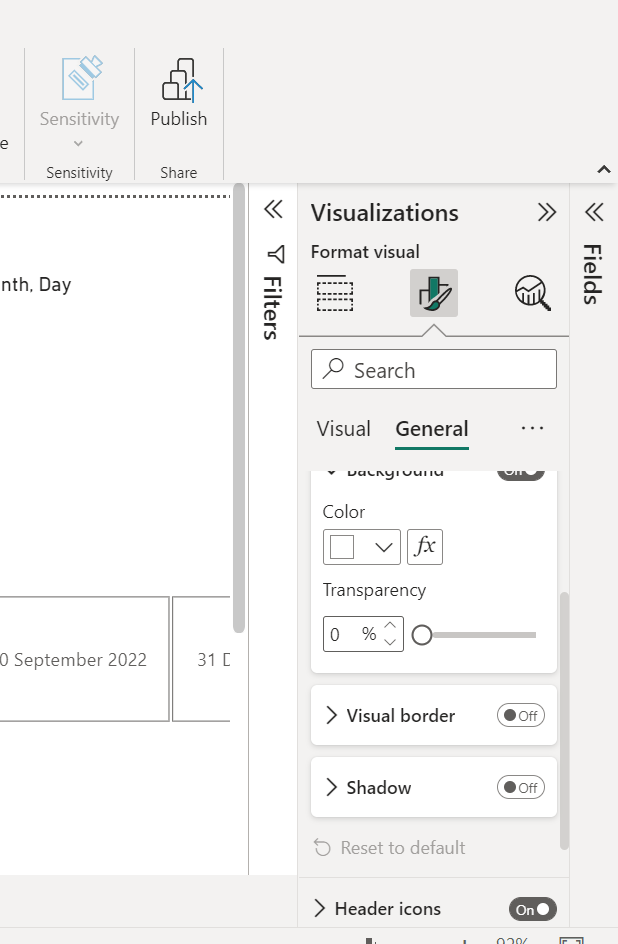
How can I add a 3D border or drop shadow to my visualizations?


I am looking to improve the presentation of my Power BI Report.


Thank You,


Michael

1 ACCEPTED SOLUTION
sandeephijam
Helper I
Helper I

Hi,


you can use the "Format your visual " Option then select effects, then turn on the "visual border"& "Shadow"


sandeephijam_0-1672858379993.png


Also go through the official documentation for more visual enhancement : Use visual elements to enhance Power BI reports - Power BI | Microsoft Learn


View solution in original post

1 REPLY 1
sandeephijam
Helper I
Helper I

Hi,


you can use the "Format your visual " Option then select effects, then turn on the "visual border"& "Shadow"


sandeephijam_0-1672858379993.png


Also go through the official documentation for more visual enhancement : Use visual elements to enhance Power BI reports - Power BI | Microsoft Learn


Helpful resources

Announcements
Power BI DataViz World Championships

Power BI Dataviz World Championships

The Power BI Data Visualization World Championships is back! Get ahead of the game and start preparing now!

December 2025 Power BI Update Carousel

Power BI Monthly Update - December 2025

Check out the December 2025 Power BI Holiday Recap!

FabCon Atlanta 2026 carousel

FabCon Atlanta 2026

Join us at FabCon Atlanta, March 16-20, for the ultimate Fabric, Power BI, AI and SQL community-led event. Save $200 with code FABCOMM.