Join us at FabCon Atlanta from March 16 - 20, 2026, for the ultimate Fabric, Power BI, AI and SQL community-led event. Save $200 with code FABCOMM.
Register now!Get Fabric Certified for FREE during Fabric Data Days. Don't miss your chance! Request now
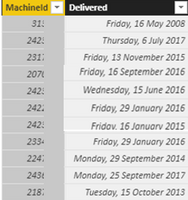
Hi. I have thousands of row look like this table. This table has data from 2008 and I used a formula below to count the number of the machines upto 2015.
Machine Quantity = CALCULATE(COUNT(Table[MachineId]),FILTER(ALL(Table[Delivered]),'Table'[Delivered]<DATE("2015",1,1)))
I want to creat a visual that present the add of the number of machines in each month from January 2015 upto most recent month. In each month, there are number of machines delivered therefore I want to show in in month/year accordingly in addition to number of machines in 2015.
Can anyone help me to build a formula for this?
Solved! Go to Solution.
Hi @Anonymous,
Please try this measure:
Accumulate count per month =
CALCULATE (
COUNT ( 'Table'[MachineID] ),
FILTER (
ALL ( 'Table'[Delivered] ),
'Table'[Delivered] > DATE ( 2015, 1, 1 )
&& 'Table'[Delivered] <= MAX ( 'Table'[Delivered] )
)
)
Regards,
Yuliana Gu
Hi,
I have a similar problem. Could anyone show me a standard dax?
I have this table:
| Course | Total Hours | Stard Date | End Date |
| 1 | 100 | 01/07/2019 | 08/09/2019 |
| 2 | 50 | 05/03/2019 | 08/06/2019 |
| 3 | 35 | 21/07/2019 | 21/09/2019 |
| 4 | 15 | 15/09/2019 | 08/12/2019 |
I need to show accumulative hours from thouse dates. The thing is that if i show this on a visualization, i can only put on X axis only one date, Start or End Date. How can i manage this?
Thanks
Hi @Anonymous,
Please try this measure:
Accumulate count per month =
CALCULATE (
COUNT ( 'Table'[MachineID] ),
FILTER (
ALL ( 'Table'[Delivered] ),
'Table'[Delivered] > DATE ( 2015, 1, 1 )
&& 'Table'[Delivered] <= MAX ( 'Table'[Delivered] )
)
)
Regards,
Yuliana Gu
Hi @Anonymous
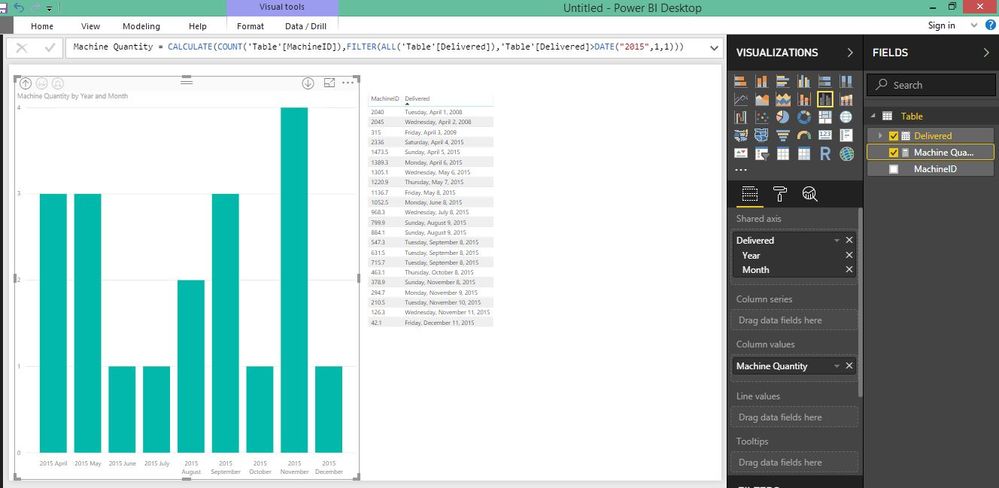
I'm not sure whether I understood your problem correctly, however I did below change and got into below chart. On the date hierarchy you should remove date and the quarter part.
Hi @dilumd. Thanks for your reply.
I don't think I explained my problem correctly. I need to add number of machines every month so it can accumulate on prior month rather than showing how many were added each month. Is there any way I can do that?
@Anonymous
You mean monthly cumulative count?
Check out the November 2025 Power BI update to learn about new features.
Advance your Data & AI career with 50 days of live learning, contests, hands-on challenges, study groups & certifications and more!