This is best Fabric, Power BI, SQL and AI community event. How do we know? The last event sold out! Save €200 with code FABCMTY200.
Register nowA new Data Days event is coming soon! This time we’re going bigger than ever. Fabric, Power BI, SQL, AI and more. Don't miss out.
Hi,
I have been using the wonderful slicer 'timeline 2.1.0'.
It was working perfect, but it seems it has been woking wrong since at least a couple of weeks ago.
When the start month of the fiscal year is set to Jan, it's alright.
But when it's set to other than Jan, the year seems that of 1 year ago.
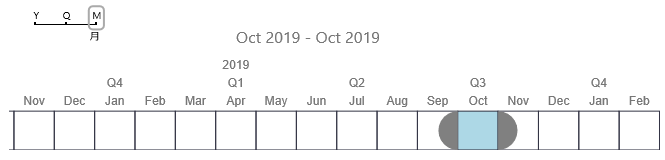
In the above image, 2019 Oct actually means 2018 Oct, where the start month of the fiscal year
is set to April.
If I set the start month to January, it works fine.
Does anybody know anything about above?
Thanks,
Shinya
Same issue here. My dataset is 2022-23. The range slider filters to 2022 Sep data when set to 2023 Sep, and 2023 Sep data when set to 2024 Sep! It shouldnt even show 2024 Sep since there's no such data in the dataset.
Hi shtak,
You need to know Fiscal Year is different from calendar year, so when you use Fiscal Year in timeline, you will get the different date from calendar year. So if you want to use Fiscal Year to calcultae result, you could create relationship between fiscal date and factbale table, Then I think you will get the correct result.
By the way, I want to know whatis wrong you get when you use fiscal year? Could you please inform me in details?
Best Regards,
Zoe Zhi
If this post helps, then please consider Accept it as the solution to help the other members find it more quickly.
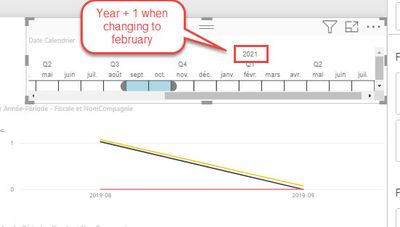
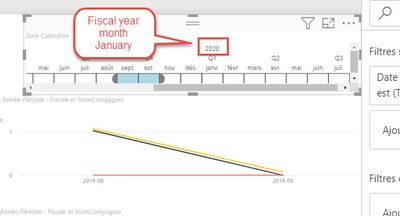
The problem is that as soon as you select a different fiscal month, the year Labeled in the Timeline is not the correct year. it switch to year+1
This seems to be an intentional feature, if you add in 2 financial years worth of data it makes sense. It just doesnt if there is only one years data.
Check out the May 2026 Power BI update to learn about new features.
Sign up to receive a private message when registration opens and key events begin.
If you have recently started exploring Fabric, we'd love to hear how it's going. Your feedback can help with product improvements.
| User | Count |
|---|---|
| 30 | |
| 28 | |
| 23 | |
| 19 | |
| 17 |
| User | Count |
|---|---|
| 49 | |
| 47 | |
| 41 | |
| 21 | |
| 19 |