cancel
Showing results for 
Search instead for 
Did you mean: 

The Power BI Data Visualization World Championships is back! Get ahead of the game and start preparing now! Learn more

Reply
Sagejah9
Helper III
Helper III

YTD for last 3 months based on selected month in slicer not working

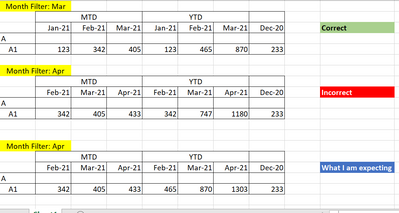
Hi, I am building a report to show last 3 months of data grouped by Month to Date and Year to date. I created a measure to Calculate the year to date amount and used the datesinperiod function to get the last 3 months. However the Ytd is not showing correctly. For instance when I select a month to show the last 3 months from, Its not calculating the YTD from January but from the earliest of the last 3 months from the month selected. 

Sagejah9_0-1627880923074.png


1 ACCEPTED SOLUTION

Try Use following to calculate YTD and see if this works for you


Amount_YTD = 

CALCULATE(SUM(IncomeStatement[Value]),DATESYTD(IncomeStatement[EndofMonth]),ALL(IncomeStatement))


Did I answer your question? Mark my post as a solution! Appreciate your Kudos!!

Proud to be a Super User!


View solution in original post

5 REPLIES 5
FarhanAhmed
Community Champion
Community Champion

Can you please share the DAX code that you are writing to calculate your YTD ?

Also if possible if you can share the columns/measures that  you are using while creating the Matrix/Visual


Did I answer your question? Mark my post as a solution! Appreciate your Kudos!!

Proud to be a Super User!


Amount_YTD= TOTALYTD(SUM(IncomeStatement[Value]),IncomeStatement[EndofMonth],"Dec/31")

Try Use following to calculate YTD and see if this works for you


Amount_YTD = 

CALCULATE(SUM(IncomeStatement[Value]),DATESYTD(IncomeStatement[EndofMonth]),ALL(IncomeStatement))


Did I answer your question? Mark my post as a solution! Appreciate your Kudos!!

Proud to be a Super User!


It's an improvement but  it returns duplicates of the first row. The All function is causing it. 


I figured out what the problem was. The all was applied to the wrong table. Thanks @FarhanAhmed 

Helpful resources

Announcements
Power BI DataViz World Championships

Power BI Dataviz World Championships

The Power BI Data Visualization World Championships is back! Get ahead of the game and start preparing now!

December 2025 Power BI Update Carousel

Power BI Monthly Update - December 2025

Check out the December 2025 Power BI Holiday Recap!

FabCon Atlanta 2026 carousel

FabCon Atlanta 2026

Join us at FabCon Atlanta, March 16-20, for the ultimate Fabric, Power BI, AI and SQL community-led event. Save $200 with code FABCOMM.