We launched a new platform last year, and I want to show a line graph showing the % of users who used it each month.
I have 2 tables one with all user information and one with usage information
This counts active users in a given month from User Table:
MonthlyActUserCnt = CALCULATE (
COUNT ( 'UserData'[User unique ID] ),
FILTER ( ALL ( 'UserData' ), [Termination Date] = BLANK () )
)
+ CALCULATE (
COUNT ( 'UserData'[User Unique Id] ),
FILTER (
ALL ( 'UserData' ),
[Hire / Start Date] >= MIN ( 'DateTable'[Date] )
&& [Termination date] <= MAX ( 'DateTable'[Date] )
&& [Termination date] <> BLANK ()
&& [Hire / Start Date] <> BLANK()
)
)
This counts monthly users from Dashboard Table:
CntUnqEnroll = DISTINCTCOUNT('New Dashboard'[User unique ID])
This gets the usage%:
%Usage = Divide([CntUnqEnroll],[MonthlyActUserCnt])
In individual tables each count reflects the right numbers, but in the line graph the % shown is incorrect for the numbers being used.
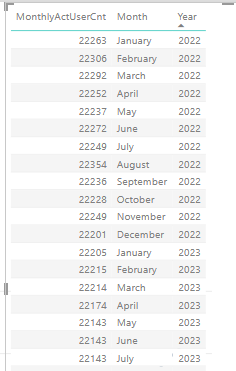
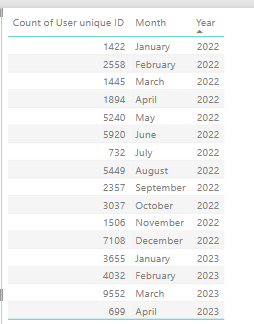
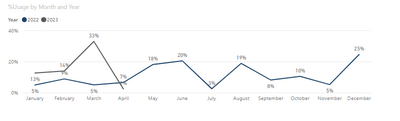
For instance March 2023 should be 43% not 33%
I have a date table that I created off of dates in the user table, and I am using the date heirarchy month and year from the date table in the MonthlyUserCount:
DateTable = CALENDAR(Min(UserData[Hire / Start Date]),TODAY())
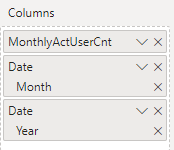
The New Dashboard table has subscription dates with Month and year heirarchy, and thats what is being used as the filters on the Other table
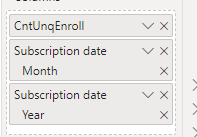
In the Data Model, the date table is not linked to anything.
I feel I am missing something here.....
I need to say for these given years and months show me the usage % but I can't figure out the right combination of fields and metrics to get this to populate right
What do I need to do?


