cancel
Showing results for 
Search instead for 
Did you mean: 

The Power BI Data Visualization World Championships is back! Get ahead of the game and start preparing now! Learn more

Reply
cmotta
Regular Visitor

XNPV through time

Hi,


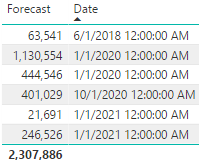
I have the following cash flow, and I need the npv value of it through time.

3.PNG


I have tried using xnpv, but either I get the npv of just the period or I get the npv of the whole thing. What I need is the npv of future cashflows. The closest I have gotten is using 


CALCULATE(
XNPV(cf,(CF[Forecast])*-1,CF[Date],.15)
,filter(ALL(CF),
CF[Date]>=max(CF[Date]))) 


However, that has two main problems. One is that at the end it just goes back to the npv of the whole thing instead of 0 or ending, and second that it is just seems to be calculating at the points where there is data, and not every month. 

The black line is that it should look like (I did it in excel and imported it), and the other line is the formula I pasted.


2.PNG


So the question is: How can I calculate XNPV of all and only the future months?


Thanks!

1 ACCEPTED SOLUTION
v-sihou-msft
Microsoft Employee
Microsoft Employee

@cmotta


1. One is that at the end it just goes back to the npv of the whole thing instead of 0 or ending


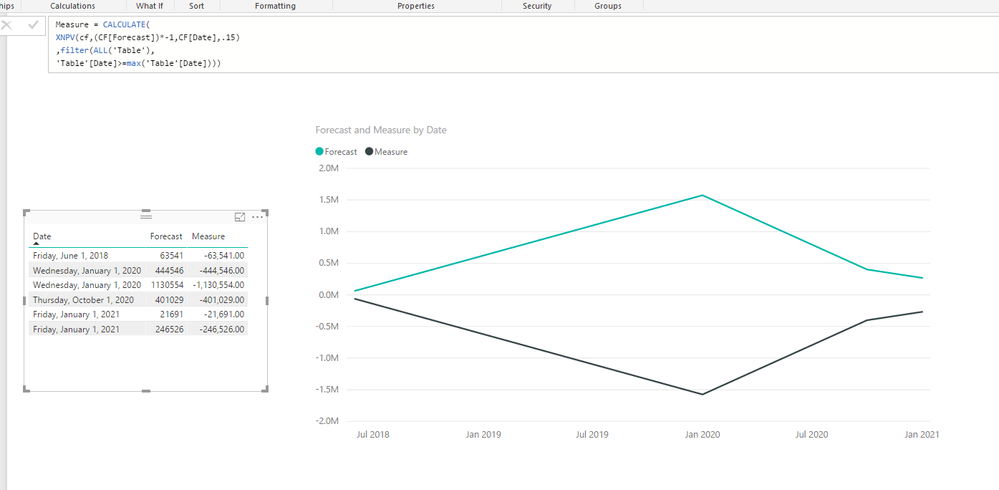
I haven't reproduced your issue. It just typed 6 rows as your sample. The measure goes to the end properly in line chart. 


44.PNG


2. it is just seems to be calculating at the points where there is data, and not every month. 


This issue should be solved by add a full calendar table and build relationship to your CF table on Date column.


Regards,

View solution in original post

1 REPLY 1
v-sihou-msft
Microsoft Employee
Microsoft Employee

@cmotta


1. One is that at the end it just goes back to the npv of the whole thing instead of 0 or ending


I haven't reproduced your issue. It just typed 6 rows as your sample. The measure goes to the end properly in line chart. 


44.PNG


2. it is just seems to be calculating at the points where there is data, and not every month. 


This issue should be solved by add a full calendar table and build relationship to your CF table on Date column.


Regards,

Helpful resources

Announcements
Power BI DataViz World Championships

Power BI Dataviz World Championships

The Power BI Data Visualization World Championships is back! Get ahead of the game and start preparing now!

December 2025 Power BI Update Carousel

Power BI Monthly Update - December 2025

Check out the December 2025 Power BI Holiday Recap!

FabCon Atlanta 2026 carousel

FabCon Atlanta 2026

Join us at FabCon Atlanta, March 16-20, for the ultimate Fabric, Power BI, AI and SQL community-led event. Save $200 with code FABCOMM.