cancel
Showing results for 
Search instead for 
Did you mean: 

Get Fabric Certified for FREE during Fabric Data Days. Don't miss your chance! Request now

Reply
Avivek
Post Partisan
Post Partisan

`X-Axis in the column chart and line chart should either show as horizontal or wrap text

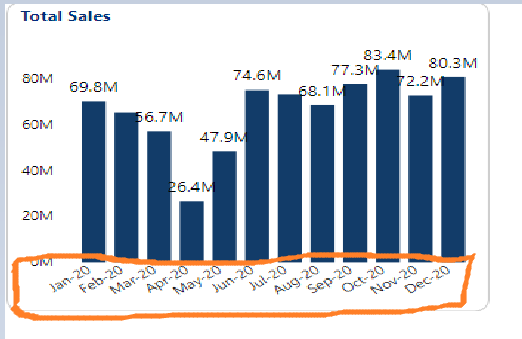
In the below shown visual the x axis shows value in 2 lines.

Avivek_0-1618993781704.png

Is there a way to either see them in a single line without increasing the size of this visual. Or otherwise to see them in a slanting line instead like as shown below

Avivek_1-1618993921286.png


1 ACCEPTED SOLUTION
negi007
Community Champion
Community Champion

@Avivek 


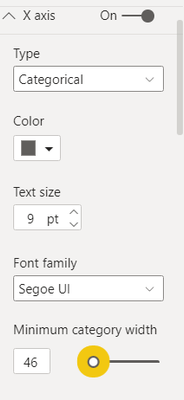
Either you change the axis type to continous or change the minimum category width to adjust the x-axis lable.


negi007_0-1618994661575.png


Did I answer your question? Mark my post as a solution!
Appreciate your Kudos


Proud to be a Super User!


Follow me on linkedin

View solution in original post

2 REPLIES 2
HarishKM
Memorable Member
Memorable Member

@Avivek Hey ,

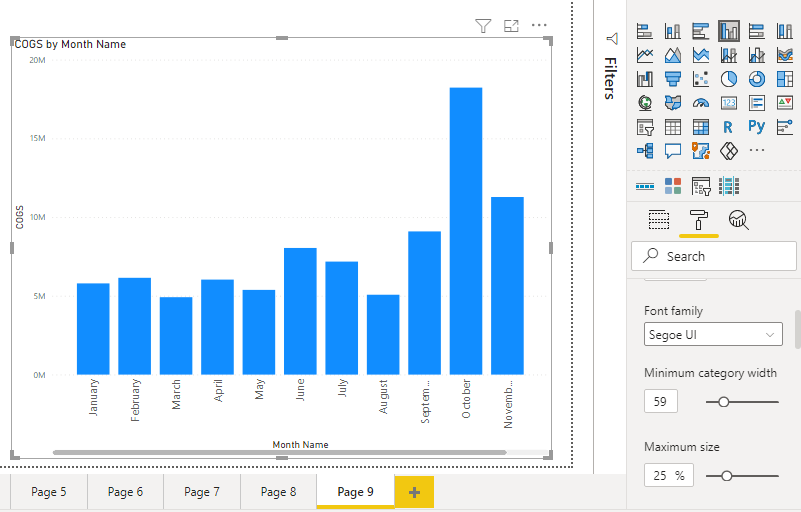
You increase your minimum category width to around 40-60. It will fulfil your requirement .

Note : I am using Cluster coloumn chart .


HarishKM_0-1618995339550.png


negi007
Community Champion
Community Champion

@Avivek 


Either you change the axis type to continous or change the minimum category width to adjust the x-axis lable.


negi007_0-1618994661575.png


Did I answer your question? Mark my post as a solution!
Appreciate your Kudos


Proud to be a Super User!


Follow me on linkedin

Helpful resources

Announcements
November Power BI Update Carousel

Power BI Monthly Update - November 2025

Check out the November 2025 Power BI update to learn about new features.

Fabric Data Days Carousel

Fabric Data Days

Advance your Data & AI career with 50 days of live learning, contests, hands-on challenges, study groups & certifications and more!

FabCon Atlanta 2026 carousel

FabCon Atlanta 2026

Join us at FabCon Atlanta, March 16-20, for the ultimate Fabric, Power BI, AI and SQL community-led event. Save $200 with code FABCOMM.

Top Solution Authors
Top Kudoed Authors