
cancel
Showing results for 
Search instead for 
Did you mean: 

Get Fabric Certified for FREE during Fabric Data Days. Don't miss your chance! Request now

Reply
ROG
Responsive Resident
Responsive Resident

Wrong results. Data modelling problem.

Hi all,

All the tables below come from database and they're directquery.
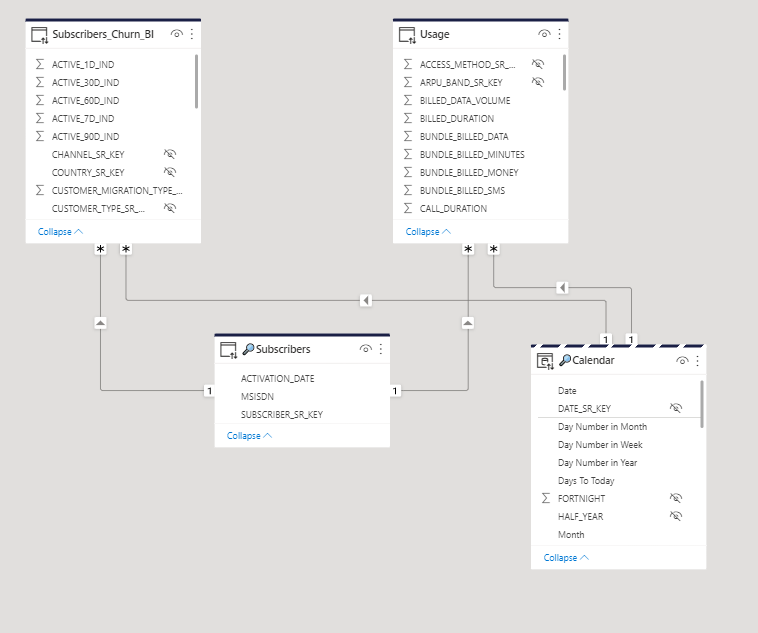
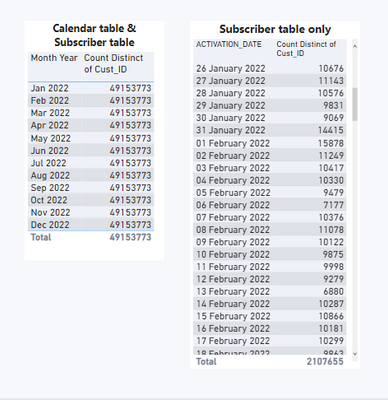
I want to create some analysis between the tables Calendar and Subscriber, but it's not worrking.
As you can see below, they're not connected directly. What should I do? 


ROG_1-1659036780995.png


ROG_2-1659041820364.png

Thanks very much!

1 ACCEPTED SOLUTION
PaulDBrown
Community Champion
Community Champion

You need to create and inactive relationship between the Calendar date and the Subscribe activation date


Or if you prefey not to have the relationship. Try

Subrscibers =
CALCULATE (
    DISTINCTCOUNT ( Subribers[Cust ID] ),
    TREATAS ( VALUES(Calendar[Date]), Subscribers[Activation Date] )
)


Did I answer your question? Mark my post as a solution!
In doing so, you are also helping me. Thank you!

Proud to be a Super User!
Paul on Linkedin.


View solution in original post

6 REPLIES 6
PaulDBrown
Community Champion
Community Champion

Is the inactive relationship between the Calendar date and the activation date? Are both fields set to type Date?


Did I answer your question? Mark my post as a solution!
In doing so, you are also helping me. Thank you!

Proud to be a Super User!
Paul on Linkedin.


ROG
Responsive Resident
Responsive Resident

Hey @PaulDBrown  thanks for your reply. 
No relationship between Calendar and Subscribers table, and the Date and Activation Date are both set to date type.

PaulDBrown
Community Champion
Community Champion

You need to create and inactive relationship between the Calendar date and the Subscribe activation date


Or if you prefey not to have the relationship. Try

Subrscibers =
CALCULATE (
    DISTINCTCOUNT ( Subribers[Cust ID] ),
    TREATAS ( VALUES(Calendar[Date]), Subscribers[Activation Date] )
)


Did I answer your question? Mark my post as a solution!
In doing so, you are also helping me. Thank you!

Proud to be a Super User!
Paul on Linkedin.


ROG
Responsive Resident
Responsive Resident

Thanks a million @PaulDBrown 

It works and I was able to create similar measures using other fields. 

PaulDBrown
Community Champion
Community Champion

Create an inactive relationship between the Calendar Table and the Subscriber table via the corresponding date fields and use this measure:


ubrscibers =
CALCULATE (
    DISTINCTCOUNT ( Subribers[Cust ID] ),
    USERELATIONSHIP ( Calendar[Date], Subscribers[Activation Date] )
)


Did I answer your question? Mark my post as a solution!
In doing so, you are also helping me. Thank you!

Proud to be a Super User!
Paul on Linkedin.


ROG
Responsive Resident
Responsive Resident

Thanks @PaulDBrown 

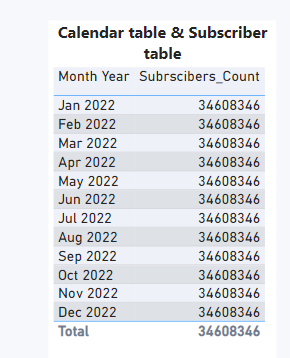
It's not working unfortunately. ☹️


ROG_1-1659088300634.png


ROG_0-1659088111443.png


Thank you

Helpful resources

Announcements
November Power BI Update Carousel

Power BI Monthly Update - November 2025

Check out the November 2025 Power BI update to learn about new features.

Fabric Data Days Carousel

Fabric Data Days

Advance your Data & AI career with 50 days of live learning, contests, hands-on challenges, study groups & certifications and more!

FabCon Atlanta 2026 carousel

FabCon Atlanta 2026

Join us at FabCon Atlanta, March 16-20, for the ultimate Fabric, Power BI, AI and SQL community-led event. Save $200 with code FABCOMM.

Top Solution Authors
Top Kudoed Authors