FabCon is coming to Atlanta
Join us at FabCon Atlanta from March 16 - 20, 2026, for the ultimate Fabric, Power BI, AI and SQL community-led event. Save $200 with code FABCOMM.
Register now!- Power BI forums
- Get Help with Power BI
- Desktop
- Service
- Report Server
- Power Query
- Mobile Apps
- Developer
- DAX Commands and Tips
- Custom Visuals Development Discussion
- Health and Life Sciences
- Power BI Spanish forums
- Translated Spanish Desktop
- Training and Consulting
- Instructor Led Training
- Dashboard in a Day for Women, by Women
- Galleries
- Data Stories Gallery
- Themes Gallery
- Contests Gallery
- QuickViz Gallery
- Quick Measures Gallery
- Visual Calculations Gallery
- Notebook Gallery
- Translytical Task Flow Gallery
- TMDL Gallery
- R Script Showcase
- Webinars and Video Gallery
- Ideas
- Custom Visuals Ideas (read-only)
- Issues
- Issues
- Events
- Upcoming Events
The Power BI Data Visualization World Championships is back! Get ahead of the game and start preparing now! Learn more
- Power BI forums
- Forums
- Get Help with Power BI
- Desktop
- Wrong Grand Totals Using SWITCH
- Subscribe to RSS Feed
- Mark Topic as New
- Mark Topic as Read
- Float this Topic for Current User
- Bookmark
- Subscribe
- Printer Friendly Page

- Mark as New
- Bookmark
- Subscribe
- Mute
- Subscribe to RSS Feed
- Permalink
- Report Inappropriate Content
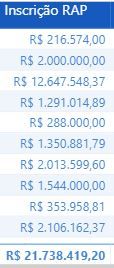
Wrong Grand Totals Using SWITCH
Solved! Go to Solution.


- Mark as New
- Bookmark
- Subscribe
- Mute
- Subscribe to RSS Feed
- Permalink
- Report Inappropriate Content
Hi @Anonymous ,
We can try to use the following measure to meet your requirement, the 'Table'[Column] means the first column you used in the table visual:
Inscrição RAP =
SUMX (
    SUMMARIZE (
        'Table';
        'Table'[Column];
        "Result";
        VAR InscricaoRAP =
            CALCULATE (
                SUM ( fEmpenho[Saldo - R$ (Conta Contábil)] );
                fEmpenho[Conta Contábil] = "622920105"
            )
        VAR InscricaoRAPLiquidar =
            CALCULATE (
                SUM ( fEmpenho[Saldo - R$ (Conta Contábil)] );
                fEmpenho[Conta Contábil] = "531110100"
            )
        VAR ReinscricaoRAP =
            CALCULATE (
                SUM ( fEmpenho[Saldo - R$ (Conta Contábil)] );
                fEmpenho[Conta Contábil] = "531210000"
            )
        VAR InscricaoConsolidada =
            SWITCH (
                TRUE ();
                InscricaoRAP <> BLANK (); InscricaoRAP;
                InscricaoRAPLiquidar <> BLANK (); InscricaoRAPLiquidar;
                ReinscricaoRAP
            )
        RETURN
            InscricaoConsolidada
    );
    [Result]
)
If it doesn't meet your requirement, kindly share your sample data and expected result to me if you don't have any Confidential Information. Please upload your files to One Drive and share the link here.
Best regards,
If this post helps, then please consider Accept it as the solution to help the other members find it more quickly.
- Mark as New
- Bookmark
- Subscribe
- Mute
- Subscribe to RSS Feed
- Permalink
- Report Inappropriate Content
Hi @Anonymous ,
We can try to use the following measure to meet your requirement, the 'Table'[Column] means the first column you used in the table visual:
Inscrição RAP =
SUMX (
    SUMMARIZE (
        'Table';
        'Table'[Column];
        "Result";
        VAR InscricaoRAP =
            CALCULATE (
                SUM ( fEmpenho[Saldo - R$ (Conta Contábil)] );
                fEmpenho[Conta Contábil] = "622920105"
            )
        VAR InscricaoRAPLiquidar =
            CALCULATE (
                SUM ( fEmpenho[Saldo - R$ (Conta Contábil)] );
                fEmpenho[Conta Contábil] = "531110100"
            )
        VAR ReinscricaoRAP =
            CALCULATE (
                SUM ( fEmpenho[Saldo - R$ (Conta Contábil)] );
                fEmpenho[Conta Contábil] = "531210000"
            )
        VAR InscricaoConsolidada =
            SWITCH (
                TRUE ();
                InscricaoRAP <> BLANK (); InscricaoRAP;
                InscricaoRAPLiquidar <> BLANK (); InscricaoRAPLiquidar;
                ReinscricaoRAP
            )
        RETURN
            InscricaoConsolidada
    );
    [Result]
)
If it doesn't meet your requirement, kindly share your sample data and expected result to me if you don't have any Confidential Information. Please upload your files to One Drive and share the link here.
Best regards,
If this post helps, then please consider Accept it as the solution to help the other members find it more quickly.


- Mark as New
- Bookmark
- Subscribe
- Mute
- Subscribe to RSS Feed
- Permalink
- Report Inappropriate Content
I'm unsure exactly how your code is working without more inofmration, but the grand total is not a sum of all the rows.
Instead, it is the DAX calculation with no row level context - the value in "rows" of your matrix.
I suiggest reading this article:
https://powerpivotpro.com/2012/03/subtotals-and-grand-totals-that-add-up-correctly/
Appreciate your Kudos
Connect with me!
Stay up to date on
Read my blogs on


Did I answer your question? Mark my post as a solution! Proud to be a Super User!
Connect with me!
Stay up to date on
Read my blogs on


- Mark as New
- Bookmark
- Subscribe
- Mute
- Subscribe to RSS Feed
- Permalink
- Report Inappropriate Content
Could you tell us what you expect the totals to be ? and which lines are in error ?
Did this post answer your question? Mark it as a solution so others can find it!
Help when you know. Ask when you don't!
Join the conversation at We Talk BI find out more about me at Slow BI
- Mark as New
- Bookmark
- Subscribe
- Mute
- Subscribe to RSS Feed
- Permalink
- Report Inappropriate Content
The lines are corrects, just the grand total are wrong.
- Mark as New
- Bookmark
- Subscribe
- Mute
- Subscribe to RSS Feed
- Permalink
- Report Inappropriate Content
Hi @Anonymous ,
How about the result after you follow the suggestions mentioned in my original post?Could you please provide more details about it If it doesn't meet your requirement?
Best regards,
If this post helps, then please consider Accept it as the solution to help the other members find it more quickly.
- Mark as New
- Bookmark
- Subscribe
- Mute
- Subscribe to RSS Feed
- Permalink
- Report Inappropriate Content
Generally, that kind of problem means there is some issue with the filter context.
if you RETURN each of the VARs do you see the results you expect
for example
Did this post answer your question? Mark it as a solution so others can find it!
Help when you know. Ask when you don't!
Join the conversation at We Talk BI find out more about me at Slow BI
Helpful resources

Power BI Dataviz World Championships
The Power BI Data Visualization World Championships is back! Get ahead of the game and start preparing now!

Power BI Monthly Update - December 2025
Check out the December 2025 Power BI Holiday Recap!

FabCon Atlanta 2026
Join us at FabCon Atlanta, March 16-20, for the ultimate Fabric, Power BI, AI and SQL community-led event. Save $200 with code FABCOMM.

| User | Count |
|---|---|
| 37 | |
| 37 | |
| 33 | |
| 32 | |
| 29 |


| User | Count |
|---|---|
| 130 | |
| 88 | |
| 82 | |
| 68 | |
| 64 |


