Join us at FabCon Atlanta from March 16 - 20, 2026, for the ultimate Fabric, Power BI, AI and SQL community-led event. Save $200 with code FABCOMM.
Register now!The Power BI Data Visualization World Championships is back! Get ahead of the game and start preparing now! Learn more
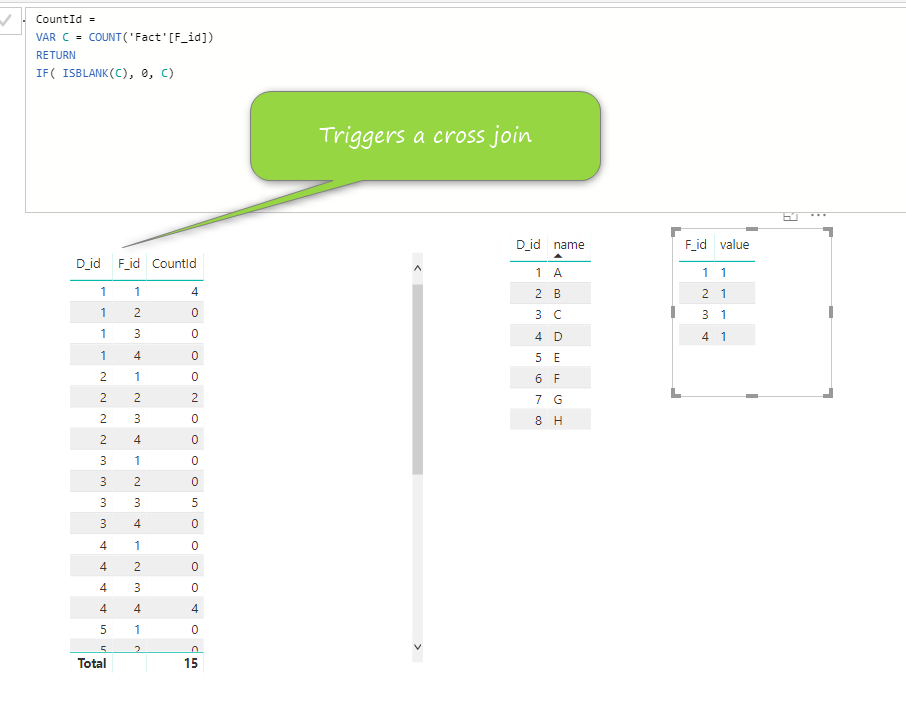
I have a test dimension table and a fact table. I try to count the number of ids in the fact table. However, my DAX formula triggers a cross join between the tables. I want to know why. D_id is from the dimension table. F_id is the id in the fact table.
If I just use "COUNT()" without the IF statement to test blank values. It does not trigger the cross join. I am very confused.
Solved! Go to Solution.
@Anonymous
I have to agree that this behaviour is confusing!
See this page for an explanation from the experts:
https://www.sqlbi.com/articles/autoexist-and-normalization/
When columns of the same table are added to a visual, the AutoExist feature ensures only existing combinations of values from those columns are displayed.
However, when columns of different tables are added to a visual (as in your case), even if there is a relationship between the tables, all combinations including "non-existing" combinations are displayed.
On top of this, any "rows" where all measures evaluate to blank are hidden.
Since you have constructed a measure that always returns a non-blank value, all possible combinations of D_id and F_id are displayed, effectively giving you a crossjoin of the two sets of values.
When you use COUNT() without IF, the non-existing combinations are hidden because the measure returns blank.
Did you have a particular output you were trying to create, or were you just curious about the behaviour?
Regards,
Owen
@Anonymous
I have to agree that this behaviour is confusing!
See this page for an explanation from the experts:
https://www.sqlbi.com/articles/autoexist-and-normalization/
When columns of the same table are added to a visual, the AutoExist feature ensures only existing combinations of values from those columns are displayed.
However, when columns of different tables are added to a visual (as in your case), even if there is a relationship between the tables, all combinations including "non-existing" combinations are displayed.
On top of this, any "rows" where all measures evaluate to blank are hidden.
Since you have constructed a measure that always returns a non-blank value, all possible combinations of D_id and F_id are displayed, effectively giving you a crossjoin of the two sets of values.
When you use COUNT() without IF, the non-existing combinations are hidden because the measure returns blank.
Did you have a particular output you were trying to create, or were you just curious about the behaviour?
Regards,
Owen
Thanks for the link and explanation. I kept running through my head that the row context was correct and the filter context was correct. I was banging my head on the wall.
"auto exists" - this is the first time I heard of it.
I have a report that needs to turn blanks cells into zero. Do you have any good idea how to do it?
Again thank you very much.
The Power BI Data Visualization World Championships is back! Get ahead of the game and start preparing now!
| User | Count |
|---|---|
| 38 | |
| 38 | |
| 37 | |
| 28 | |
| 28 |
| User | Count |
|---|---|
| 124 | |
| 89 | |
| 73 | |
| 66 | |
| 65 |