Join us at FabCon Atlanta from March 16 - 20, 2026, for the ultimate Fabric, Power BI, AI and SQL community-led event. Save $200 with code FABCOMM.
Register now!The Power BI Data Visualization World Championships is back! Get ahead of the game and start preparing now! Learn more
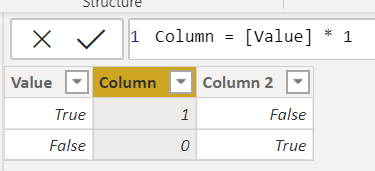
In the above image, I can convert the True/False in the [Value] column to a number by multiplying by 1. Great.
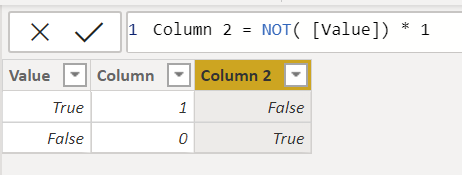
However, as shown above, if I wrap [Value] with NOT(), thus changing true to false and false to true, I can not convert it to a number by multiplying by 1. It stays as a true/false value.
Why is that? What am I missing?
DAX is for Analysis. Power Query is for Data Modeling
Proud to be a Super User!
MCSA: BI ReportingSolved! Go to Solution.
Hi @edhans
I followed your steps and got the same result.
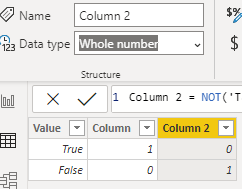
What I noticed is that the data type still remained "True/False" instead os changing to Whole number unlike for "Column".
Changing it to Whole number serves the purpose.
As to why it is behaving in such way still might be a question as it follows the similar construct as "Column".
This might have to do with how Power BI internally finalises the data type.
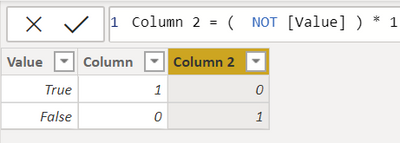
Interesting @Anonymous - good catch on the data type. I also found out that if I used it as an operator and not as a function it works without having to change the data type.
And, of course, I hit this behavior inside of a measure where you cannot change the data type, nor could you deeper in a more detailed function even inside of a calculated column. But good thinking!
DAX is for Analysis. Power Query is for Data Modeling
Proud to be a Super User!
MCSA: BI ReportingHi @edhans
I followed your steps and got the same result.
What I noticed is that the data type still remained "True/False" instead os changing to Whole number unlike for "Column".
Changing it to Whole number serves the purpose.
As to why it is behaving in such way still might be a question as it follows the similar construct as "Column".
This might have to do with how Power BI internally finalises the data type.
Interesting @Anonymous - good catch on the data type. I also found out that if I used it as an operator and not as a function it works without having to change the data type.
And, of course, I hit this behavior inside of a measure where you cannot change the data type, nor could you deeper in a more detailed function even inside of a calculated column. But good thinking!
DAX is for Analysis. Power Query is for Data Modeling
Proud to be a Super User!
MCSA: BI ReportingThe Power BI Data Visualization World Championships is back! Get ahead of the game and start preparing now!
| User | Count |
|---|---|
| 64 | |
| 47 | |
| 41 | |
| 36 | |
| 23 |
| User | Count |
|---|---|
| 185 | |
| 123 | |
| 106 | |
| 78 | |
| 52 |