cancel
Showing results for 
Search instead for 
Did you mean: 

The Power BI Data Visualization World Championships is back! Get ahead of the game and start preparing now! Learn more

Reply
Mgrike
Frequent Visitor

When I connect to a PowerBI dataset then what-if parameter is greyed out

Hi 


I need my users to be able to edit some parameters. They can control variables such as number of hours, wage etc.


When I imported the CSVs straight into PowerBI desktop, then I could get everything working. However, long term I want to have a shared dataset that this report (and others) are built on top of. When I try connecting to a shared PowerBI dataset, I can no longer add parameters to my report?


Is there anything I can do about this ?


Thanks

1 ACCEPTED SOLUTION
amitchandak
Super User
Super User

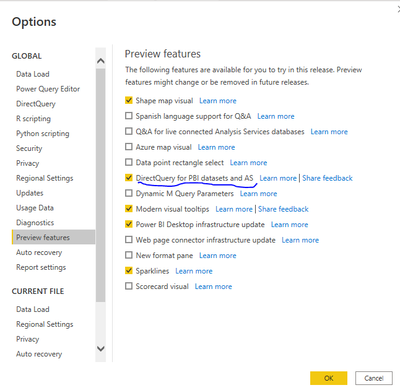
@Mgrike , When you use the Power BI dataset as Live, then you can not add a table. But you can change model to direct query  then you can use that 

You need enable this option from options and setting

amitchandak_0-1643216442827.png


Then in the modeling tab, you will have the option to change the model type


Share with Power BI Enthusiasts: Full Power BI Video (20 Hours) YouTube
Microsoft Fabric Series 60+ Videos YouTube
Microsoft Fabric Hindi End to End YouTube

View solution in original post

1 REPLY 1
amitchandak
Super User
Super User

@Mgrike , When you use the Power BI dataset as Live, then you can not add a table. But you can change model to direct query  then you can use that 

You need enable this option from options and setting

amitchandak_0-1643216442827.png


Then in the modeling tab, you will have the option to change the model type


Share with Power BI Enthusiasts: Full Power BI Video (20 Hours) YouTube
Microsoft Fabric Series 60+ Videos YouTube
Microsoft Fabric Hindi End to End YouTube

Helpful resources

Announcements
November Power BI Update Carousel

Power BI Monthly Update - November 2025

Check out the November 2025 Power BI update to learn about new features.

Fabric Data Days Carousel

Fabric Data Days

Advance your Data & AI career with 50 days of live learning, contests, hands-on challenges, study groups & certifications and more!

FabCon Atlanta 2026 carousel

FabCon Atlanta 2026

Join us at FabCon Atlanta, March 16-20, for the ultimate Fabric, Power BI, AI and SQL community-led event. Save $200 with code FABCOMM.

Top Solution Authors