FabCon is coming to Atlanta
Join us at FabCon Atlanta from March 16 - 20, 2026, for the ultimate Fabric, Power BI, AI and SQL community-led event. Save $200 with code FABCOMM.
Register now!- Power BI forums
- Get Help with Power BI
- Desktop
- Service
- Report Server
- Power Query
- Mobile Apps
- Developer
- DAX Commands and Tips
- Custom Visuals Development Discussion
- Health and Life Sciences
- Power BI Spanish forums
- Translated Spanish Desktop
- Training and Consulting
- Instructor Led Training
- Dashboard in a Day for Women, by Women
- Galleries
- Data Stories Gallery
- Themes Gallery
- Contests Gallery
- QuickViz Gallery
- Quick Measures Gallery
- Visual Calculations Gallery
- Notebook Gallery
- Translytical Task Flow Gallery
- TMDL Gallery
- R Script Showcase
- Webinars and Video Gallery
- Ideas
- Custom Visuals Ideas (read-only)
- Issues
- Issues
- Events
- Upcoming Events
The Power BI Data Visualization World Championships is back! Get ahead of the game and start preparing now! Learn more
- Power BI forums
- Forums
- Get Help with Power BI
- Desktop
- What if parameter
- Subscribe to RSS Feed
- Mark Topic as New
- Mark Topic as Read
- Float this Topic for Current User
- Bookmark
- Subscribe
- Printer Friendly Page

- Mark as New
- Bookmark
- Subscribe
- Mute
- Subscribe to RSS Feed
- Permalink
- Report Inappropriate Content
What if parameter
I have sales table with Product Group name,Product Sub group name,Volume, Price.
I created a Matrix with Product Group name and Product Sub group in rows and volume and price in Values.Then i have created what if Parameter for volume.based on selected value in What if, Volume in matrix will change.
but i have new requiremnt, such that what if Volume for each product will vary.
Example.if i have 3 products, book, table and pen. what if volume change for book will be 5%, pen will be 10%, for pencil no change.Need to show all the variation together in a Matrix.
How can i implement above requirement?
Solved! Go to Solution.


- Mark as New
- Bookmark
- Subscribe
- Mute
- Subscribe to RSS Feed
- Permalink
- Report Inappropriate Content
Hi @annjoseph ,
If the ratio of changes between products is fixed, then @amitchandak solution is indeed effective.
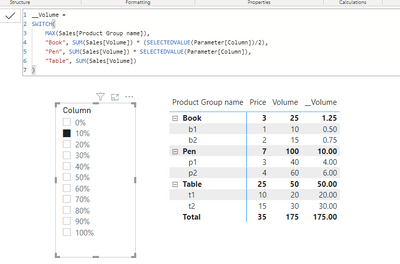
Otherwise you may need to create multiple ‘What if’ parameters.
Best regards,
Lionel Chen
If this post helps, then please consider Accept it as the solution to help the other members find it more quickly.
- Mark as New
- Bookmark
- Subscribe
- Mute
- Subscribe to RSS Feed
- Permalink
- Report Inappropriate Content
Hi @annjoseph ,
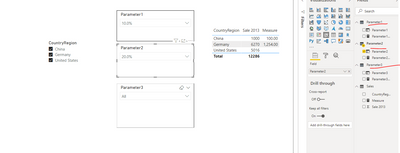
Measure =
SWITCH(
    SELECTEDVALUE(Sales[CountryRegion]),
    "China", SUM(Sales[Sale 2013]) * [Parameter1 Value],
    "Germany", SUM(Sales[Sale 2013])*[Parameter2 Value],
    "United", SUM(Sales[Sale 2013])*[Parameter3 Value]
)
You need to create multiple 'What-IF' parameters, otherwise, you need use bookmark feature.
Best regards,
Lionel Chen
If this post helps, then please consider Accept it as the solution to help the other members find it more quickly.
- Mark as New
- Bookmark
- Subscribe
- Mute
- Subscribe to RSS Feed
- Permalink
- Report Inappropriate Content
Hi @annjoseph ,
If the ratio of changes between products is fixed, then @amitchandak solution is indeed effective.
Otherwise you may need to create multiple ‘What if’ parameters.
Best regards,
Lionel Chen
If this post helps, then please consider Accept it as the solution to help the other members find it more quickly.
- Mark as New
- Bookmark
- Subscribe
- Mute
- Subscribe to RSS Feed
- Permalink
- Report Inappropriate Content
Thanks for the reply. Hard coding measures wont work for our requirement.
As per our requirement, we need to find the What-If Solution for each product based on what-if parameter. I will be having one what-if parameter & when i select one product i should be able to apply the what-if condition to that product . Then, that product's value should be changed to what-if condition. Similarly I should be able to apply different what-if condition for each products based on my selection. Final results will be a table of all products selected with changed values and un-selected products with unchanged values. The whole process should be dynamic.
- Mark as New
- Bookmark
- Subscribe
- Mute
- Subscribe to RSS Feed
- Permalink
- Report Inappropriate Content
Hi @annjoseph ,
Measure =
SWITCH(
    SELECTEDVALUE(Sales[CountryRegion]),
    "China", SUM(Sales[Sale 2013]) * [Parameter1 Value],
    "Germany", SUM(Sales[Sale 2013])*[Parameter2 Value],
    "United", SUM(Sales[Sale 2013])*[Parameter3 Value]
)
You need to create multiple 'What-IF' parameters, otherwise, you need use bookmark feature.
Best regards,
Lionel Chen
If this post helps, then please consider Accept it as the solution to help the other members find it more quickly.

- Mark as New
- Bookmark
- Subscribe
- Mute
- Subscribe to RSS Feed
- Permalink
- Report Inappropriate Content
HI @annjoseph
Create new paramertes to get what if % increase and use it in a measure to and display it.
Checkl the below link.
https://www.youtube.com/watch?v=iiNDq2VrZPY


- Mark as New
- Bookmark
- Subscribe
- Mute
- Subscribe to RSS Feed
- Permalink
- Report Inappropriate Content
@annjoseph , you can have more than one whatif or /with a measure like this
new measure =
switch ( true(),
FIRSTNONBLANK(Table[Product],"NA") ="book" , [Measure] * selectedvalue(param[param]),
FIRSTNONBLANK(Table[Product],"NA") ="table " ,[Measure] *selectedvalue(param[param]) *2 ,
/// Add more conditions
[Measure]
)
new measure =
switch ( true(),
FIRSTNONBLANK(Table[Product],"NA") ="book" , [Measure] * selectedvalue(param1[param1]),
FIRSTNONBLANK(Table[Product],"NA") ="table " ,[Measure] *selectedvalue(param2[param2]) ,
/// Add more conditions
[Measure]
)
Helpful resources

Power BI Dataviz World Championships
The Power BI Data Visualization World Championships is back! Get ahead of the game and start preparing now!

Power BI Monthly Update - December 2025
Check out the December 2025 Power BI Holiday Recap!

FabCon Atlanta 2026
Join us at FabCon Atlanta, March 16-20, for the ultimate Fabric, Power BI, AI and SQL community-led event. Save $200 with code FABCOMM.

| User | Count |
|---|---|
| 37 | |
| 37 | |
| 33 | |
| 32 | |
| 29 |


| User | Count |
|---|---|
| 130 | |
| 88 | |
| 82 | |
| 68 | |
| 64 |


