cancel
Showing results for 
Search instead for 
Did you mean: 

View all the Fabric Data Days sessions on demand. View schedule

Reply
jashjacob
Helper I
Helper I

Weird filtering issue involving many-to-one join - first time ever

I have this weird issue that propped up recently. So, I am bringing in data from two tables which are joined via one-to-many join.

Lets call these tables Product and ProductTransactions. They are joined based on the ProductCode. 


Product Table:

IDNameDescriptionCategoryInventoryCost
ab133abramagical momentstoddler1005
ab123cain historyadolescent2007
ab333dabraof entertainmentteenage5009


Product Transaction Table

IDDateCustomerProductNoQuantityAmount
tr0016/27/2022XYXab1331050
tr1236/27/2022ABCab1331284
tr1536/27/2022ABCab12312108


Ideally, we would expect that if the page is filtered for a few products (not slicers, but page level filters), then the data will be filtered, considering that we are bringing in data from only these 2 tables and the Product Category is coming from the ONE side of the join. However, this is not happening for me.


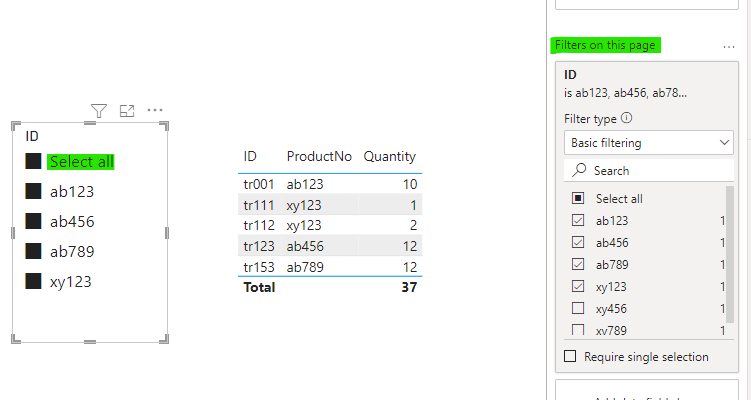
When I use a slicer and select any of the products already filtered within the page, I get the filtered value. But, if I select all, it goes back to all Categories ignoring the page level filter. What could be happening? Initially I assumed it could be a "meh, needs a restart" issue, but that didn't solve it.

5 REPLIES 5
v-kkf-msft
Community Support
Community Support

Hi @jashjacob ,


I can't reproduce your issue. When I filter using the 'Product Table'[ID] column in both the page filter and the slicer, the correct result is returned.


vkkfmsft_0-1656570993772.png


Best Regards,
Winniz
If this post helps, then please consider Accept it as the solution to help the other members find it more quickly.

Hi,

While trying to prepare a copy, I kinda figured out a possible cause. I was removing some of the tables that were irrelevant to this particular table, and viola, it resolved it. Now the issue I am dealing with is how to fix the issue, without having to remove the other table.

jashjacob
Helper I
Helper I

Hi Amit,


Thanks for the response. I have removed and added all filters, slicers, and even rebuilt the matrix. The only thing I haven't tried is all of them together.


Is there any reason that you can think of where a filter placed on the one side of a many-to-one join will not affect the table when only 2 tables are in play in this particular page. Even weird is the fact that when I use a sliver and select individual values, it works. To expand on this point, out of 10 categories, this page is filtered for 3 of them. These 3 are available as a slicer. If I select all 3 of them using control, I get just the 3, but if I use "select all" or leave it unselected, I get all categories.


If I don't bring in the transaction table, the filter is still effective. 

amitchandak
Super User
Super User

@jashjacob , This is really strange. Just delete the page level filter and add it again and check if that is working now.


If this does not help
Can you share a sample pbix after removing sensitive data.

Share with Power BI Enthusiasts: Full Power BI Video (20 Hours) YouTube
Microsoft Fabric Series 60+ Videos YouTube
Microsoft Fabric Hindi End to End YouTube

Let me figure out a way to duplicate this without critical information. I probably need to share this.

Helpful resources

Announcements
November Power BI Update Carousel

Power BI Monthly Update - November 2025

Check out the November 2025 Power BI update to learn about new features.

Fabric Data Days Carousel

Fabric Data Days

Advance your Data & AI career with 50 days of live learning, contests, hands-on challenges, study groups & certifications and more!

FabCon Atlanta 2026 carousel

FabCon Atlanta 2026

Join us at FabCon Atlanta, March 16-20, for the ultimate Fabric, Power BI, AI and SQL community-led event. Save $200 with code FABCOMM.

Top Solution Authors
Top Kudoed Authors