Join us at FabCon Atlanta from March 16 - 20, 2026, for the ultimate Fabric, Power BI, AI and SQL community-led event. Save $200 with code FABCOMM.
Register now!The Power BI Data Visualization World Championships is back! Get ahead of the game and start preparing now! Learn more
Hi PBI Gurus,
I'm requesting your help in trying to figure out some weird behavior of Power BI.
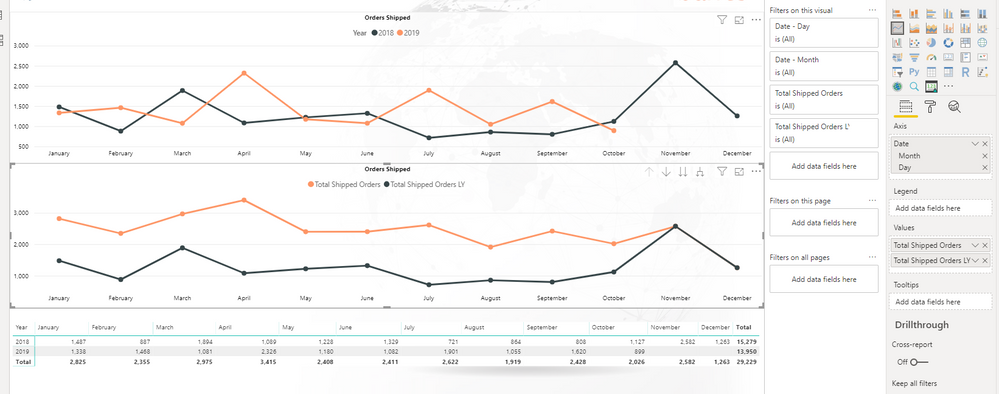
Take a look at my screenshot. The top graph is displaying correct data. The following fields are being used:
Total Shipped Orders = DISTINCTCOUNT (Orders)
Axis is Month ( from date table )
Legend is Year ( from date table )
The bottom graph is showing incorrect data for THIS YEAR. ( It seems to be adding this year and last year together )
Total Shipped Orders LY = CALCULATE( [Total Shipped Orders] , SAMEPERIODLASTYEAR( [Date] ))
You can see the correct, verified values in the table below both graphs.
The reason this is causing me trouble, is because I want to display a bar chart below the top graph that is % difference from last year. However, because it is not calculating current year correctly, the % change is obviously different.
My % change measure is, % Change = DIVIDE ( [Total Shipped Orders LY] - [Total Shipped Orders] , [Total Shipped Orders LY], 0 )
For example, June % change is showing me an INCREASE of 81%, when in actuality, it should be a DECREASE of -18.5%.
Any idea of why this is happening? Or more importantly, how to fix it?
Thank you so much!
Solved! Go to Solution.
Nevermind,
I just fixed it. It looks like I just had to apply a YEAR filter set to 2019.
Thanks for your help!
You seem to be using [Total Shipped Orders], which seems like a measure.
Can you share its calculation? In case it is a measure, is possible to have the same calculation in last year's formula itself.
Thanks
Yes, it is a measure, I thought I specified it's calculation in my OP.
Here are my measures.
Total Shipped Orders = DISTINCTCOUNT( 'Orders'[Order Number] )
Total Shipped Orders LY = CALCULATE( [Total Shipped Orders] , SAMEPERIODLASTYEAR( 'Date'[Date] ) )
% Change from Last Year = DIVIDE( [Total Shipped Orders] - [Total Shipped Orders LY] , [Total Shipped Orders LY] , 0 )
My dataset is only 2018/2019.
Nevermind,
I just fixed it. It looks like I just had to apply a YEAR filter set to 2019.
Thanks for your help!
The Power BI Data Visualization World Championships is back! Get ahead of the game and start preparing now!
| User | Count |
|---|---|
| 39 | |
| 37 | |
| 33 | |
| 32 | |
| 29 |
| User | Count |
|---|---|
| 132 | |
| 88 | |
| 82 | |
| 68 | |
| 64 |