Join us at FabCon Atlanta from March 16 - 20, 2026, for the ultimate Fabric, Power BI, AI and SQL community-led event. Save $200 with code FABCOMM.
Register now!The Power BI Data Visualization World Championships is back! Get ahead of the game and start preparing now! Learn more
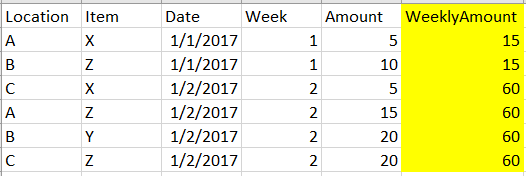
I need to create a column with weekly totals
I have different locations and different items selled on different days.
I need a column like below
Or else I need a column with weekly average values.
Like the first and second row should display an average of 7.5 and all other rows to display 15 as weekly average.
Can some one please help me with this
Solved! Go to Solution.
Weeekly Amount =
DIVIDE (
CALCULATE (
SUM ( 'Table'[Amount] ),
ALLEXCEPT ( 'Table', 'Table'[Week], 'Table'[Location], 'Table'[Item] )
),
CALCULATE (
COUNTA ( 'Table'[Item] ),
ALLEXCEPT ( 'Table', 'Table'[Week], 'Table'[Location], 'Table'[Item] )
),
0
)
I'm so sorry @Sean, I was little confused while asking the question.
It has to display based on the location, item and week - like below
| Location | Item | Date | Week | Amount | WeeklyAmount |
| A | X | 1/1/2017 | 1 | 5 | 5 |
| B | Z | 1/1/2017 | 1 | 10 | 10 |
| A | X | 1/2/2017 | 2 | 5 | 5 |
| A | Z | 1/2/2017 | 2 | 10 | 15 |
| B | Y | 1/2/2017 | 2 | 20 | 20 |
| A | Z | 1/2/2017 | 2 | 20 | 15 |
As 4 and 6 rows has same location, item and week, then it has to show the total
Weeekly Amount =
DIVIDE (
CALCULATE (
SUM ( 'Table'[Amount] ),
ALLEXCEPT ( 'Table', 'Table'[Week], 'Table'[Location], 'Table'[Item] )
),
CALCULATE (
COUNTA ( 'Table'[Item] ),
ALLEXCEPT ( 'Table', 'Table'[Week], 'Table'[Location], 'Table'[Item] )
),
0
)
The Power BI Data Visualization World Championships is back! Get ahead of the game and start preparing now!
Check out the November 2025 Power BI update to learn about new features.
| User | Count |
|---|---|
| 59 | |
| 43 | |
| 42 | |
| 23 | |
| 17 |
| User | Count |
|---|---|
| 190 | |
| 122 | |
| 96 | |
| 66 | |
| 47 |