cancel
Showing results for 
Search instead for 
Did you mean: 

The Power BI Data Visualization World Championships is back! Get ahead of the game and start preparing now! Learn more

Reply
Anonymous
Not applicable

Weekly Data Modeling using static values

Hello, 
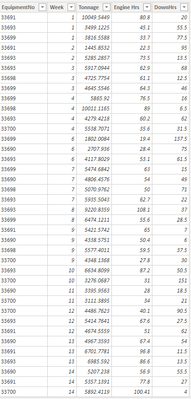
I have the following table which has this particular data. This signifies the downhour allocated towards a particular system.

Capture.PNG
If I wanted to model the data to calculate the Availability so that I get availability per system using the following calculation 
Availabilty(%) = (no.of.system*totalhrsperweek - Downhrs) / no.of.system*totalhrsperweek
I did the no.of.system*totalhrsperweek by using static values i.e - 168*6 which can give me the total weekly avaibility but how do I come up with a more dynamic way of solving this so that the availability measure gives me per system as well as total availabilty(%) in the totals column. Help will be highly appreciated. 

1 ACCEPTED SOLUTION
Anonymous
Not applicable

Hi @Anonymous ,


Try


availabilty(%) = 
var _no.of.system = calculate(distinctcount('table'[systemid]),filter(allselected('table'),'table'[week] = selectedvalue('table'[week])))
var _downhrs = calculate(sum(downhrs),filter('table','table'[week] = selectedvalue('table'[week])&&'table'[systemid]=selectedvalue('table'[systemid])))
return
(_no.of.system*168-_downhrs)/_no.of.system*168


Best Regards,

Jay


View solution in original post

3 REPLIES 3
Anonymous
Not applicable

Hi @Anonymous ,


I can barely found the parameters in your formula from the screenshot.

"Availabilty(%) = (no.of.system*totalhrsperweek - Downhrs) / no.of.system*totalhrsperweek".

Can you follow the screenshot to give an example to explain the logic of your formula?


Best Regards,

jay

Anonymous
Not applicable

HI @Anonymous ,
So the numbers across the matrix represent the downhours for each equiment(system). There are 6 equipment in place namely 33690 to 33700 as you can see from the headers of each column. The rows represent the week and the value of the downhours each week per system. We know total hours in a week is 168hrs so across 6 system it is going to be 6*168 = 1008hrs. How can I get the value of the avalaibility per each system. Riight now the formula I am using is Availability = (1008 -downhours)/1008. It can give me the availability calculation per week across all 6 systems combined. How do I define a variable to dynamical adjust the availability calculation per each equipment. I hope I could clarify my question. I also added the table for clarification.

Capture.PNG


Thank you for your help! 
Khan

Anonymous
Not applicable

Hi @Anonymous ,


Try


availabilty(%) = 
var _no.of.system = calculate(distinctcount('table'[systemid]),filter(allselected('table'),'table'[week] = selectedvalue('table'[week])))
var _downhrs = calculate(sum(downhrs),filter('table','table'[week] = selectedvalue('table'[week])&&'table'[systemid]=selectedvalue('table'[systemid])))
return
(_no.of.system*168-_downhrs)/_no.of.system*168


Best Regards,

Jay


Helpful resources

Announcements
Power BI DataViz World Championships

Power BI Dataviz World Championships

The Power BI Data Visualization World Championships is back! Get ahead of the game and start preparing now!

December 2025 Power BI Update Carousel

Power BI Monthly Update - December 2025

Check out the December 2025 Power BI Holiday Recap!

FabCon Atlanta 2026 carousel

FabCon Atlanta 2026

Join us at FabCon Atlanta, March 16-20, for the ultimate Fabric, Power BI, AI and SQL community-led event. Save $200 with code FABCOMM.