Join us at FabCon Atlanta from March 16 - 20, 2026, for the ultimate Fabric, Power BI, AI and SQL community-led event. Save $200 with code FABCOMM.
Register now!The Power BI Data Visualization World Championships is back! Get ahead of the game and start preparing now! Learn more
Hello,
I'm new to PowerBI and need help creating a visualizer for a Week Over Week Trend. The data i'm working with currently doesn't have entries tied to the week they land in just a timestamp of the date and time the adjustments were issued to the account. I am only working with Data from 2022-01-01 forward.
Thanks in Advance.
Solved! Go to Solution.
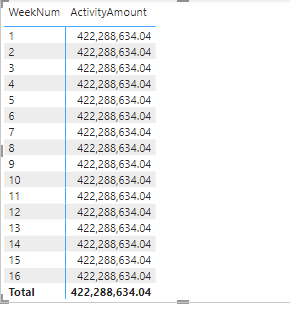
Check your data model wiring. The same number in all rows usually indicates a wiring fault.
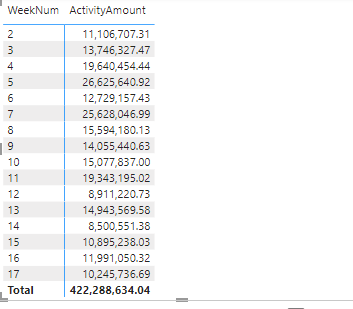
Thanks for the responses, I think I figured out the WoW part but the credit amounts appear to just only reflect the total for the year instead of only the weekly amounts issued.
Check your data model wiring. The same number in all rows usually indicates a wiring fault.
you were right of course! Any idea on how to add a column that shows the change delta?
Are you sure you want a column? That is immutable. Usually you would use measures for period over period. Check out the quick measures.
Hi, @PB797
You can check this link about a similar topic if it helps.
https://community.powerbi.com/t5/Desktop/Week-over-Week-Change/m-p/243318
Include a calendar table in your data model. Include a week number column in your calendar table.
The Power BI Data Visualization World Championships is back! Get ahead of the game and start preparing now!
| User | Count |
|---|---|
| 143 | |
| 123 | |
| 102 | |
| 79 | |
| 54 |