cancel
Showing results for 
Search instead for 
Did you mean: 

The Power BI Data Visualization World Championships is back! Get ahead of the game and start preparing now! Learn more

Reply
kjani
Helper I
Helper I

Waterfall chart help

Here is my dataset. I want to have walk-forward that takes from Gross Revenue to Net Revenue to Gross Profit. I am also sharing sketch of proposed waterfall. Can you help?

Data Table:

CustomerLine itemAmount
Customer AGross Revenue $    10.00
Customer ADiscounts $     (2.00)
Customer ANet Revenue $      8.00
Customer ACost of Goods $     (3.00)
Customer AFreight $     (1.00)
Customer AGross Profit $      4.00
   
Customer BGross Revenue $    12.00
Customer BDiscounts $     (2.00)
Customer BNet Revenue $    10.00
Customer BCost of Goods $     (2.00)
Customer BFreight $     (1.00)
Customer BGross Profit $      7.00


Output:

Waterfall pic.jpg

1 ACCEPTED SOLUTION
sanimesa
Post Prodigy
Post Prodigy

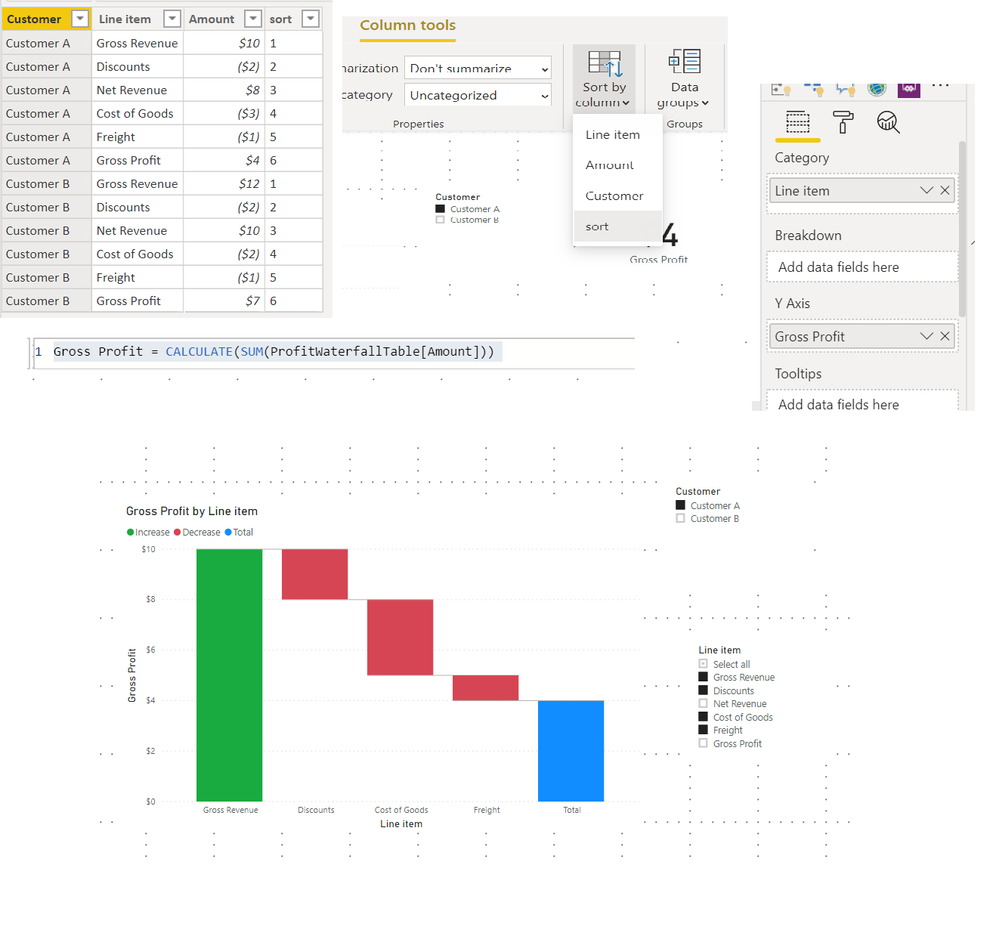
@kjani  It can be done with a few adjustments to you table.


1. Add a sort column to your table - this is to make sure the line items appear in the right order.

2. Create a simple measure:

Gross Profit = CALCULATE(SUM(ProfitWaterfallTable[Amount]))

3. Add the Waterfall chart as shown in example. 

4. You can only add one customer at a time and exclude the Gross Revenue and Net Revenue using slicers - else it will not work. PBI help waterfall.png

View solution in original post

1 REPLY 1
sanimesa
Post Prodigy
Post Prodigy

@kjani  It can be done with a few adjustments to you table.


1. Add a sort column to your table - this is to make sure the line items appear in the right order.

2. Create a simple measure:

Gross Profit = CALCULATE(SUM(ProfitWaterfallTable[Amount]))

3. Add the Waterfall chart as shown in example. 

4. You can only add one customer at a time and exclude the Gross Revenue and Net Revenue using slicers - else it will not work. PBI help waterfall.png

Helpful resources

Announcements
Power BI DataViz World Championships

Power BI Dataviz World Championships

The Power BI Data Visualization World Championships is back! Get ahead of the game and start preparing now!

December 2025 Power BI Update Carousel

Power BI Monthly Update - December 2025

Check out the December 2025 Power BI Holiday Recap!

FabCon Atlanta 2026 carousel

FabCon Atlanta 2026

Join us at FabCon Atlanta, March 16-20, for the ultimate Fabric, Power BI, AI and SQL community-led event. Save $200 with code FABCOMM.