Join us at FabCon Atlanta from March 16 - 20, 2026, for the ultimate Fabric, Power BI, AI and SQL community-led event. Save $200 with code FABCOMM.
Register now!The Power BI Data Visualization World Championships is back! Get ahead of the game and start preparing now! Learn more
Hi,
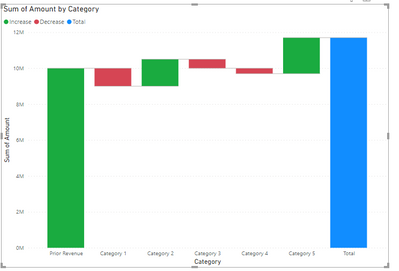
I have a waterfall chart where I'm starting from last year's revenue and having different categories to walk to my current revenue.
In the chart below, is there a way to have subtotal of Prior Revenue and Categories 1 to 4 and have it show before Category 5? Basically I want a bar in between Category 4 and 5 below as a subtotal of everything before it. Sample data also included below.
CategoryAmountSort Order
| Prior Revenue | 10000000 | 1 |
| Category 1 | -1000000 | 2 |
| Category 2 | 1500000 | 3 |
| Category 3 | -500000 | 4 |
| Category 4 | -300000 | 5 |
| Category 5 | 2000000 | 6 |
Solved! Go to Solution.
It is possible but you need to use custom visuals and you need to massage your data accordingly.
Might be easier to do with Deneb.
See attached.
If you switch Limit Steps to "Off" you should see the Define Pillars option appear
Thanks for posting this. Solved my issue
I am not sure how but when I used your file and copied your visual then I get the "Define Pillars" option but when I had used the same custom visual myself I was not getting that option under formatting. Did you do something differently in the dataset or settings to enable it?
Yes, I had to modify your data. Please check the Power Query transforms in the attached pbix.
Yes I checked that and I had the same data format but still was not seeing the Define Pillars option. It's a mystery
The Power BI Data Visualization World Championships is back! Get ahead of the game and start preparing now!
Check out the November 2025 Power BI update to learn about new features.
| User | Count |
|---|---|
| 59 | |
| 46 | |
| 42 | |
| 23 | |
| 17 |
| User | Count |
|---|---|
| 190 | |
| 122 | |
| 96 | |
| 66 | |
| 47 |