cancel
Showing results for 
Search instead for 
Did you mean: 

Get Fabric Certified for FREE during Fabric Data Days. Don't miss your chance! Request now

Reply
Olga_S
Frequent Visitor

Vsualize text measure

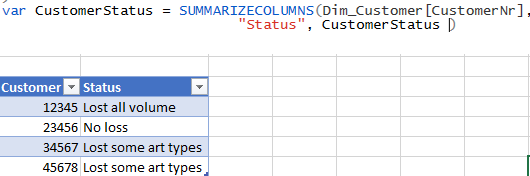
I have a measure that gives status for the customer based on the sales history.

I would like to visualize it with a bar chart where I have status as Axis and number of customers in values.

How can I do it?

Please help, I can’t solve this for several weeks!


I also managed to build a calculated table where every customer got its status, but have no idea how to turn it in a wat to get counted customers per status.
 2021-03-24_13-02-51.png


Measure:
Var CustomerStatus = if ( and( SalesLastMonth = 0, Sales3MonthAgo = 0),

    "No Sales In Relevant Period"

    if ( SalesLastMonth = 0,

        "Lost all volume",

        if (LossIndicator = 0,

            "No loss",

            "Lost some art types")

     )

)

1 ACCEPTED SOLUTION
amitchandak
Super User
Super User

@Olga_S , if you want, measure as dimension, create a table with these four values (Say Status)


Then create a measure like

countx(filter(values(Table[Customer]), [Measure] = max(Status[Status])),[Customer])


Refer my video  : https://youtu.be/CuczXPj0N-k

Share with Power BI Enthusiasts: Full Power BI Video (20 Hours) YouTube
Microsoft Fabric Series 60+ Videos YouTube
Microsoft Fabric Hindi End to End YouTube

View solution in original post

2 REPLIES 2
Olga_S
Frequent Visitor

Works perfect! Thank you so much! 
finally i bult 3 measures: 

Sale per customer = sumx(Fact_Sales, Fact_Sales[Sale])
Customer Status = if ([Sale per customer] >50, "high",  "low")
Count customer per status = countx(filter(values(Dim_Customer[CustomerName]), [Customer Status] = max(Dim_Status[Status])),Dim_Customer[CustomerName])

At the visual I used Status from the created table with statuses and measure Count customer per status as values
Thanks again!

amitchandak
Super User
Super User

@Olga_S , if you want, measure as dimension, create a table with these four values (Say Status)


Then create a measure like

countx(filter(values(Table[Customer]), [Measure] = max(Status[Status])),[Customer])


Refer my video  : https://youtu.be/CuczXPj0N-k

Share with Power BI Enthusiasts: Full Power BI Video (20 Hours) YouTube
Microsoft Fabric Series 60+ Videos YouTube
Microsoft Fabric Hindi End to End YouTube

Helpful resources

Announcements
November Power BI Update Carousel

Power BI Monthly Update - November 2025

Check out the November 2025 Power BI update to learn about new features.

Fabric Data Days Carousel

Fabric Data Days

Advance your Data & AI career with 50 days of live learning, contests, hands-on challenges, study groups & certifications and more!

FabCon Atlanta 2026 carousel

FabCon Atlanta 2026

Join us at FabCon Atlanta, March 16-20, for the ultimate Fabric, Power BI, AI and SQL community-led event. Save $200 with code FABCOMM.

Top Solution Authors
Top Kudoed Authors