cancel
Showing results for 
Search instead for 
Did you mean: 

The Power BI Data Visualization World Championships is back! Get ahead of the game and start preparing now! Learn more

Reply
Anonymous
Not applicable

Visualization problem with bar charts

Dear Community,


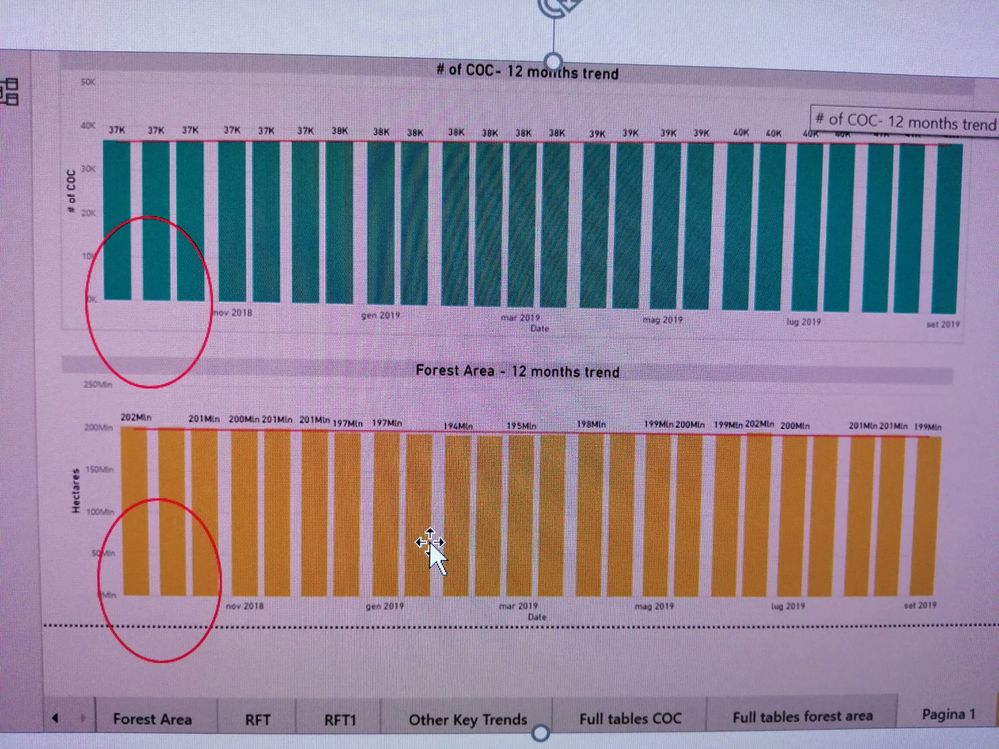
please see screenshot below 

PBI_barchart.jpg

How is it possible to make all the x axis labels (months, in this case) to show up? 

The 'Labeli density' command does not apply to those, and it seems like there is no other way. It is not a matter of space/size of the chart, no matter how big I make it.


Thanks for any hints!


2 ACCEPTED SOLUTIONS
v-frfei-msft
Community Support
Community Support

Hi @Anonymous ,


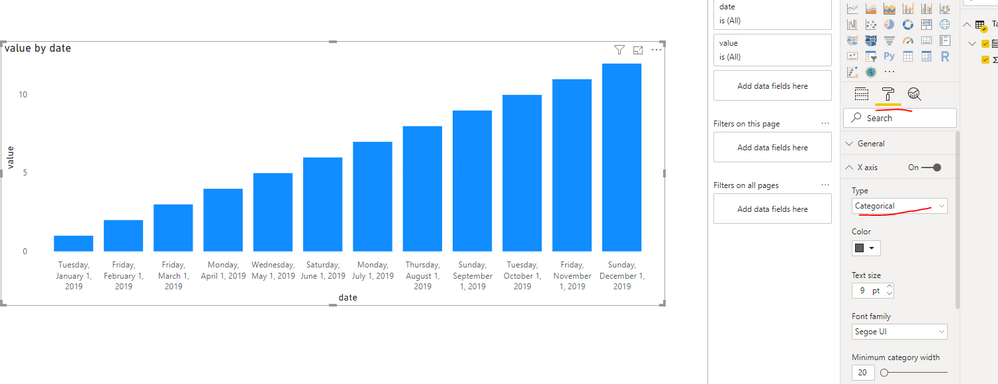
Please set the type of the X -axis to Categorical in Format pane as the picture below.

Capture.PNG


Community Support Team _ Frank
If this post helps, then please consider Accept it as the solution to help the others find it more quickly.

View solution in original post

Anonymous
Not applicable


Hi,


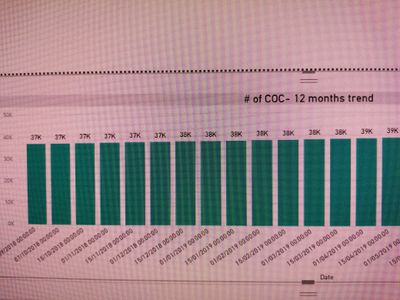
thanks. That also doesn not help, since that changes the format of the data label itself (I have 2 data points every month, so I end up with a DD.MM.YY plus the time lable which is not what I am looking for - example below).

But I guess, this is the closest as I can get to a solution - in the lack of more custom options on the labels, and without changing the data structure of course.


THanks


IMG_20190926_134036_resized_20190926_014100361.jpg


View solution in original post

2 REPLIES 2
v-frfei-msft
Community Support
Community Support

Hi @Anonymous ,


Please set the type of the X -axis to Categorical in Format pane as the picture below.

Capture.PNG


Community Support Team _ Frank
If this post helps, then please consider Accept it as the solution to help the others find it more quickly.
Anonymous
Not applicable


Hi,


thanks. That also doesn not help, since that changes the format of the data label itself (I have 2 data points every month, so I end up with a DD.MM.YY plus the time lable which is not what I am looking for - example below).

But I guess, this is the closest as I can get to a solution - in the lack of more custom options on the labels, and without changing the data structure of course.


THanks


IMG_20190926_134036_resized_20190926_014100361.jpg


Helpful resources

Announcements
Power BI DataViz World Championships

Power BI Dataviz World Championships

The Power BI Data Visualization World Championships is back! Get ahead of the game and start preparing now!

December 2025 Power BI Update Carousel

Power BI Monthly Update - December 2025

Check out the December 2025 Power BI Holiday Recap!

FabCon Atlanta 2026 carousel

FabCon Atlanta 2026

Join us at FabCon Atlanta, March 16-20, for the ultimate Fabric, Power BI, AI and SQL community-led event. Save $200 with code FABCOMM.