Get Fabric certified for FREE!
Don't miss your chance to take the Fabric Data Engineer (DP-700) exam on us!
Learn more- Power BI forums
- Get Help with Power BI
- Desktop
- Service
- Report Server
- Power Query
- Mobile Apps
- Developer
- DAX Commands and Tips
- Custom Visuals Development Discussion
- Health and Life Sciences
- Power BI Spanish forums
- Translated Spanish Desktop
- Training and Consulting
- Instructor Led Training
- Dashboard in a Day for Women, by Women
- Galleries
- Data Stories Gallery
- Themes Gallery
- Contests Gallery
- QuickViz Gallery
- Quick Measures Gallery
- Visual Calculations Gallery
- Notebook Gallery
- Translytical Task Flow Gallery
- TMDL Gallery
- R Script Showcase
- Webinars and Video Gallery
- Ideas
- Custom Visuals Ideas (read-only)
- Issues
- Issues
- Events
- Upcoming Events
The FabCon + SQLCon recap series starts April 14th at 8am Pacific. If you’re tracking where AI is going inside Fabric, this first session is a can't miss. Register now
- Power BI forums
- Forums
- Get Help with Power BI
- Desktop
- Visualization To Compare Today, Yesterday, This We...
- Subscribe to RSS Feed
- Mark Topic as New
- Mark Topic as Read
- Float this Topic for Current User
- Bookmark
- Subscribe
- Printer Friendly Page


- Mark as New
- Bookmark
- Subscribe
- Mute
- Subscribe to RSS Feed
- Permalink
- Report Inappropriate Content
Visualization To Compare Today, Yesterday, This Week, Last Week, This Month, Last Month?
Can someone recommend the best type of visualization to display the following data:
Trying to show trends in appointments, by comparing the count of appointment records created today, versus yesterday; this week vs last week; this month vs last month; this year vs last year.
I currently have a bunch of cards where the value is a count of hte rows and the visual filter is set for the date range (ex, last week). Is there an easier way to do this or a better visualization to display this type of KPI?
Solved! Go to Solution.

- Mark as New
- Bookmark
- Subscribe
- Mute
- Subscribe to RSS Feed
- Permalink
- Report Inappropriate Content
@pe2950,
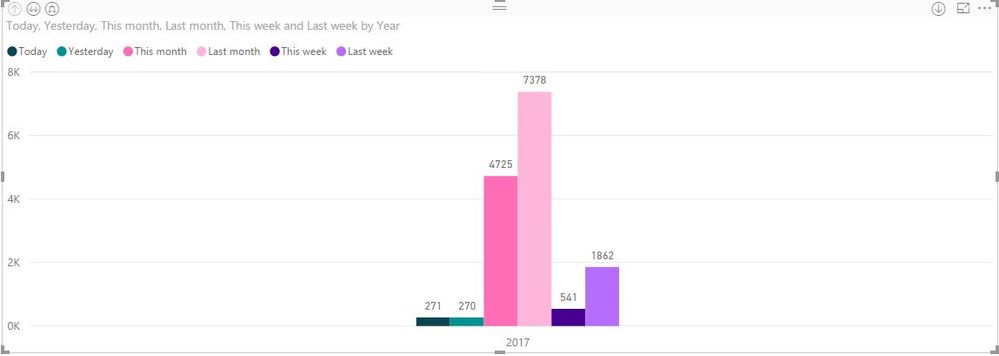
If you want to involve all the data(Today, Yesterday, This Week, Last Week, This Month, Last Month) in a single visual, create the following similar measures in your table, you may need to replace the sum function with count function.
Today = CALCULATE(SUM(Table[appointments]),FILTER(Table,Table[Date]=TODAY()))
Yesterday = CALCULATE(SUM(Table[appointments]),FILTER(Table,Table[Date]=TODAY()-1))
This month = CALCULATE(SUM(Table[appointments]),FILTER(Table,YEAR(Table[Date])=YEAR(TODAY()) && MONTH(Table[Date])=MONTH(TODAY())))
Last month = CALCULATE(SUM(Table[appointments]),FILTER(Table,YEAR(Table[Date])=YEAR(TODAY())&&MONTH(Table[Date])=MONTH(TODAY())-1))
This week = CALCULATE(SUM(Table[appointments]),FILTER(Table,YEAR(Table[Date])=YEAR(TODAY())&&WEEKNUM(Table[Date])=WEEKNUM(TODAY())))
Last week = CALCULATE(SUM(Table[appointments]),FILTER(Table,YEAR(Table[Date])=YEAR(TODAY())&&WEEKNUM(Table[Date])=WEEKNUM(TODAY())-1))
Then you can create clustered column chart as shown in the following screenshot.
Regards,
Lydia
- Mark as New
- Bookmark
- Subscribe
- Mute
- Subscribe to RSS Feed
- Permalink
- Report Inappropriate Content
@pe2950,
If you want to involve all the data(Today, Yesterday, This Week, Last Week, This Month, Last Month) in a single visual, create the following similar measures in your table, you may need to replace the sum function with count function.
Today = CALCULATE(SUM(Table[appointments]),FILTER(Table,Table[Date]=TODAY()))
Yesterday = CALCULATE(SUM(Table[appointments]),FILTER(Table,Table[Date]=TODAY()-1))
This month = CALCULATE(SUM(Table[appointments]),FILTER(Table,YEAR(Table[Date])=YEAR(TODAY()) && MONTH(Table[Date])=MONTH(TODAY())))
Last month = CALCULATE(SUM(Table[appointments]),FILTER(Table,YEAR(Table[Date])=YEAR(TODAY())&&MONTH(Table[Date])=MONTH(TODAY())-1))
This week = CALCULATE(SUM(Table[appointments]),FILTER(Table,YEAR(Table[Date])=YEAR(TODAY())&&WEEKNUM(Table[Date])=WEEKNUM(TODAY())))
Last week = CALCULATE(SUM(Table[appointments]),FILTER(Table,YEAR(Table[Date])=YEAR(TODAY())&&WEEKNUM(Table[Date])=WEEKNUM(TODAY())-1))
Then you can create clustered column chart as shown in the following screenshot.
Regards,
Lydia
- Mark as New
- Bookmark
- Subscribe
- Mute
- Subscribe to RSS Feed
- Permalink
- Report Inappropriate Content
Million Thanks for sharing such a great logic in very simple way
- Mark as New
- Bookmark
- Subscribe
- Mute
- Subscribe to RSS Feed
- Permalink
- Report Inappropriate Content
Hello @Anonymous ,
Thank you for the above information!
The last week formula is not working if the current week is January 2021 first week and the last week is December 2020 last week.
The last month formula is not working if the current month is January 2021 and the last month is December 2020.
The above formulas are not showing any values in these cases.
Can you please let me know how to make last week, last month formulas work in the above scenarios.
Thank you!
Regards,
Aswini
- Mark as New
- Bookmark
- Subscribe
- Mute
- Subscribe to RSS Feed
- Permalink
- Report Inappropriate Content
When I use this Dax, But it starts the week start from Sunday to Saturday.
I need to set Dax in such a way that Week Start from Monday to Sunday.
Give the result accordingly!


- Mark as New
- Bookmark
- Subscribe
- Mute
- Subscribe to RSS Feed
- Permalink
- Report Inappropriate Content
@Anonymous,
WEEKNUM has two parameters,
- Date
- Return type - use 1 when the week begins on Sunday; use 2 when the week begins on Monday
More info can be found here
- Mark as New
- Bookmark
- Subscribe
- Mute
- Subscribe to RSS Feed
- Permalink
- Report Inappropriate Content
Last month = CALCULATE(SUM(Table[appointments]),FILTER(Table,YEAR(Table[Date])=YEAR(TODAY())&&MONTH(Table[Date])=MONTH(TODAY())-1))
If the Current month is January so last month should be Dec. But that not show any value in this case.
Can you please help me how I can manage if show last year Dec detail?


- Mark as New
- Bookmark
- Subscribe
- Mute
- Subscribe to RSS Feed
- Permalink
- Report Inappropriate Content
Same problem I am also facing any solution for this?
- Mark as New
- Bookmark
- Subscribe
- Mute
- Subscribe to RSS Feed
- Permalink
- Report Inappropriate Content
Try this,
Last month = CALCULATE(SUM(Table[appointments]),FILTER(ALL(Table),YEAR(Table[Date])=YEAR(TODAY())&&MONTH(Table[Date])=MONTH(TODAY())-1))
- Mark as New
- Bookmark
- Subscribe
- Mute
- Subscribe to RSS Feed
- Permalink
- Report Inappropriate Content
Helpful resources

New to Fabric Survey
If you have recently started exploring Fabric, we'd love to hear how it's going. Your feedback can help with product improvements.

Power BI DataViz World Championships - June 2026
A new Power BI DataViz World Championship is coming this June! Don't miss out on submitting your entry.

Join our Fabric User Panel
Share feedback directly with Fabric product managers, participate in targeted research studies and influence the Fabric roadmap.

Power BI Community Update - March 2026
Check out the March 2026 Power BI update to learn about new features.

| User | Count |
|---|---|
| 53 | |
| 40 | |
| 37 | |
| 19 | |
| 18 |


| User | Count |
|---|---|
| 69 | |
| 67 | |
| 34 | |
| 33 | |
| 30 |


