Don't miss your chance to take the Fabric Data Engineer (DP-700) exam on us!
Learn moreWe've captured the moments from FabCon & SQLCon that everyone is talking about, and we are bringing them to the community, live and on-demand. Starts on April 14th. Register now
Hi,
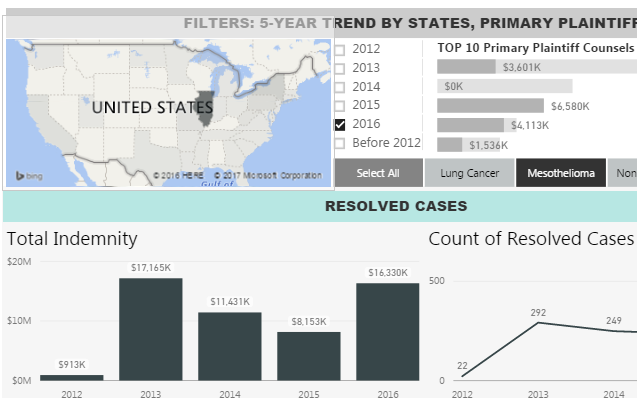
I have a map and a slicer (top 10 primary plaintiff counsels) that I want them both to filter on a third graph.
For the screenshot below, I want to see the total indemnity of a certain plaintiff counsel in IL. However, currently if I first select a state, this filter will be removed when I go ahead and select a plaintiff, and vice versa.
Is there anyway that I can keep both filters alive on the same graph? Optimally, I do want to allow state and the slicer to filter on each other - it is very helpful to see a plaintiff is active in how many states - but I ok to comprise this feature if it contradicts with the aforementioned goal.
Could anyone help? Thanks a lot!
Yuwen
io
Solved! Go to Solution.
Hi @xiaoyu7016, check out this feature request. If it's what you're looking for, you can vote for it to help the Power BI team implement it sooner 🙂
https://ideas.powerbi.com/forums/265200-power-bi-ideas/suggestions/10755336-multiple-cross-filter
I know this post is old - but: have the same problem. Is this now somehow possible?
I have 3 visuals and I want to have two of them filter a third on - but when I click in the second visual, to add a filter, it instead empties the filter from the first visual.
Any ideas on that?
I created a work around - used a real slicer for primary plaintiff counsel instead of a visual. I am able to keep both the state filter and the plaintiff filter at the same time.
Still looking forward to solution that can use two visuals as filters at the same time.
Hi @xiaoyu7016, check out this feature request. If it's what you're looking for, you can vote for it to help the Power BI team implement it sooner 🙂
https://ideas.powerbi.com/forums/265200-power-bi-ideas/suggestions/10755336-multiple-cross-filter
Thank you @Anonymous, this is exactly what I am looking for. 3 votes for that ![]()
If you have recently started exploring Fabric, we'd love to hear how it's going. Your feedback can help with product improvements.
A new Power BI DataViz World Championship is coming this June! Don't miss out on submitting your entry.
Share feedback directly with Fabric product managers, participate in targeted research studies and influence the Fabric roadmap.
| User | Count |
|---|---|
| 56 | |
| 40 | |
| 35 | |
| 19 | |
| 18 |
| User | Count |
|---|---|
| 70 | |
| 69 | |
| 38 | |
| 35 | |
| 23 |