cancel
Showing results for 
Search instead for 
Did you mean: 

The Power BI Data Visualization World Championships is back! Get ahead of the game and start preparing now! Learn more

Reply
Syndicate_Admin
Administrator
Administrator

Visual Calendar

Good afternoon!

I'm creating a calendar visualization to show the dates employees go on vacation, then I show the picture.

nataliaguzman02_0-1638304908142.png

I need to remove Saturdays and Sundays from the visualization and create a color marking for the holidays, can you help me?, I have already tried different strategies but I do not achieve my goal, thank you! , then show the fields used in the visualization.

nataliaguzman02_1-1638304989259.png

1 ACCEPTED SOLUTION
Anonymous
Not applicable

Hi @Syndicate_Admin 

I have a test in my side. I find that calendar visual doesn't support you to remove Saturday/Sumday. They will show grey out instead of being removed if you remove them in filter. And calendar visual doesn't support conditional formatting. 

I think you can refer to this offical blog to add conditonal formatting in custom visual.

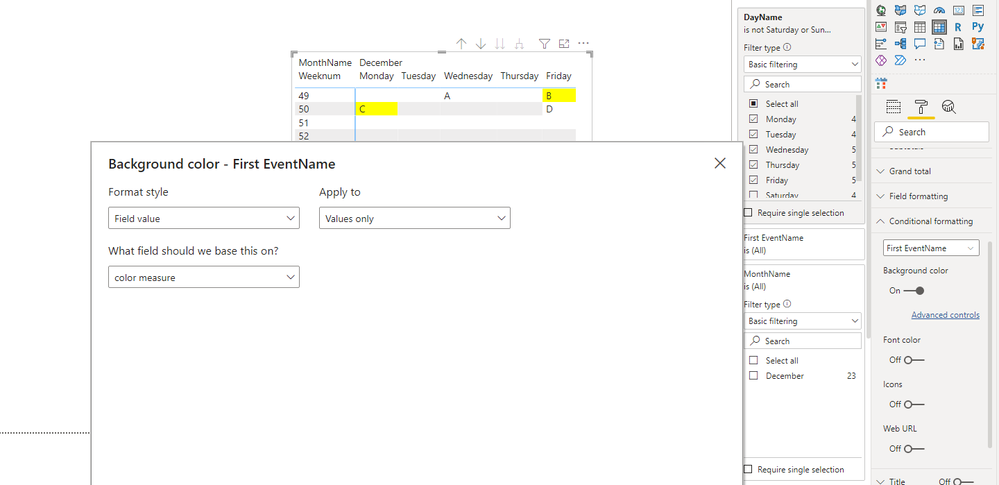
Here I suggest you to create a calendar table by Matrix visual.

Create a color measure and use condtional formatting to format the background color.


color measure = IF(MAX('Date'[Date]) in VALUES('List of Holidays in Spain in 2021'[Date]),"Yellow","White")


Result looks like as below.

3.png

For reference:

Power BI Calendar Visual

Use conditional formatting in tables


Best Regards,
Rico Zhou


If this post helps, then please consider Accept it as the solution to help the other members find it more quickly.

View solution in original post

4 REPLIES 4
Anonymous
Not applicable

Hi @Syndicate_Admin 

I have a test in my side. I find that calendar visual doesn't support you to remove Saturday/Sumday. They will show grey out instead of being removed if you remove them in filter. And calendar visual doesn't support conditional formatting. 

I think you can refer to this offical blog to add conditonal formatting in custom visual.

Here I suggest you to create a calendar table by Matrix visual.

Create a color measure and use condtional formatting to format the background color.


color measure = IF(MAX('Date'[Date]) in VALUES('List of Holidays in Spain in 2021'[Date]),"Yellow","White")


Result looks like as below.

3.png

For reference:

Power BI Calendar Visual

Use conditional formatting in tables


Best Regards,
Rico Zhou


If this post helps, then please consider Accept it as the solution to help the other members find it more quickly.

Thanks for the reply.

Anonymous
Not applicable

Hi @Syndicate_Admin ,

Could you tell me if your problem has been solved? If it is, kindly Accept it as the solution. More people will benefit from it. Or you are still confused about it, please provide me with more details about your table and your problem or share me with your pbix file without sensitive data.


Best Regards,

Rico Zhou

MFelix
Super User
Super User

Hi @nataliaguzman02 ,


Can you please share a mockup data or sample of your PBIX file. You can use a onedrive, google drive, we transfer or similar link to upload your files.

If the information is sensitive please share it trough private message.


Regards

Miguel Félix


Did I answer your question? Mark my post as a solution!

Proud to be a Super User!

Check out my blog: Power BI em Português


Helpful resources

Announcements
Power BI DataViz World Championships

Power BI Dataviz World Championships

The Power BI Data Visualization World Championships is back! Get ahead of the game and start preparing now!

December 2025 Power BI Update Carousel

Power BI Monthly Update - December 2025

Check out the December 2025 Power BI Holiday Recap!

FabCon Atlanta 2026 carousel

FabCon Atlanta 2026

Join us at FabCon Atlanta, March 16-20, for the ultimate Fabric, Power BI, AI and SQL community-led event. Save $200 with code FABCOMM.