

cancel
Showing results for 
Search instead for 
Did you mean: 

The Power BI Data Visualization World Championships is back! Get ahead of the game and start preparing now! Learn more

Reply
Anonymous
Not applicable

Vertical alignment of card visual in PBI

Hello All,


Just want to know that, do't we have vertical alignimnet property of card visual yet? I have created a measure to dynaically set the values as per slicer selection and show this to Y axis vertically. I searched all properties of card but cant find any. Does anyone know workaround to this?


Please advise, thanks!

4 REPLIES 4
Anonymous
Not applicable

Hi all, I am looking to get my text box vertical, I do not want to use a shape and format it with text options. I can think of even rotating a card. Is any such option available?.
v-piga-msft
Resident Rockstar
Resident Rockstar

Hi @Anonymous,


We still don't have the properties to set the alignment of card visual in Power BI currently.


You could vote this similar idea here which has been submitted in Power BI ideas forum and add your comments there to improve Power BI and make this feature coming sooner.


For a workaround, You could try with Multi-row Card like below.


Untitled.png


In addtion, I'm a little confused about the saying below.


 I have created a measure to dynaically set the values as per slicer selection and show this to Y axis vertically.


If you need additional help please share your expected output.


Best regards,

Cherry

Community Support Team _ Cherry Gao
If this post helps, then please consider Accept it as the solution to help the other members find it more quickly.
Anonymous
Not applicable

Hi @v-piga-msft


I have voted that idea but I could not get how the multi row card visual will display value as vertically.


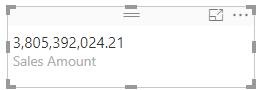
The card visual is like this - 


Capture.PNG

and I need to display like this-


Capture.PNG


Please advise. thanks

Hi @Anonymous,


I'm sorry that I misunderstand your requirement before. 


However, your requirement is not supported in power BI currently. Please post your new idea in Power BI Forum and add your comments there in details to make this feature coming sooner.


There is no good workaroud to meet your requirement that put measure as Y axis to be vertically. Because the measure cannot be dragged to Y axis field.


Best Regards,

Cherry

Community Support Team _ Cherry Gao
If this post helps, then please consider Accept it as the solution to help the other members find it more quickly.

Helpful resources

Announcements
Power BI DataViz World Championships

Power BI Dataviz World Championships

The Power BI Data Visualization World Championships is back! Get ahead of the game and start preparing now!

December 2025 Power BI Update Carousel

Power BI Monthly Update - December 2025

Check out the December 2025 Power BI Holiday Recap!

FabCon Atlanta 2026 carousel

FabCon Atlanta 2026

Join us at FabCon Atlanta, March 16-20, for the ultimate Fabric, Power BI, AI and SQL community-led event. Save $200 with code FABCOMM.