cancel
Showing results for 
Search instead for 
Did you mean: 

The Power BI Data Visualization World Championships is back! Get ahead of the game and start preparing now! Learn more

Reply
GeraSanz11
Frequent Visitor

Variations with specific dates

Hi everyone


I'm stuck with a calculation, and i've been looking at the forums but i haven't found anything similar yet.


The database is as follows. Captura.JPGI have 3 columns Year, id_Month and Number, and the data is monthly, from January(1) to December(12) for each year that goes from 2006 to 2016
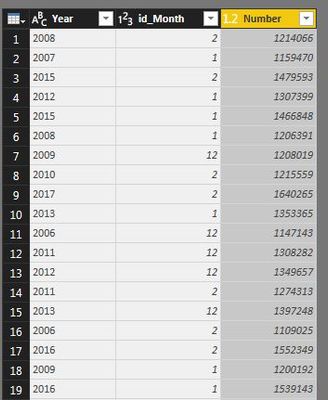
 

i'm trying to calculate the increases or decreases for a chosen month, something like YTD formula, but the catch here is that because of the nature of this data, the total of a year isn't the sum of all the months but instead the data of December alone


So for example, if i want to calculate the variation of February 2016, the formula should go something like this:


(Sum of February 2016) minus (December 2015)


and so on for every February of the remaining years (Sum of February 2015 minus December 2014) 


So i could have a stacked column chart by year in the X axis showing each february's variation


i found YTD and SamePeriodLastYear but i couldn't find a way, as i said, i don't need to sum every month for a given year to calculate the total of that year.


Also the idea is to have a filter in the canvas so i could choose the month i want to evaluate


Any ideas? also thx in advance for the help


2 ACCEPTED SOLUTIONS
Zubair_Muhammad
Community Champion
Community Champion

@GeraSanz11


Try this MEASURE


Measure =
SUM ( TableName[Number] )
    - CALCULATE (
        SUM ( TableName[Number] ),
        FILTER (
            ALL ( TableName ),
            TableName[id-Month] = 12
                && TableName[YEAR]
                    = SELECTEDVALUE ( TableName[YEAR] ) - 1
        )
    )

View solution in original post

This worked perfectly! 


just did some adjustments like adding a report filter for the first year since it will not have a previous year to calculate 


Thank you so much!

View solution in original post

2 REPLIES 2
Zubair_Muhammad
Community Champion
Community Champion

@GeraSanz11


Try this MEASURE


Measure =
SUM ( TableName[Number] )
    - CALCULATE (
        SUM ( TableName[Number] ),
        FILTER (
            ALL ( TableName ),
            TableName[id-Month] = 12
                && TableName[YEAR]
                    = SELECTEDVALUE ( TableName[YEAR] ) - 1
        )
    )

This worked perfectly! 


just did some adjustments like adding a report filter for the first year since it will not have a previous year to calculate 


Thank you so much!

Helpful resources

Announcements
Power BI DataViz World Championships

Power BI Dataviz World Championships

The Power BI Data Visualization World Championships is back! Get ahead of the game and start preparing now!

December 2025 Power BI Update Carousel

Power BI Monthly Update - December 2025

Check out the December 2025 Power BI Holiday Recap!

FabCon Atlanta 2026 carousel

FabCon Atlanta 2026

Join us at FabCon Atlanta, March 16-20, for the ultimate Fabric, Power BI, AI and SQL community-led event. Save $200 with code FABCOMM.

Top Solution Authors