cancel
Showing results for 
Search instead for 
Did you mean: 

Level up your Power BI skills this month - build one visual each week and tell better stories with data! Get started

Reply
Keropi79
Frequent Visitor

Variance and margin calculation

Hi,

I tried to do a visualization that looks like the below for the P&L:

Amount (USD)ActualBudgetVar
Revenue         60,000     50,00016.67%
Service         50,000     35,00030.00%
Others         10,000     15,000-50.00%
Cost         48,500     37,000-31.08%
Service         45,000     35,000-28.57%
Others           3,500        2,000-75.00%
Margin         11,500     13,000-13.04%
Margin%19%26%-6.83%


With pivot visualization, I manage to get the variance, however, I can't get to calculate Margin and Margin%. Is there any visualization that allows me to have calculation or metric by row?


Thanks.

1 ACCEPTED SOLUTION
v-lionel-msft
Community Support
Community Support

Hi @Keropi79 ,


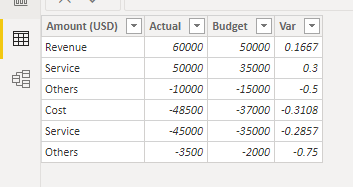
fff10.PNG

If you have such a fact table, you can use ± to mark income and expenses.

Then, you can create a calculated table.

Table = 
VAR Margin =  
ROW(
    "Amount (USD)", "Margin",
    "Actual", CALCULATE( SUM(Sheet5[Actual]), ALL(Sheet5) ),
    "Budget", CALCULATE( SUM(Sheet5[Budget]), ALL(Sheet5) ),
    "Var", BLANK()
)
RETURN
UNION(
    Sheet5,
    Margin
)

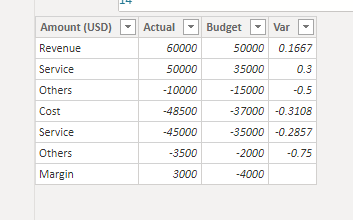
fff11.PNG

The same is true for the row ‘Margin%’. I don't know your mathematical calculation logic so I can't calculate it for you.


Best regards,
Lionel Chen

If this post helps, then please consider Accept it as the solution to help the other members find it more quickly.

View solution in original post

2 REPLIES 2
v-lionel-msft
Community Support
Community Support

Hi @Keropi79 ,


fff10.PNG

If you have such a fact table, you can use ± to mark income and expenses.

Then, you can create a calculated table.

Table = 
VAR Margin =  
ROW(
    "Amount (USD)", "Margin",
    "Actual", CALCULATE( SUM(Sheet5[Actual]), ALL(Sheet5) ),
    "Budget", CALCULATE( SUM(Sheet5[Budget]), ALL(Sheet5) ),
    "Var", BLANK()
)
RETURN
UNION(
    Sheet5,
    Margin
)

fff11.PNG

The same is true for the row ‘Margin%’. I don't know your mathematical calculation logic so I can't calculate it for you.


Best regards,
Lionel Chen

If this post helps, then please consider Accept it as the solution to help the other members find it more quickly.

amitchandak
Super User
Super User

@ you have to create table like this and try

union (
summarize(table1, "Name", "Table1", "Value", sum(Table1[value])),
summarize(table2, "Name", "Table2", "Value", sum(Table2[value])),
summarize(table3, "Name", "Table3", "Value", sum(Table3[value]))
)


Union (
	Summarize(filter(Table,Sceniro="Budget"),Table[Business_category],"Name","Budget","Value",Sum(Table[Value])),
	Summarize(filter(Table,Sceniro="Actual"),Table[Business_category],"Name","Actual","Value",Sum(Table[Value])),
	Summarize(Table,Table[Business_category],"Name","Actual","Value",Sumx(Table,if(Sceniro="Actual",-1*Table[Value],1*Table[Value])))
	)
	
Share with Power BI Enthusiasts: Full Power BI Video (20 Hours) YouTube
Microsoft Fabric Series 60+ Videos YouTube
Microsoft Fabric Hindi End to End YouTube

Helpful resources

Announcements
April Power BI Update Carousel

Power BI Monthly Update - April 2026

Check out the April 2026 Power BI update to learn about new features.

Fabric SQL PBI Data Days

Data Days 2026 coming soon!

Sign up to receive a private message when registration opens and key events begin.

New to Fabric survey Carousel

New to Fabric Survey

If you have recently started exploring Fabric, we'd love to hear how it's going. Your feedback can help with product improvements.

Power BI DataViz World Championships carousel

Power BI DataViz World Championships - June 2026

A new Power BI DataViz World Championship is coming this June! Don't miss out on submitting your entry.