cancel
Showing results for 
Search instead for 
Did you mean: 

The Power BI Data Visualization World Championships is back! It's time to submit your entry. Live now!

Reply
Anonymous
Not applicable

Variance Calculation by Condition

Hi 

I'm trying to create the variance between actual vs budget.  I have tables one for actual and another for budget, and they both have a relationship to "Date" and "Account List" tables. 


I want to show the variance between actual and budget table with condition that :

If it's revenue accounts, it will do  Actual  less Budget, 

If it's expense accounts, it will do Budget less Actual. 


I tried to do a measure, but the value did not come out correctly.


Var $ Test =
SUMX(Actual,
              IF(RELATED('Account List'[Type])="Income",
                 [Actual $]-[Budget $],
                 [Budget $]-[Actual $]
      )
)


1 ACCEPTED SOLUTION
v-zhenbw-msft
Community Support
Community Support

Hi @Anonymous ,


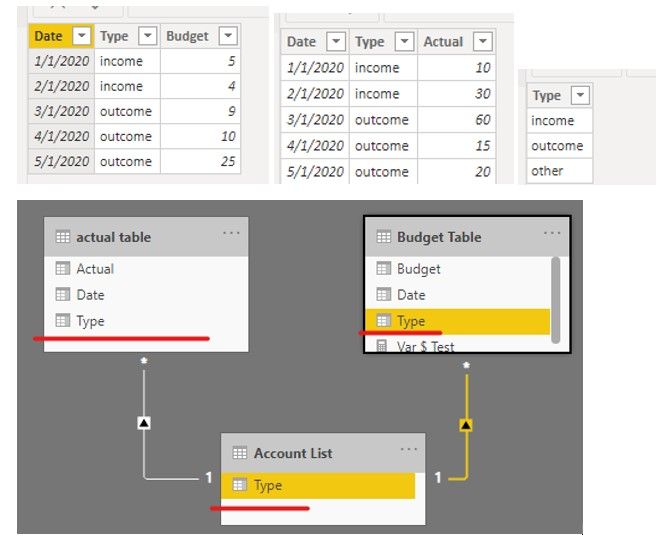
We create a sample like this,


Va1.jpg


Then we can create a measure to meet your requirement.


Var $ Test = 
IF(
    MAX('Account List'[Type]) = "income",
    SUM('actual table'[Actual]) - SUM('Budget Table'[Budget]),
    SUM('Budget Table'[Budget]) - SUM('actual table'[Actual]))


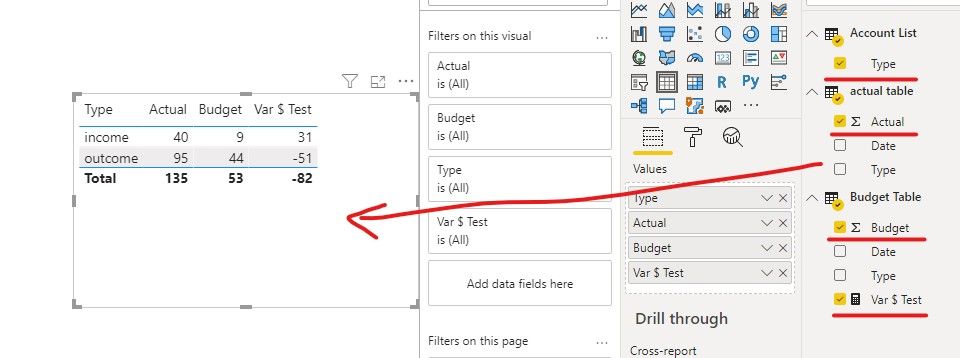
The result like this,


va2.jpg


If it doesn’t meet your requirement, could you please provide a mockup sample based on fake data?

It will be helpful if you can show us the exact expected result based on the tables.


Please upload your files to OneDrive For Business and share the link here. Please don't contain any Confidential Information or Real data in your reply.


Best regards,


Community Support Team _ zhenbw

If this post helps, then please consider Accept it as the solution to help the other members find it more quickly.


BTW, pbix as attached.

View solution in original post

3 REPLIES 3
v-zhenbw-msft
Community Support
Community Support

Hi @Anonymous ,


We create a sample like this,


Va1.jpg


Then we can create a measure to meet your requirement.


Var $ Test = 
IF(
    MAX('Account List'[Type]) = "income",
    SUM('actual table'[Actual]) - SUM('Budget Table'[Budget]),
    SUM('Budget Table'[Budget]) - SUM('actual table'[Actual]))


The result like this,


va2.jpg


If it doesn’t meet your requirement, could you please provide a mockup sample based on fake data?

It will be helpful if you can show us the exact expected result based on the tables.


Please upload your files to OneDrive For Business and share the link here. Please don't contain any Confidential Information or Real data in your reply.


Best regards,


Community Support Team _ zhenbw

If this post helps, then please consider Accept it as the solution to help the other members find it more quickly.


BTW, pbix as attached.

amitchandak
Super User
Super User

@Anonymous , assuming actual and budget are measures 


Var $ Test =
SUMX('Account List',
IF(('Account List'[Type])="Income",
[Actual $]-[Budget $],
[Budget $]-[Actual $]
)
)

Share with Power BI Enthusiasts: Full Power BI Video (20 Hours) YouTube
Microsoft Fabric Series 60+ Videos YouTube
Microsoft Fabric Hindi End to End YouTube
DataInsights
Super User
Super User

Hi @Anonymous, create the three measures below:


Actual $ = SUM ( Actual[Amount] )

Budget $ = SUM ( Budget[Amount] )

Var $ =
VAR vAccountType =
    MAX ( AccountList[AccountType] )
VAR Result =
    SWITCH (
        vAccountType,
        "Revenue", [Actual $] - [Budget $],
        "Expense", [Budget $] - [Actual $]
    )
RETURN
    Result


In a matrix visual, add AccountList[Account] as rows, and the three measures above as values.


Did I answer your question? Mark my post as a solution!

Proud to be a Super User!


Helpful resources

Announcements
Power BI DataViz World Championships

Power BI Dataviz World Championships

The Power BI Data Visualization World Championships is back! It's time to submit your entry.

January Power BI Update Carousel

Power BI Monthly Update - January 2026

Check out the January 2026 Power BI update to learn about new features.

FabCon Atlanta 2026 carousel

FabCon Atlanta 2026

Join us at FabCon Atlanta, March 16-20, for the ultimate Fabric, Power BI, AI and SQL community-led event. Save $200 with code FABCOMM.