cancel
Showing results for 
Search instead for 
Did you mean: 

The Power BI Data Visualization World Championships is back! Get ahead of the game and start preparing now! Learn more

Reply
LewisB
Frequent Visitor

Values exist in two columns to create/filter to a new column

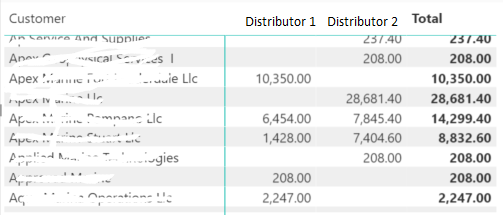
I am trying create a new column that comfirms if a customer has bought product from both distributors. An example data set is below. Most companies only by one from distributor, however there are some that buy from both. I want to be able to filter out the custoemrs that buy from both distributors.


The columns I'm using below are 'Customer'[Customer Name], 'Distributor'[Distributor Name] and 'Key Measures'[Revenue].

These columns also exist in my fact table (called 'Orders'). eg.  'Orders'[Customer Name], 'Orders'[Distributor Name] etc.


Distributors.PNG


I understand that this will most likely involve nested IF AND statements, but I am unable to get it to work!


Does anyone have tips to point me in the right direction?

1 ACCEPTED SOLUTION
v-yingjl
Community Support
Community Support

Hi @LewisB ,

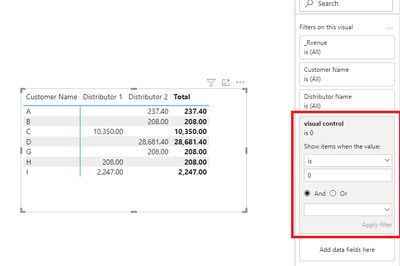
Sorry for replying late. You can create a measure liek this, put it in the visual filter and set its value as 0:

visual control =
IF (
    COUNTX (
        FILTER ( 'Key Measures', 'Key Measures'[Revenue] <> BLANK () ),
        [Customer]
    ) >= 2,
    1,
    0
)

matrix.png 

Attached a sample file in the below, hopes it could help.


Best Regards,
Community Support Team _ Yingjie Li
If this post helps, then please consider Accept it as the solution to help the other members find it more quickly.

View solution in original post

3 REPLIES 3
v-yingjl
Community Support
Community Support

Hi @LewisB ,

Sorry for replying late. You can create a measure liek this, put it in the visual filter and set its value as 0:

visual control =
IF (
    COUNTX (
        FILTER ( 'Key Measures', 'Key Measures'[Revenue] <> BLANK () ),
        [Customer]
    ) >= 2,
    1,
    0
)

matrix.png 

Attached a sample file in the below, hopes it could help.


Best Regards,
Community Support Team _ Yingjie Li
If this post helps, then please consider Accept it as the solution to help the other members find it more quickly.

LewisB
Frequent Visitor

Would nested IF statements be better in this regard?

LewisB
Frequent Visitor

I have tried the below formula, however it just shows up as "No" for all rows:


Both Distributors = SWITCH(
TRUE(),
Orders[Distributor Name] = "Distributor 1" && Orders[Distributor Name] = "Distributor 2" && [Revenue] > 0, "Yes",
"No"
)
 
I'm sure I'm missing a simple step here. Does it have something to do with the fact that both distributors are drawn from the same column in the same table?

Helpful resources

Announcements
November Power BI Update Carousel

Power BI Monthly Update - November 2025

Check out the November 2025 Power BI update to learn about new features.

Fabric Data Days Carousel

Fabric Data Days

Advance your Data & AI career with 50 days of live learning, contests, hands-on challenges, study groups & certifications and more!

FabCon Atlanta 2026 carousel

FabCon Atlanta 2026

Join us at FabCon Atlanta, March 16-20, for the ultimate Fabric, Power BI, AI and SQL community-led event. Save $200 with code FABCOMM.

Top Solution Authors
Top Kudoed Authors