cancel
Showing results for 
Search instead for 
Did you mean: 

The Power BI Data Visualization World Championships is back! Get ahead of the game and start preparing now! Learn more

Reply
Laila92
Helper V
Helper V

Value of last month in DAX measure

This is a continuation on this post: https://community.powerbi.com/t5/Desktop/Dax-Measure-to-calculate-Billing-of-active-deals/m-p/101388...

I am having issues with this bit of my measure (the second one in the post), the last part of the if statement is not returning: 

IF(ISBLANK([Lost Date]),VALUE(YEAR(TODAY()) & FORMAT(MONTH(TODAY()),"0#")),
                        IF(DAY([Lost Date]) <> 1,VALUE(YEAR([Lost Date]) & FORMAT(MONTH([Lost Date]),"0#")),
                        VALUE(YEAR(LastMonth) & FORMAT(MONTH(LastMonth),"0#"))
                        ))


My measure was working like this:


Live BILLING over time = 
VAR tmpBillingPeriod = ADDCOLUMNS(Deals_Lookup,
                "MonthYearBegin",
                IF(ISBLANK([Live Date]),VALUE(YEAR(TODAY()) & FORMAT(MONTH(TODAY()),"0#")),VALUE(YEAR([Live Date]) & FORMAT(MONTH([Live Date]),"0#"))),
                "MonthYearEnd",
                    IF(
                        ISBLANK([Lost Date]),VALUE(YEAR(TODAY()) & FORMAT(MONTH(TODAY()),"0#")),
                        VALUE(YEAR([Lost Date]) & FORMAT(MONTH([Lost Date]),"0#")))
                             )
                        )
VAR tmpTable = 
SELECTCOLUMNS(
    FILTER(
        GENERATE(
            tmpBillingPeriod,
            SUMMARIZE(Dates,[Year],[MonthNum],[MonthYearNum])
        ),
        [MonthYearNum] >= [MonthYearBegin]&&
        [MonthYearNum] <= [MonthYearEnd]
    ),
    "Customer",[ID],
    "Year",[Year],
    "Month",[MonthNum],
    "Amount",[Total Value]
)
RETURN SUMX(tmpTable,[Amount])


However, I now need to include that IF the lost date is on the first day of the month, the deal is not considered LIVE for that month. So lets say a lost date is on april 1st 2020, I want the last monht with LIVE billing to be March 2020. If the lost date is on april 2nd, I want to include April 2020 in the billing months.
I adding another IF sentence, where if the DAY value = 1, I try to subtract one month from the lost date, but it is not working, see below. How can i fix this measure?


Live MRR over time = 
VAR LastMonth =   IF (
        MONTH ( [Lost Date] ) = 1,
        /* YES */
        DATE ( YEAR ( [Lost Date] ) - 1, 12, 1 ),
        /* NO */
        DATE ( YEAR ( [Lost Date]), MONTH ( [Lost Date] ) - 1, 1 )
    )
RETURN
VAR tmpBillingPeriod = ADDCOLUMNS(Deals_Lookup,
                "MonthYearBegin",
                IF(ISBLANK([Live Date]),VALUE(YEAR(TODAY()) & FORMAT(MONTH(TODAY()),"0#")),VALUE(YEAR([Live Date]) & FORMAT(MONTH([Live Date]),"0#"))),
                "MonthYearEnd",
                    IF(ISBLANK([Lost Date]),VALUE(YEAR(TODAY()) & FORMAT(MONTH(TODAY()),"0#")),
                        IF(DAY([Lost Date]) <> 1,VALUE(YEAR([Lost Date]) & FORMAT(MONTH([Lost Date]),"0#")),
                        VALUE(YEAR(LastMonth) & FORMAT(MONTH(LastMonth),"0#"))
                        )))
VAR tmpTable = 
SELECTCOLUMNS(
    FILTER(
        GENERATE(
            tmpBillingPeriod,
            SUMMARIZE(Dates,[Year],[MonthNum],[MonthYearNum])
        ),
        [MonthYearNum] >= [MonthYearBegin]&&
        [MonthYearNum] <= [MonthYearEnd]
    ),
    "Customer",[ID],
    "Year",[Year],
    "Month",[MonthNum],
    "Amount",[Total Value]
)
RETURN SUMX(tmpTable,[Amount])


Example data:

ValueIDLost timeGo-Live Date
$1,299181942020-04-12 0:00:00 
$950106222020-04-10 0:00:002018-01-31 0:00:00
$499154912020-04-07 0:00:002019-03-22 0:00:00
$0178062020-04-06 0:00:002020-03-12 0:00:00
$0178072020-04-06 0:00:002020-03-12 0:00:00
$0178082020-04-06 0:00:00 
$375177692020-04-06 0:00:002020-03-12 0:00:00
$899158262020-04-06 0:00:002019-05-15 0:00:00
$899171032020-04-06 0:00:002020-01-09 0:00:00
$899172202020-04-06 0:00:002020-01-08 0:00:00
$199157582020-04-02 0:00:002019-05-02 0:00:00
$399171562020-04-01 0:00:00 
$399171572020-04-01 0:00:00 
$995172682020-04-01 0:00:00 
1 ACCEPTED SOLUTION
v-lid-msft
Community Support
Community Support

Hi @Laila92 ,


We can use the following measure to meet your requirement, put the calculate of last previous month into Addcolumns function, since when define a var, the result will be constant instead different for each row in Addoculmns


Measure Live MRR over time = 
VAR tmpBillingPeriod =
    ADDCOLUMNS (
        Deals_Lookup,
        "MonthYearBegin", IF (
            ISBLANK ( [Live Date] ),
            VALUE ( YEAR ( TODAY () ) & FORMAT ( MONTH ( TODAY () ), "0#" ) ),
            VALUE ( YEAR ( [Live Date] ) & FORMAT ( MONTH ( [Live Date] ), "0#" ) )
        ),
        "MonthYearEnd", IF (
            ISBLANK ( [Lost Date] ),
            VALUE ( YEAR ( TODAY () ) & FORMAT ( MONTH ( TODAY () ), "0#" ) ),
            IF (
                DAY ( [Lost Date] ) <> 1,
                VALUE ( YEAR ( [Lost Date] ) & FORMAT ( MONTH ( [Lost Date] ), "0#" ) ),
                VALUE (
                    YEAR ( DATE ( YEAR ( [Lost Date] ), MONTH ( [Lost Date] ) - 1, 1 ) )
                        & FORMAT (
                            MONTH ( DATE ( YEAR ( [Lost Date] ), MONTH ( [Lost Date] ) - 1, 1 ) ),
                            "0#"
                        )
                )
            )
        )
    )
VAR tmpTable =
    SELECTCOLUMNS (
        FILTER (
            GENERATE (
                tmpBillingPeriod,
                SUMMARIZE ( Dates, [Year], [MonthNum], [MonthYearNum] )
            ),
            [MonthYearNum] >= [MonthYearBegin]
                && [MonthYearNum] <= [MonthYearEnd]
        ),
        "Customer", [ID],
        "Year", [Year],
        "Month", [MonthNum],
        "Amount", [Value]
    )
RETURN
SUMX ( tmpTable, [Amount] )


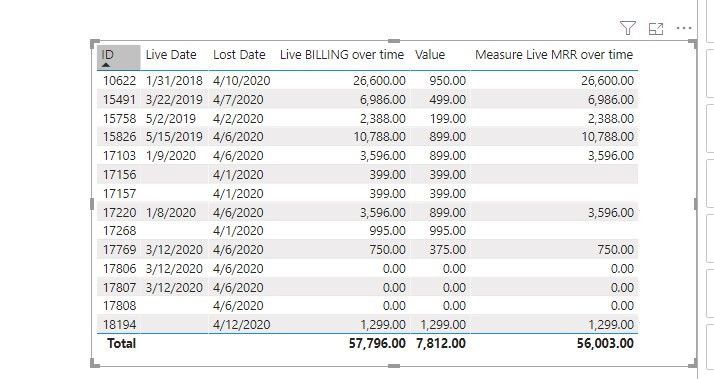
By using your sample data, we can get the result like this,


13.jpg


If it doesn't meet your requirement, Could you please show the exact expected result based on the Tables that you have shared?


BTW, pbix as attached.


Best regards,

Community Support Team _ Dong Li
If this post helps, then please consider Accept it as the solution to help the other members find it more quickly.

View solution in original post

1 REPLY 1
v-lid-msft
Community Support
Community Support

Hi @Laila92 ,


We can use the following measure to meet your requirement, put the calculate of last previous month into Addcolumns function, since when define a var, the result will be constant instead different for each row in Addoculmns


Measure Live MRR over time = 
VAR tmpBillingPeriod =
    ADDCOLUMNS (
        Deals_Lookup,
        "MonthYearBegin", IF (
            ISBLANK ( [Live Date] ),
            VALUE ( YEAR ( TODAY () ) & FORMAT ( MONTH ( TODAY () ), "0#" ) ),
            VALUE ( YEAR ( [Live Date] ) & FORMAT ( MONTH ( [Live Date] ), "0#" ) )
        ),
        "MonthYearEnd", IF (
            ISBLANK ( [Lost Date] ),
            VALUE ( YEAR ( TODAY () ) & FORMAT ( MONTH ( TODAY () ), "0#" ) ),
            IF (
                DAY ( [Lost Date] ) <> 1,
                VALUE ( YEAR ( [Lost Date] ) & FORMAT ( MONTH ( [Lost Date] ), "0#" ) ),
                VALUE (
                    YEAR ( DATE ( YEAR ( [Lost Date] ), MONTH ( [Lost Date] ) - 1, 1 ) )
                        & FORMAT (
                            MONTH ( DATE ( YEAR ( [Lost Date] ), MONTH ( [Lost Date] ) - 1, 1 ) ),
                            "0#"
                        )
                )
            )
        )
    )
VAR tmpTable =
    SELECTCOLUMNS (
        FILTER (
            GENERATE (
                tmpBillingPeriod,
                SUMMARIZE ( Dates, [Year], [MonthNum], [MonthYearNum] )
            ),
            [MonthYearNum] >= [MonthYearBegin]
                && [MonthYearNum] <= [MonthYearEnd]
        ),
        "Customer", [ID],
        "Year", [Year],
        "Month", [MonthNum],
        "Amount", [Value]
    )
RETURN
SUMX ( tmpTable, [Amount] )


By using your sample data, we can get the result like this,


13.jpg


If it doesn't meet your requirement, Could you please show the exact expected result based on the Tables that you have shared?


BTW, pbix as attached.


Best regards,

Community Support Team _ Dong Li
If this post helps, then please consider Accept it as the solution to help the other members find it more quickly.

Helpful resources

Announcements
Power BI DataViz World Championships

Power BI Dataviz World Championships

The Power BI Data Visualization World Championships is back! Get ahead of the game and start preparing now!

December 2025 Power BI Update Carousel

Power BI Monthly Update - December 2025

Check out the December 2025 Power BI Holiday Recap!

FabCon Atlanta 2026 carousel

FabCon Atlanta 2026

Join us at FabCon Atlanta, March 16-20, for the ultimate Fabric, Power BI, AI and SQL community-led event. Save $200 with code FABCOMM.