cancel
Showing results for 
Search instead for 
Did you mean: 

The Power BI Data Visualization World Championships is back! Get ahead of the game and start preparing now! Learn more

Reply
BartzD01
Regular Visitor

Value Allocation

I apprieciate if you can help at the following issue. 

At a Column {A} with 20 values I want to allocate an amount “X” proportionally based on the percentage contribution of the sum of the top 10 values of the column {A} and make a new column {B} with the new results (Col A + allocated values at top ten column {A} values).

The X value will be user entry value.   

3 REPLIES 3
Anonymous
Not applicable

HI @BartzD01 ,

It is hard to coding formula without any detail information. Can you please share some sample data with expected result for test?

Regards,

Xiaoxin Sheng

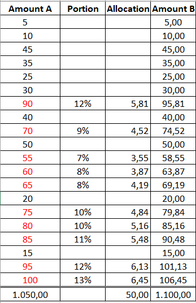
Thanks for answering. Please find below example:

image.png

At col A I have the value from 5 -100. The Top 10 values is from 55 - 100. Based on that assumption (top 10) I have to allocate an amount (50) proportionaly only at the top 10 and make a new column that will include the col A and the allocation of the amount(50).

Anonymous
Not applicable

HI @BartzD01 ,

You can use following calculated column formula to calculate total amount of 'current row value' + 'top 10' records:

Column B =
VAR offset =
    SUMX ( TOPN ( 10, Table, [AmountA], DESC ), [AmountA] )
RETURN
    [AmountA] + offset

Regards,

Xiaoxin Sheng

Helpful resources

Announcements
Power BI DataViz World Championships

Power BI Dataviz World Championships

The Power BI Data Visualization World Championships is back! Get ahead of the game and start preparing now!

December 2025 Power BI Update Carousel

Power BI Monthly Update - December 2025

Check out the December 2025 Power BI Holiday Recap!

FabCon Atlanta 2026 carousel

FabCon Atlanta 2026

Join us at FabCon Atlanta, March 16-20, for the ultimate Fabric, Power BI, AI and SQL community-led event. Save $200 with code FABCOMM.