This is best Fabric, Power BI, SQL and AI community event. How do we know? The last event sold out! Save €200 with code FABCMTY200.
Register nowA new Data Days event is coming soon! This time we’re going bigger than ever. Fabric, Power BI, SQL, AI and more. Don't miss out.
Hi all
One of the things that we thing will make life easier for our users is if we have a report page that says what measures are in the model and gives a brief description. Helpfully, Power BI supports a "description" attribute for each measure, and so the obvious thing to do is simply to query the model's own metadata to produce a table listing all measures and their description. What I can't figure out is how you can do this.
Help please!
Thanks
Stuart
Hi @Anonymous ,
Sorry for my late reply ... You could follow these steps.
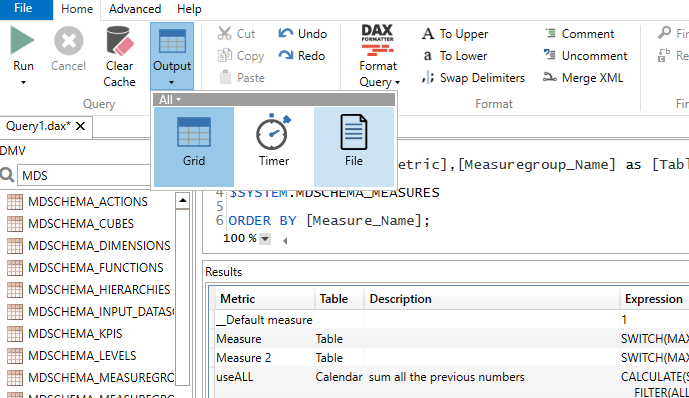
1.Use the following Query code in DAX Studio(the pbix file should be run )
SELECT
[Measure_Name] as [Metric],[Measuregroup_Name] as [Table],[Description],[Expression]
from
$SYSTEM.MDSCHEMA_MEASURES
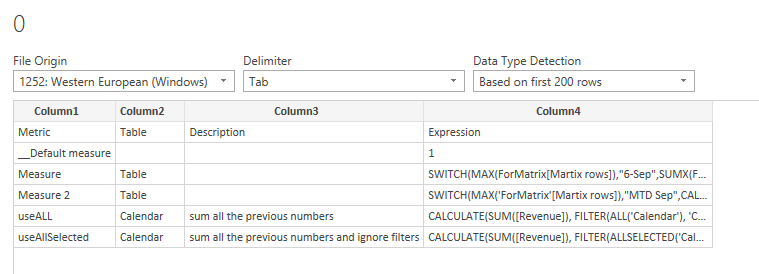
ORDER BY [Measure_Name];2.Clike OutputàFile and Run again, the results will be save as Text file.
3.Then you could get data from the Text file
You could take a look at these two articles for more information.
https://insightsquest.com/2017/12/14/query-power-bi-field-descriptions/
https://exceleratorbi.com.au/getting-started-dax-studio/
Did I answer your question ? Please mark my reply as solution. Thank you very much.
If not, please upload some insensitive data samples and expected output.
Best Regards,
Eyelyn Qin
Thanks all for the responses so far, but I've had limited success. @amitchandak and @Fowmy , your links seem to be designed for a one-off exercise and rely out output files. @MFelix , your link got me further in that I was able to generate a table of measure directly in the Power BI report, but it relied of the PID of the open file, which changes:
let
Source = OleDb.Query("Provider=MSOLAP.8;Data Source=localhost:52697;Update Isolation Level=2", "SELECT * FROM $SYSTEM.MDSCHEMA_MEASURES")
in
Source
What I erally need is:
@Anonymous
One way to achieve this is by going to DAX Studio and run the following script, It will list all the measures in the model Then you can export it to ExcelCsv and proceed.
select * from$SYSTEM.TMSCHEMA_MEASURES
Dax Studio download: https://daxstudio.org/
________________________
If my answer was helpful, please consider Accept it as the solution to help the other members find it
Click on the Thumbs-Up icon if you like this reply 🙂
⭕ Subscribe and learn Power BI from these videos
⚪ Website ⚪ LinkedIn ⚪ PBI User Group
Hi @Anonymous ,
In the blog post below you have a description of how to identify the not used measures however one of the first steps is to retrieve all the measures in your file.
Read the part Retrieve a list of all measures and you can get the expected result.
Regards
Miguel Félix
Proud to be a Super User!
Check out my blog: Power BI em Português@Anonymous , See if these can offer you some help
https://radacad.com/exposing-m-code-and-query-metadata-of-power-bi-pbix-file
https://www.finditez.com/blog/extract-power-bi-metadata/
https://cran.r-project.org/web/packages/pbixr/vignettes/explore.html
Check out the May 2026 Power BI update to learn about new features.
Sign up to receive a private message when registration opens and key events begin.
If you have recently started exploring Fabric, we'd love to hear how it's going. Your feedback can help with product improvements.
| User | Count |
|---|---|
| 30 | |
| 28 | |
| 23 | |
| 19 | |
| 17 |
| User | Count |
|---|---|
| 49 | |
| 47 | |
| 40 | |
| 21 | |
| 19 |